
Transparency note: this article contains no affiliate links. Every outbound link goes to the vendor’s own site. Prices below were read from the official plans pages on 28 November 2026 and can change.
Moving a business website off cheap shared hosting is one of those jobs people put off until something breaks. A big email campaign sends traffic and the site crawls. A plugin update leaves the checkout page blank at 9 p.m. on a Sunday. Managed WordPress hosting exists to take that pain away, and two names come up in almost every shortlist: Kinsta and WP Engine.
This comparison is written for US small business owners, marketers and agencies who run WordPress and want to know which of the two fits. I read both vendors’ plans pages on 28 November 2026 and stuck to what those pages say. I did not run speed tests or migrate a site, so you will not find invented benchmark numbers or fake customer quotes here. What you will find is a side by side look at pricing, limits, support, security and the traps that are easy to miss when you compare two pricing tables that were designed differently.
TL;DR
- Simplest for one business site: Kinsta, which lists plans from $35 a month with unlimited free migrations and a 99.9% uptime guarantee on the page.
- Lowest advertised starting price: WP Engine Essential, which starts at $28 a month billed annually, though the page says first-year pricing applies to new Essential customers and renewal pricing may change.
- Best for higher traffic and a formal uptime SLA: WP Engine Business, which lists isolated resources and a 99.99% SLA, starting at $400 a month billed annually.
- The catch: the two vendors count limits differently (installs, visits, storage, bandwidth), so compare your own numbers, not the headline price.
How We Compared Them
I looked at five things that decide whether a business is still happy with its host a year later. First, what the plan really costs once you factor in how many sites you run. Second, the limits: visits, storage and bandwidth. Third, protection and recovery, meaning backups, firewall, malware handling and uptime commitments. Fourth, support. Fifth, how easy it is to leave if the fit turns out to be wrong.
A word on method. Both companies publish a lot on Kinsta’s plans page and WP Engine’s plans page, but they do not use the same plan names or the same limits, so I only compare like with like where I can. Whenever a page did not say something, I wrote that it did not say it. A missing line is not proof that a feature is missing. It means you should ask before you pay.
Quick Comparison Table
| Item | Kinsta | WP Engine |
|---|---|---|
| Starting price | $35 a month list for the entry plan (1 WordPress install) | Essential from $28 a month billed annually; Business from $400 a month billed annually |
| Entry limits | 10GB storage, 20GB server bandwidth, 125GB CDN bandwidth | Essential: 1 site, 25,000 visits a month, 10GB storage |
| Uptime commitment | 99.9% uptime guaranteed on the plans page | 99.99% SLA on Business and Enterprise, not on Essential |
| Support | 24/7 human support in 8 languages | 24/7 chat on Essential, chat and phone on Business |
| Migrations | Unlimited free migrations | Managed site migrations listed on Business |
| Staging | Free one-click staging | 1-click staging on all plans |
| Backups | 14-day retention on entry plans | Daily backups, kept for 30 to 60 days |
| Free trial or promo | First month free on select plans and a Black Friday offer ending December 2, 2026 | Discount for new Essential customers in the first year |
Sources: both vendors’ plans pages, read 28 November 2026. Prices are in US dollars and exclude tax.
Kinsta: Simple Pricing and a Long List of Included Features
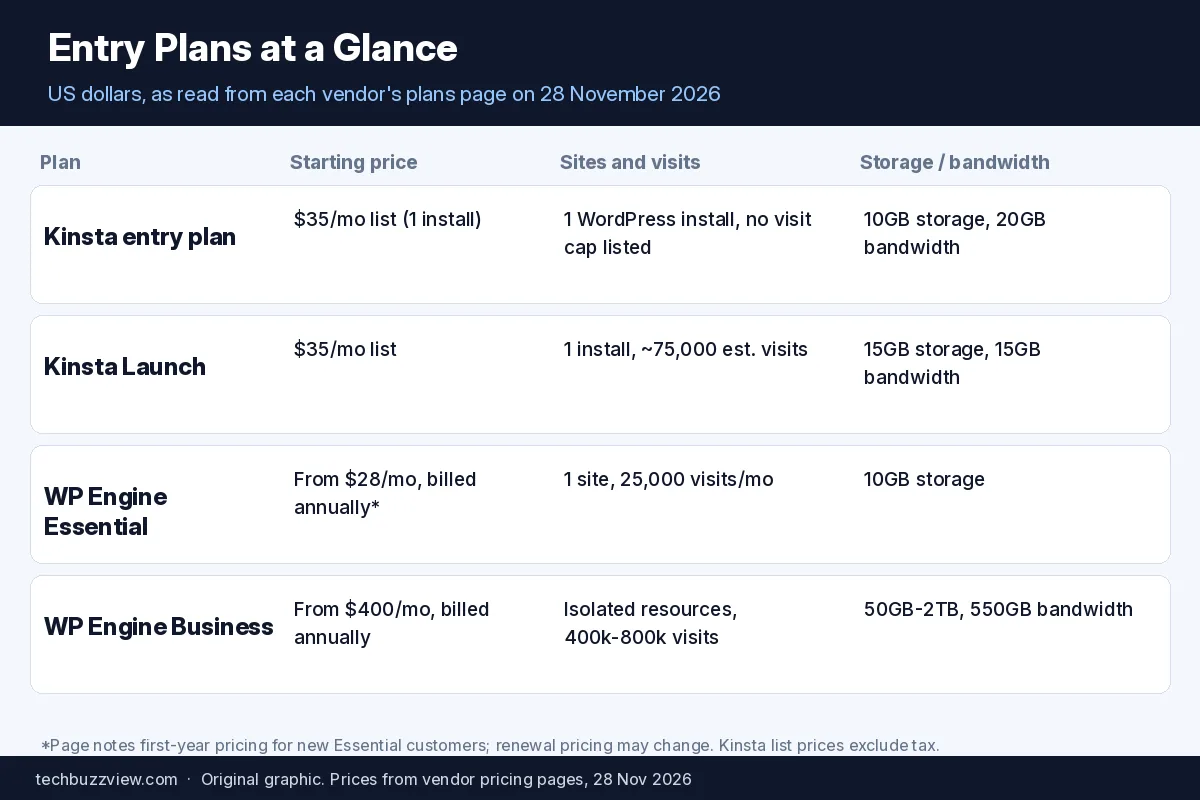
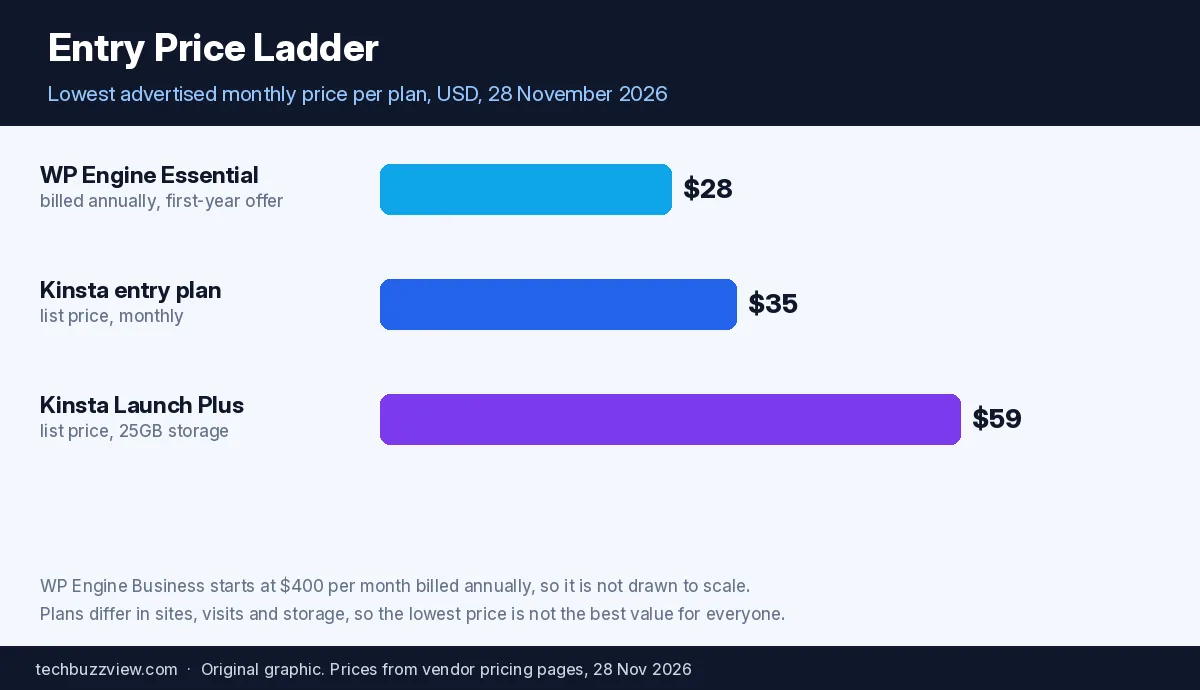
Kinsta’s page presents its plans as a ladder. The entry plan is listed at $35 a month for one WordPress install, with 10GB of storage, 20GB of server bandwidth and 125GB of CDN bandwidth. Next to it, a second ladder of business plans starts with Launch at $35 a month, with an estimated 75,000 visits a month, 15GB of storage and 15GB of server bandwidth. Launch Plus is $59 a month with an estimated 125,000 visits and 25GB of storage, and Build is $69 a month for two installs and 200,000 estimated visits.
The more useful part is what is bundled in. Across the plans I read, the page lists a 99.9% uptime guarantee, continuous database optimization, a built-in application performance monitoring tool, bot protection, vulnerability protection, free SSL certificates with wildcard support, a managed firewall with DDoS protection, free malware removal, free one-click staging, an API, SAML single sign-on and unlimited users. Expert support is listed as 24/7 human support in eight languages. All of that is described as part of the plan rather than an add-on.
The page also says unlimited free migrations are included, which matters if you are moving a site that already has years of content. Backup retention is listed at 14 days on the entry plans and rises to 20 or 30 days on some larger ones.
What the price really means
On 28 November 2026 the Kinsta page was running a Black Friday promotion: 50% off for three months on monthly plans and three months free on annual plans, with the offer shown as ending on December 2, 2026 for new customers. The regular price for the entry plan is the $35 figure. If you are reading this after the promotion ends, use $35 a month as the number to plan around, not the discounted first-quarter price.
Where Kinsta may not fit
- The entry plans do not list multisite support, so a WordPress network of several sites needs a larger tier.
- Extra sites cost extra. The page lists one additional site at $30 a month on the entry plan and 20GB of additional disk space at $20 a month.
- Backup retention of 14 days is fine for most small sites, but a store or membership site may want longer.
WP Engine: A Lower Entry Price and a Tiered Structure
WP Engine splits its managed hosting into three tiers: Essential, Business and Enterprise. Essential starts at $28 a month billed annually, which works out to $336 up front. The page says the first-year price and coupons apply to new Essential customers only and that renewal pricing is subject to change, so treat $28 as a first-year figure and look for the renewal price in the checkout before you commit.
Within Essential, the page shows capacity steps: one site with 25,000 visits a month and 10GB of storage, up to three sites with 75,000 visits and 15GB, up to ten sites with 100,000 visits and 20GB, and up to thirty sites with 400,000 visits and 50GB. The table also lists 75GB of bandwidth for Essential and describes visit counts as estimates, adding that you should get in touch for dynamic sites or traffic spikes.
What is included on Essential, per the page: daily automated backups, 24/7 chat support, free SSL and SSH, managed WordPress, PHP and MySQL updates, a cache layer called EverCache, a global CDN powered by Cloudflare, one-click staging, ten premium themes, Genesis Blocks, and transferable sites, which is handy for freelancers building a site for a client. Security patching and plugin risk scans and Layer 3 and 4 DDoS protection are listed as included.
Essential versus Business
The jump to Business is large. It starts at $400 a month billed annually. In exchange, the page lists isolated resources instead of a shared environment, a 99.99% uptime SLA, chat and phone support, managed site migrations, premium onboarding and priority support, Git-based CI/CD workflows and an included license for automatic front-end code optimization. Essential does not list the SLA or the premium onboarding, and its automatic front-end optimization is an optional add-on.
Where WP Engine may not fit
- There is no middle step between $28 and $400 a month for isolated resources and the SLA, so a growing business can face a big jump.
- The first-year pricing language means you should plan for a higher renewal.
- Essential lists chat support only, with phone support on Business.
Pricing Compared in Practice
A small agency in Austin with five client sites will have a different answer from a dental practice with a single brochure site. For one site, WP Engine Essential at $28 billed annually is the lowest advertised starting price and Kinsta’s entry plan is $35. That is a difference of $7 a month. For a practice that wants a hands-off host, the difference is small compared with how well the support responds on a bad day, which is something no pricing page can tell you.
For several sites, the maths changes. Kinsta lists one additional site at $30 a month on its single-site plan, so five sites on that ladder would be a lot. Kinsta’s multi-site ladder and Agency plans are the better comparison there. WP Engine’s Essential tiers cover up to three, ten or thirty sites in one plan, so it is worth getting a real quote for your site count from both.
For a store or a membership site, both pages say their plans are suited to ecommerce on the right tier, but that is a vendor statement, not a test. If your revenue depends on the site, ask each vendor how they handle traffic spikes on your plan, and ask in writing.
Features and Support Compared
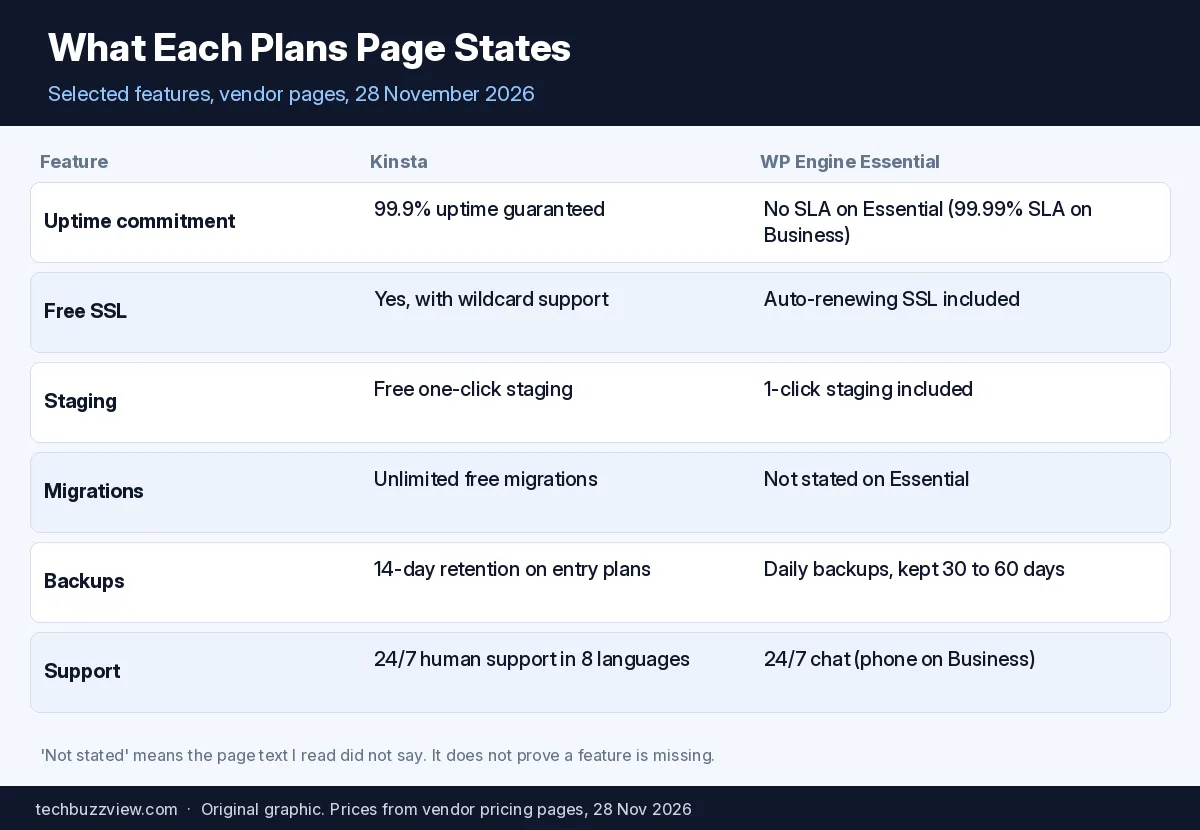
The table above shows the pattern. Kinsta puts a uniform feature set on every plan and leans on one headline guarantee: 99.9% uptime. WP Engine layers features by tier, with the stronger 99.99% SLA, phone support and managed migrations on Business. If you are comparing Kinsta’s entry plan with WP Engine’s Essential, Kinsta states more things as included, such as free malware removal and unlimited migrations. WP Engine lists SSL, backups, staging and security patching, and a few extras that Kinsta does not list, like ten premium themes and transferable sites.
One thing to check with both: uptime guarantees and SLAs are promises about credits or remedies, not promises that a site will never go down. Read the terms before you rely on them.
Security and Backups
Both hosts describe layered protection. Kinsta lists bot protection, vulnerability protection, a managed firewall with DDoS protection and free malware removal on every plan I read. WP Engine lists security patching, plugin risk scans, Layer 3 and 4 DDoS protection and, as an optional add-on, advanced DDoS and a managed WAF. If you handle customer data, a US business should also look into SOC 2 reports, HIPAA needs and PCI DSS for card payments. Ask each vendor what documentation they provide, since this is general information and not legal advice.
On backups, Kinsta lists 14 days of retention on entry plans, while WP Engine says it keeps backups for no less than 30 days and no more than 60. Neither replaces your own backup habit. If you want a second copy under your control, read our guide to the best WordPress backup plugins.
Who Should Choose Kinsta
- A business owner with one or two sites who wants a clean dashboard and a long list of features included in the price.
- Anyone moving from another host, because unlimited free migrations are listed.
- A team that wants account-level extras such as unlimited users, an API and SAML single sign-on without paying for them separately.
Who Should Choose WP Engine
- A freelancer or small agency that wants a low starting price and transferable sites to hand over to clients.
- A growing business that expects to need isolated resources, a 99.99% SLA and phone support, and is ready to budget for the Business tier.
- A developer team that wants Git-based deployment workflows, which the page lists on Business.
When Neither One Is the Right Answer
Managed WordPress hosting is a premium product. A small brochure site with a few hundred visits a month may not need either. A budget shared host can be perfectly fine for a site like that. Our guide to the best web hosting for small business covers cheaper options, and if you decide to move later, our walkthrough on how to migrate WordPress to Hostinger shows what a move involves. Slow pages are not always a hosting problem either, so check the basics first with our WordPress speed guide.
Our Verdict
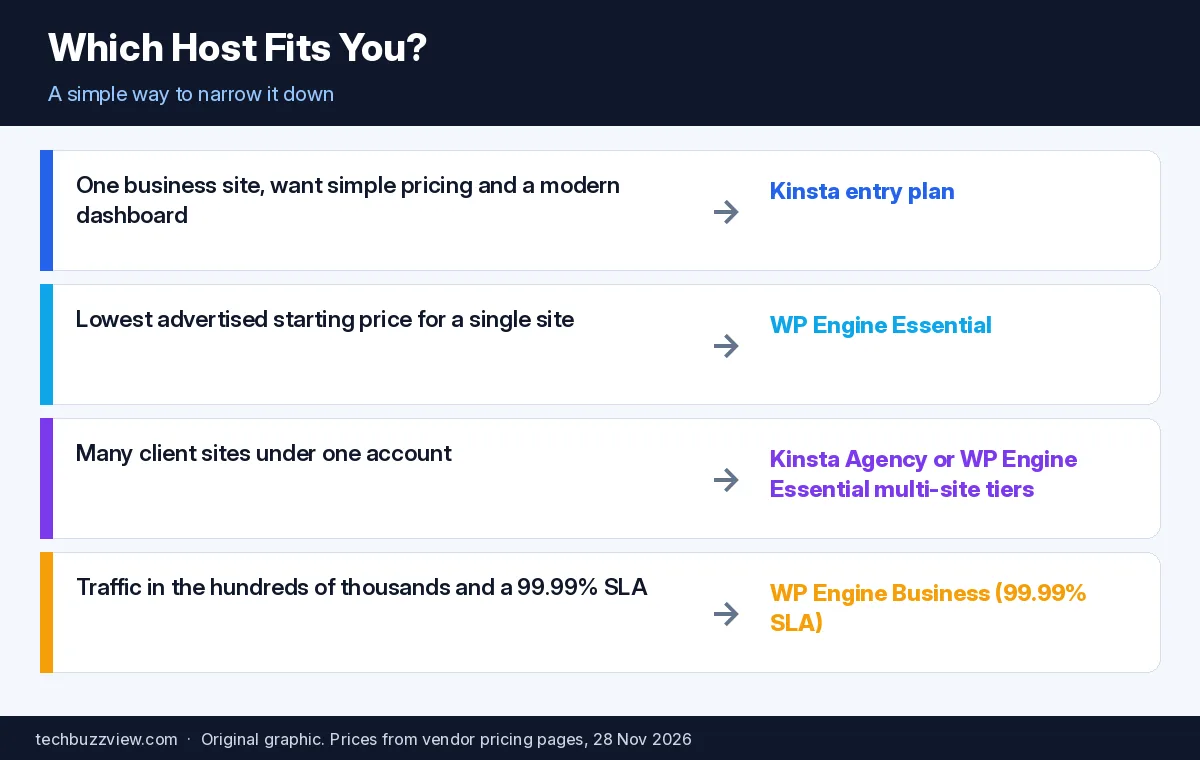
There is no single winner, and I would rather say that than invent one. If I had to pick for a typical single-site US small business, I would start by looking at Kinsta, because the entry plan lists so many features as included and the migration offer lowers the cost of switching. If the starting price matters most and you are comfortable with a first-year offer, WP Engine Essential is the cheaper door in. If your site is the business and you need a formal 99.99% SLA, plan for WP Engine Business or a higher Kinsta tier and ask both for a quote.
Before you pay, write down your numbers: sites, monthly visits, storage, and how much downtime you can tolerate. Then ask both vendors the same five questions in the same email. The answers will tell you more than any comparison table, including this one.
Frequently Asked Questions
Is Kinsta better than WP Engine?
Neither is better in every case. Kinsta lists a uniform feature set from $35 a month with a 99.9% uptime guarantee. WP Engine starts lower at $28 a month billed annually for Essential, and its 99.99% SLA arrives on the Business tier, which starts at $400 a month billed annually.
Which is cheaper, Kinsta or WP Engine?
On advertised starting prices checked on 28 November 2026, WP Engine Essential at $28 a month billed annually is lower than Kinsta’s $35 a month entry plan. WP Engine says first-year pricing applies to new Essential customers and renewal pricing may change, so compare the renewal price too.
Does Kinsta offer free migrations?
Kinsta’s plans page lists unlimited free migrations. WP Engine lists managed site migrations on its Business tier, and the Essential tier text I read did not say.
Which host has the better uptime guarantee?
Kinsta lists a 99.9% uptime guarantee. WP Engine lists a 99.99% SLA on Business and Enterprise but not on Essential. A guarantee is a contractual promise with remedies, not a promise of zero downtime.
Can I host multiple sites on Kinsta or WP Engine?
Yes on both, with different structures. WP Engine Essential lists tiers for up to 3, 10 or 30 sites. Kinsta lists multi-site plans and agency plans, and the page shows one additional site on its single-site plan at $30 a month.
Do I need managed WordPress hosting for a small business site?
Not always. A simple brochure site with modest traffic can run well on cheaper hosting. Managed hosting is worth considering when downtime costs you money, when you want expert support, or when you do not want to handle updates and backups yourself.