For most WordPress site owners in 2026, Wordfence Free is the right starting point. It ships a working firewall, malware scanner, two-factor authentication, and brute-force protection — all at no cost. If your site is under active attack, processes high traffic, or handles transactions, Sucuri’s cloud WAF is the upgrade worth paying for. The rest of this guide explains the evidence behind that call and helps you find the exact fit for your situation.
Why WordPress Security Is a Real Problem in 2026
WordPress now powers roughly 43% of all websites. That reach makes it the top target in web security. In 2025 alone, researchers catalogued 11,334 new vulnerabilities across the WordPress ecosystem — up from 7,966 in 2024, according to data from Patchstack and Wordfence. The vast majority (91%) were in third-party plugins; themes accounted for 9%; WordPress core itself had only 6 low-risk flaws for the year.
The speed of exploitation is what makes this urgent. Patchstack data shows 70% of known WordPress vulnerabilities are actively exploited within seven days of public disclosure. Nearly half — 46% — had no available patch at the moment they were first disclosed publicly. That means the gap between “vulnerability announced” and “your site targeted” is measured in days, not months.
Wordfence’s Q1 2026 threat report put the scale into sharper focus: the company’s network blocked 16.0 billion brute-force login attempts in a single quarter — a 15.3% increase from the prior quarter — and identified approximately 474,000 infected WordPress sites during that period.
A security plugin cannot guarantee zero risk. What it does is close the most common attack paths — malicious file uploads, login abuse, unpatched plugin exploits — and alert you when something slips through.
What to Look for in a WordPress Security Plugin
Not every plugin covers every category. Evaluate these six capabilities before choosing:
- Web Application Firewall (WAF): Blocks known attack patterns before they reach your application code. A server-side WAF (running on your host) is faster to deploy but can consume server resources. A cloud WAF (CDN-layer) routes traffic through the vendor’s network and offers better protection during volumetric attacks.
- Malware scanner: Checks your files and database against known malicious code signatures. Quality of the signature database and update frequency matter more than the feature name.
- Brute-force protection: Limits login attempts, locks out repeat offenders, and optionally blocks entire IP ranges or countries.
- Two-factor authentication (2FA): Adds a required second step (TOTP app or email code) to the admin login. One of the most effective defenses against credential-stuffing attacks.
- File integrity monitoring: Alerts you when core WordPress files change unexpectedly — a strong signal of a successful intrusion.
- Malware cleanup service: Removes infected files after a compromise. Some plugins include this; others require a separate paid plan or handoff to a security team.
Quick Comparison: Best WordPress Security Plugins 2026
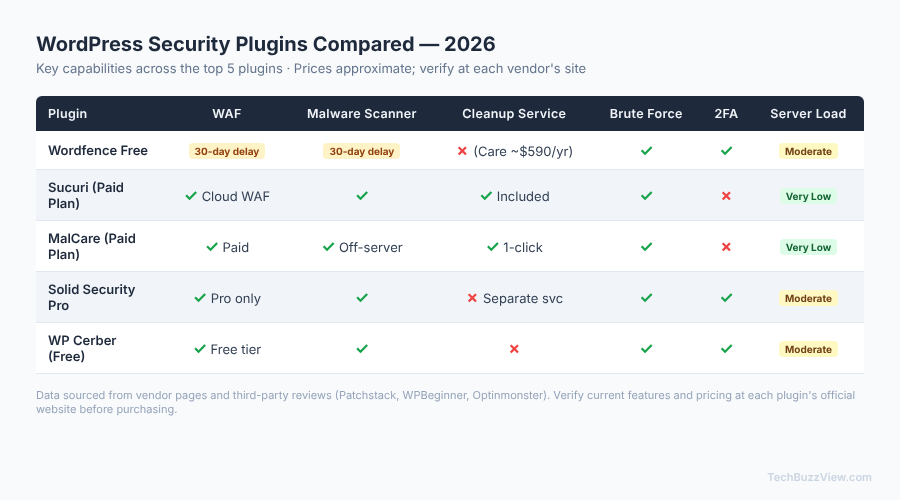
All prices are approximate, from third-party reviews as of late 2026. Verify current pricing directly on each vendor’s website before purchase.
| Plugin | WAF | Malware Scanner | Cleanup Service | Brute Force | 2FA | Server Load |
|---|---|---|---|---|---|---|
| Wordfence Free | ✓ (30-day delay) | ✓ (30-day delay) | Care plan ~$590/yr | ✓ | ✓ | Moderate (server-side) |
| Sucuri | ✓ Cloud WAF (paid) | ✓ (mixed free results) | Included in paid plan | ✓ | ✗ | Low (CDN-layer) |
| MalCare | ✓ (paid) | ✓ Off-server scan | ✓ One-click (paid) | ✓ | ✗ | Very low (off-server) |
| Solid Security Pro | ✓ (Pro only) | ✓ | ✗ Separate service | ✓ | ✓ | Moderate |
| WP Cerber | ✓ (free tier) | ✓ | ✗ | ✓ | ✓ | Moderate |
Wordfence
Best for: Budget-conscious site owners who want a capable free option.
Wordfence is the most widely deployed WordPress security plugin, and its free tier is genuinely useful — not a stripped-down teaser. You get a server-side Web Application Firewall, a malware scanner with file-integrity checking, brute-force login protection with rate limiting, and TOTP-based two-factor authentication, all at no cost.
The key free-tier limitation: firewall rules and malware signatures are delivered on a 30-day delay compared to Wordfence Premium subscribers. That gap matters in a threat landscape where 70% of vulnerabilities are exploited within the first week. If your site handles payments, collects user data, or runs significant traffic, a 30-day signature delay is a real risk window.
Pricing (approximate, verify at wordfence.com):
- Free: full feature set, 30-day signature delay
- Premium: ~$119–$149/year per site — real-time rules, country blocking, premium support
- Care: ~$590/year — includes hands-on malware cleanup
Limitation: Server-side WAF means the firewall runs on your hosting resources. On low-cost shared hosting, Wordfence scanning can occasionally trigger memory limits. Check your host’s compatibility notes before enabling deep scanning on shared plans.
Sucuri
Best for: High-traffic sites, ecommerce stores, and sites under active attack that need a cloud-layer WAF.
Sucuri’s free WordPress plugin provides basic hardening, file integrity monitoring, and a malware scanner — but third-party reviewers consistently note that the free scanner’s effectiveness is mixed compared to server-resident alternatives. Sucuri’s real value is its cloud platform: traffic flows through Sucuri’s CDN and WAF before it ever touches your server, which means attacks are absorbed upstream.
The cloud platform requires a paid subscription. For sites that have already been compromised, Sucuri includes unlimited malware cleanup in its paid plans — a significant differentiator versus Wordfence’s separate Care billing.
Pricing (approximate, verify at sucuri.net):
- Free plugin: file monitoring, basic hardening, limited scanner
- Platform plans: ~$199–$229/year (WAF + CDN + malware cleanup included)
- Firewall only: ~$10/month
Limitation: The pricing step from free to paid is steep if you only need firewall protection. If malware cleanup is not a current need and your traffic is modest, Wordfence or WP Cerber may give you more for less.
MalCare
Best for: Sites on resource-constrained hosting that need reliable malware detection and fast cleanup without affecting performance.
MalCare’s defining feature is off-server scanning: the plugin syncs your files to MalCare’s cloud infrastructure, runs the scan there, and reports results back. Your server handles almost no extra load. For sites on shared or entry-level hosting, this is a practical advantage — Wordfence’s deep scans can occasionally slow down a site mid-scan.
The free tier allows you to see whether malware was detected but requires a paid plan to view affected files and initiate cleanup. One-click malware removal is the core paid-tier selling point.
Pricing (approximate, verify at malcare.com):
- Free: detection only (no cleanup access)
- Paid plans: from ~$149/year — includes cleanup, WAF, and bot protection
Limitation: The free tier’s detection-only model means you’ll know you have a problem without an immediate path to fix it unless you upgrade. Budget for the paid plan if you’re choosing MalCare as your primary security layer.
Solid Security (formerly iThemes Security)
Best for: Agencies and developers managing multiple WordPress sites under one dashboard.
Solid Security rebranded from iThemes Security in recent years. The free version covers a range of hardening options — file change detection, database backups, away mode, strong password enforcement — but notably does not include a firewall. That gap makes the free version less suitable as a standalone security layer for active sites.
The Pro tier adds a real-time WAF, malware scanning via a partnership with Sucuri’s SiteCheck, and a Site Scanner dashboard for managing multiple installations. The per-site pricing scales reasonably for agencies: five sites cost about twice the single-site rate, and the 25-site plan is cost-effective for shops managing client portfolios.
Pricing (approximate, verify at solidwp.com):
- Free: hardening, file monitoring, no WAF
- Pro: ~$99/year (1 site), ~$199/year (5 sites), ~$299/year (10 sites), ~$549/year (25 sites)
Limitation: Free tier lacks a firewall — a significant gap compared to Wordfence Free. If you’re managing a single site on a budget, Wordfence or WP Cerber provide a more complete free option.
WP Cerber
Best for: Technically confident site owners who want granular free controls and don’t need a managed cleanup service.
WP Cerber is less widely known than Wordfence but punches above its weight in the free tier. Free features include login protection (rate limiting, IP allowlisting, custom login URL), PHP file-upload blocking, traffic inspection, anti-spam for comments and registration, and a malware scanner. TrustRadius reviewers consistently note that WP Cerber’s free offering provides more functional control than most competitors’ free tiers.
The plugin rewards hands-on administrators who want to understand and configure each rule rather than accept opinionated defaults. If you prefer a tighter control surface without a lot of UI hand-holding, it’s worth evaluating.
Pricing (approximate, verify at wpcerber.com):
- Free: login protection, traffic inspection, anti-spam, scanner
- Paid: ~$99/year (single site) or ~$29/quarter
Limitation: Smaller install base means less community documentation than Wordfence. Setup requires more deliberate configuration; less suitable for site owners who want a fire-and-forget solution.
Recommendation Summary: Which Plugin Fits Your Situation
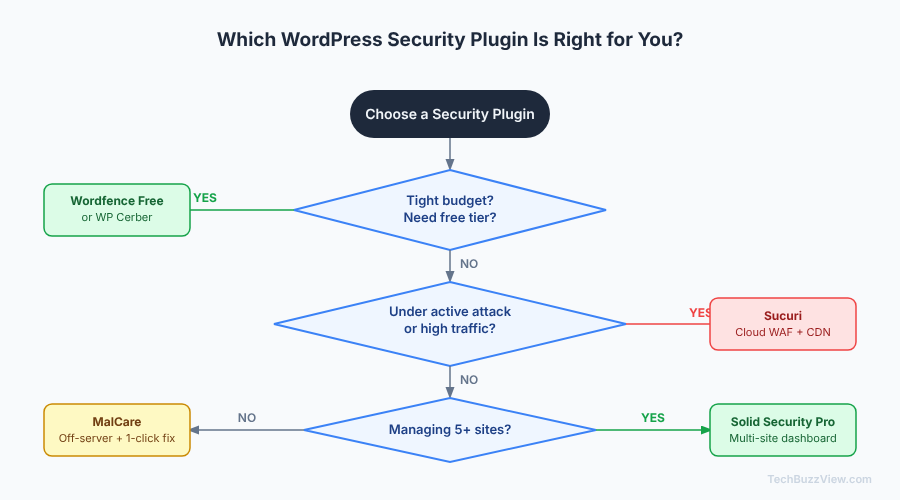
- Running a blog or small business site on a budget? Start with Wordfence Free. Enable 2FA immediately. Consider upgrading to Premium if your site handles user accounts or sensitive data.
- Under active attack, or running a high-traffic ecommerce site? Sucuri’s cloud WAF is the right tool. The upstream filtering absorbs attacks before they touch your server.
- On shared or entry-level hosting where scan load is a concern? MalCare’s off-server scanning is the practical solution. Budget for the paid plan if you need cleanup access.
- Managing 5 or more client sites? Solid Security Pro’s multi-site pricing and centralized dashboard make it the most cost-effective option at scale.
- Want maximum free-tier control and don’t mind configuring rules manually? WP Cerber gives you more granularity for free than most alternatives.
One approach to avoid: running two full security plugins simultaneously. Feature overlap between two active WAFs or scanners can cause conflicts, increase server load, and generate confusing duplicate alerts.
Regardless of which plugin you choose, pair it with a reliable backup solution. A security plugin reduces risk; a tested backup strategy gives you a recovery path when something gets through. If you’re hosting on Hostinger, the server-level daily snapshots are a useful complement to plugin-level backups. And site speed matters too — a security plugin that causes noticeable slowdowns defeats the purpose; check the WordPress performance optimization guide if scan overhead becomes an issue.
Frequently Asked Questions
Do I need a security plugin if my host already provides server-level protection?
Hosting-level protections (firewalls, malware scanning, DDoS mitigation) operate at the network and server layers — they generally don’t inspect your WordPress application code or plugin behavior. A WordPress-specific security plugin monitors login activity, file changes, and application-layer requests that server-level tools miss. Both layers are complementary, not redundant.
Is the Wordfence free version actually good enough for a small site?
For a personal blog, small portfolio, or low-traffic informational site: yes, with one caveat. The 30-day signature delay means your firewall rules are always one month behind the current threat landscape. For sites that handle user accounts, payments, or significant organic traffic, the Premium upgrade closes that gap for roughly $10–$12/month.
Can I use more than one security plugin at once?
Generally no — running two active WAFs or two malware scanners simultaneously is likely to cause rule conflicts, performance overhead, and confusing alerts. Choose one primary security plugin and let it handle its job. Pair it with a separate backup plugin rather than stacking security tools.