
If you run a small US business, such as a five-person marketing agency in Austin, a two-chair dental practice or a Shopify store doing its own books, your accounting software choice usually comes down to three names: QuickBooks Online, Xero and FreshBooks. All three handle invoicing, bank feeds, expenses and the basic reports your CPA asks for in March. They are built for different businesses, though, and the monthly bill can differ by hundreds of dollars a year once you add users, payroll and payments.
This guide compares them on November 2026 pricing, plan limits and fit, so you can pick once and avoid a painful migration later.
TL;DR: quick verdict
- Best overall: QuickBooks Online. It has the deepest feature set, the most US accountants know it, and it scales from a free plan to 25 users. It is also the priciest as you grow.
- Best value for growing teams: Xero. No per-user license fees, solid bank reconciliation, and the Growing plan removes the invoice cap for $59/mo.
- Best for freelancers and service businesses: FreshBooks. It has the friendliest invoicing, time tracking and client workflows, and plans are priced by number of billable clients.
QuickBooks vs Xero vs FreshBooks at a Glance
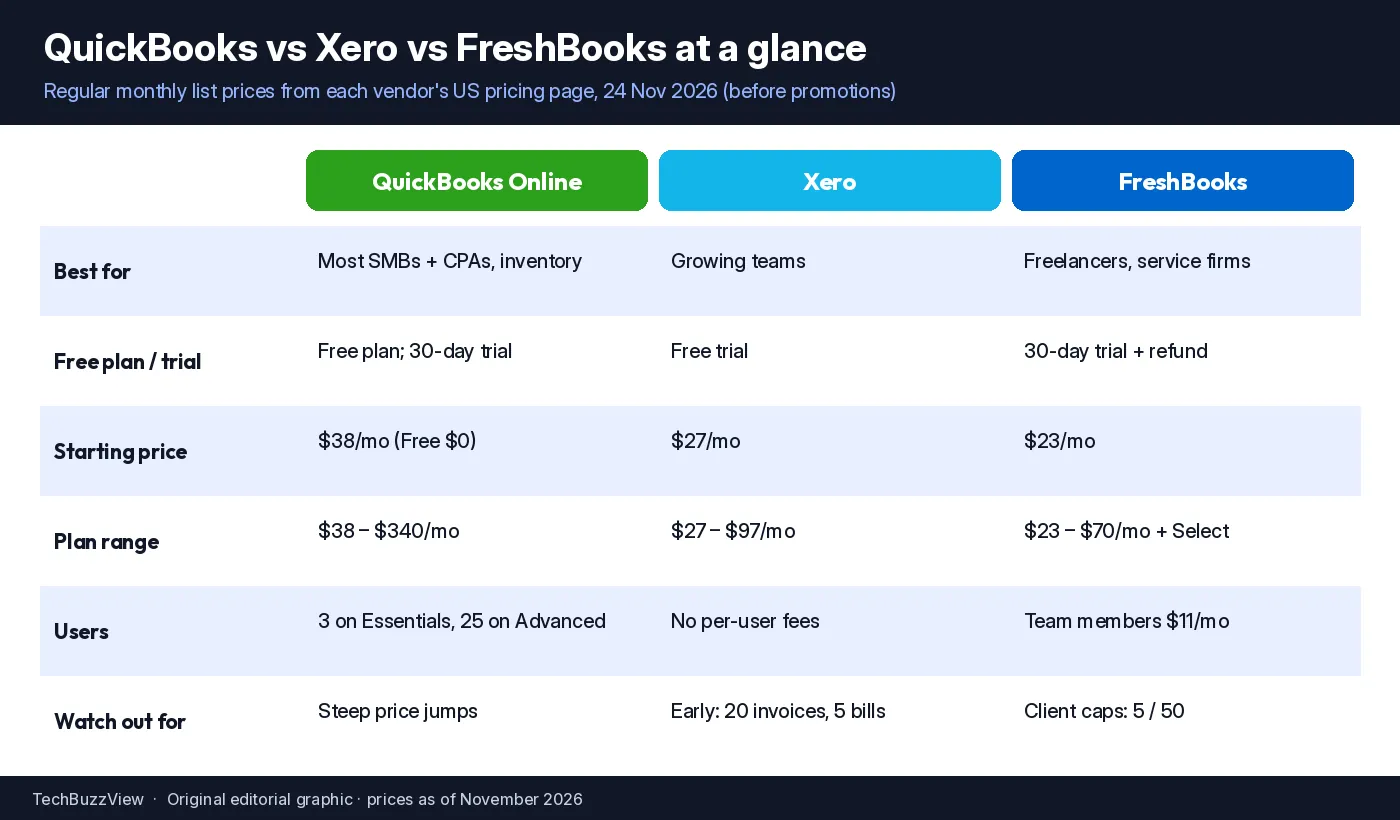
| Tool | Best for | Free plan / trial | Starting price (USD, as of Nov 2026) | Key differentiator | Notable limit |
|---|---|---|---|---|---|
| QuickBooks Online | Most small businesses that work with a CPA; inventory and job costing | Free plan ($0, 1 user) plus a 30-day trial on paid plans | $38/mo Simple Start (list price) | Depth of features, huge US accountant and app ecosystem, built-in AI tools | Price rises steeply: $85, $140 and $340/mo for higher tiers |
| Xero | Growing teams that want many users at a flat price | Free trial; promo pricing advertised in Nov 2026 | $27/mo Early | No per-user license fees; W-9 and 1099 management on every plan | Early plan caps you at 20 invoices/quotes and 5 bills a month |
| FreshBooks | Freelancers, consultants and agencies who bill clients | 30-day free trial; 30-day money-back guarantee | $23/mo Lite | Polished invoicing, estimates, proposals and retainers | Plans cap billable clients (5 on Lite, 50 on Plus); extra team members cost $11/mo each |
QuickBooks Online: Best Overall
QuickBooks Online is the default choice for US small business accounting for a reason. If you hand your books to a CPA or bookkeeper, there is a very good chance they already work in QuickBooks every day. That shared language saves time and money at tax season. It is also the one tool here that can start at $0 and scale to a 25-user company with inventory, classes, locations and project costing without switching platforms.
Key features
- Automated bookkeeping that learns how you categorize transactions and applies the same rules going forward.
- Invoicing with online card and bank payments through QuickBooks Payments, plus bill pay with free standard ACH up to monthly allotments.
- Intuit Intelligence AI features, which vary by plan: AI chat for insights (beta), expense categorization, anomaly detection and sales-tax checks on higher tiers.
- Plus adds budgets, project profitability, inventory tracking and up to 40 classes and locations.
- Advanced adds 25 users, custom roles and permissions, batch invoices and expenses, automated workflows, Excel sync and priority support.
Pricing (as of November 2026)
- Free: $0/mo, 1 user, up to 2 invoices a month (or unlimited if you qualify for and enable QuickBooks Payments), 1 bank connection, P&L and balance sheet. No accountant access, mobile app or integrations.
- Simple Start: $38/mo list price, includes access for 2 accountants.
- Essentials: $85/mo, 3 users.
- Plus: $140/mo, adds inventory, budgets, project profitability and classes/locations.
- Advanced: $340/mo, 25 users, access for 3 accountants.
Intuit was advertising steep introductory discounts on its pricing page (for example, Simple Start shown at $11.40/mo). Check how many months the discount lasts before you budget around it. Payroll is a separate QuickBooks product with its own pricing.
Pros
- Most widely used by US accountants and bookkeepers
- Scales from a free plan to 25 users and inventory
- Largest app integration ecosystem of the three
- Strong reporting, budgeting and project costing on Plus and Advanced
Cons
- Most expensive at every paid tier once promotions end
- User limits push growing teams into pricier plans
- The number of features and AI add-ons can overwhelm a solo owner
Who it’s for: product businesses, contractors, multi-location companies, and anyone whose CPA prefers QuickBooks. Who should skip it: a solo freelancer who mainly needs to send invoices. FreshBooks or the QuickBooks Free plan will do that for less.
Xero: Best Value for Growing Teams
Xero’s big selling point is simple: no per-user license fees. Your owner, office manager, bookkeeper and outside CPA can all log in without the bill going up. That makes Xero attractive for a growing company where several people need to approve bills, upload receipts or pull reports. It has a clean interface, a reputation for strong bank reconciliation, and every plan includes sales tax and W-9/1099 contractor management, which matters if you pay freelancers.
Key features
- Bank reconciliation with Smart Document Capture for bills and receipts.
- W-9 and 1099 management on all plans.
- Cash flow forecasting: 30 days on Early, 60 days on Growing, 180 days on Established.
- Online bill payments, including free domestic ACH.
- Established adds multiple currencies, project time and cost tracking, and employee expense and mileage claims.
- Payroll through Xero Payroll, powered by Gusto, as an add-on. More than 1,000 app integrations.
Pricing (as of November 2026)
- Early: $27/mo. 20 invoices and quotes plus 5 bills a month, with auto-reconcile as an optional $5/mo add-on.
- Growing: $59/mo. Unlimited invoices and bills, automated bill entry, auto-reconcile included.
- Established: $97/mo. Multi-currency, projects, expense claims and 180-day forecasting.
- Payroll add-on (Gusto): $36/mo plus $6 per employee or contractor.
In November 2026, Xero’s US page advertised 90% off the first six months for new subscribers, with the offer ending November 30. Treat that as a nice bonus, not your long-term price.
Pros
- No per-user fees, so you can add your whole team and your accountant
- Every plan includes sales tax and 1099 management
- Multi-currency on Established for businesses with overseas clients or suppliers
- Gusto-powered payroll add-on
Cons
- The Early plan’s 20-invoice and 5-bill cap is tight for most real businesses
- Fewer US accountants use it day to day than QuickBooks
- Projects and multi-currency are locked to the top plan
Who it’s for: growing service and e-commerce businesses with several people who need access, and companies that pay contractors or sell internationally. Who should skip it: businesses that need deep inventory or job costing in the core product, or anyone whose CPA works only in QuickBooks.
FreshBooks: Best for Freelancers and Service Businesses
FreshBooks started as an invoicing tool and still feels like one, which is a compliment if you bill clients for your time. Estimates, proposals, retainers, time tracking and payment reminders are easier to set up here than in the other two. It does real accounting too: double-entry reports and bank reconciliation are part of the product, and accountant access comes with Plus and above. But its plans are priced by number of billable clients, not by transactions or users.
Key features
- Invoices, estimates, proposals and client retainers, with automatic payment reminders.
- Online payments by card, ACH bank transfer, Apple Pay, Google Pay and Buy Now, Pay Later.
- Expense tracking with automatic receipt data capture.
- Double-entry accounting reports and bank reconciliation, with accountant access from the Plus plan up.
- Project profitability on Premium, plus customizable email templates.
- FreshBooks Payroll as an add-on.
Pricing (as of November 2026)
- Lite: $23/mo, invoices to 5 billable clients.
- Plus: $43/mo, 50 billable clients, adds proposals, retainers, receipt scanning and accountant access.
- Premium: $70/mo, unlimited billable clients and project profitability.
- Select: custom pricing, Advanced Payments included and 2 team member accounts at no extra charge.
- Add-ons: Team members $11/mo per user; Advanced Payments $20/mo; Payroll $40/mo plus $6/mo per user.
- Payment processing: 2.9% + $0.30 per card transaction; 1% for ACH bank transfers.
FreshBooks was running a Black Friday offer of 90% off for four months at the time of writing, along with a 30-day free trial and a 30-day money-back guarantee.
Pros
- Best invoicing and client experience of the three
- Built-in time tracking, proposals and retainers for service work
- Simple plans for solo operators
- 30-day trial plus a money-back guarantee
Cons
- Client caps on Lite (5) and Plus (50) can force an upgrade
- Extra team members add $11/mo each
- Lighter on inventory and advanced accounting than QuickBooks or Xero
Who it’s for: 1099 freelancers, consultants, designers, small agencies and other service businesses that live on invoices. Who should skip it: product businesses with inventory, or teams where many staff need access.
What It Really Costs: Plan Prices and Add-ons
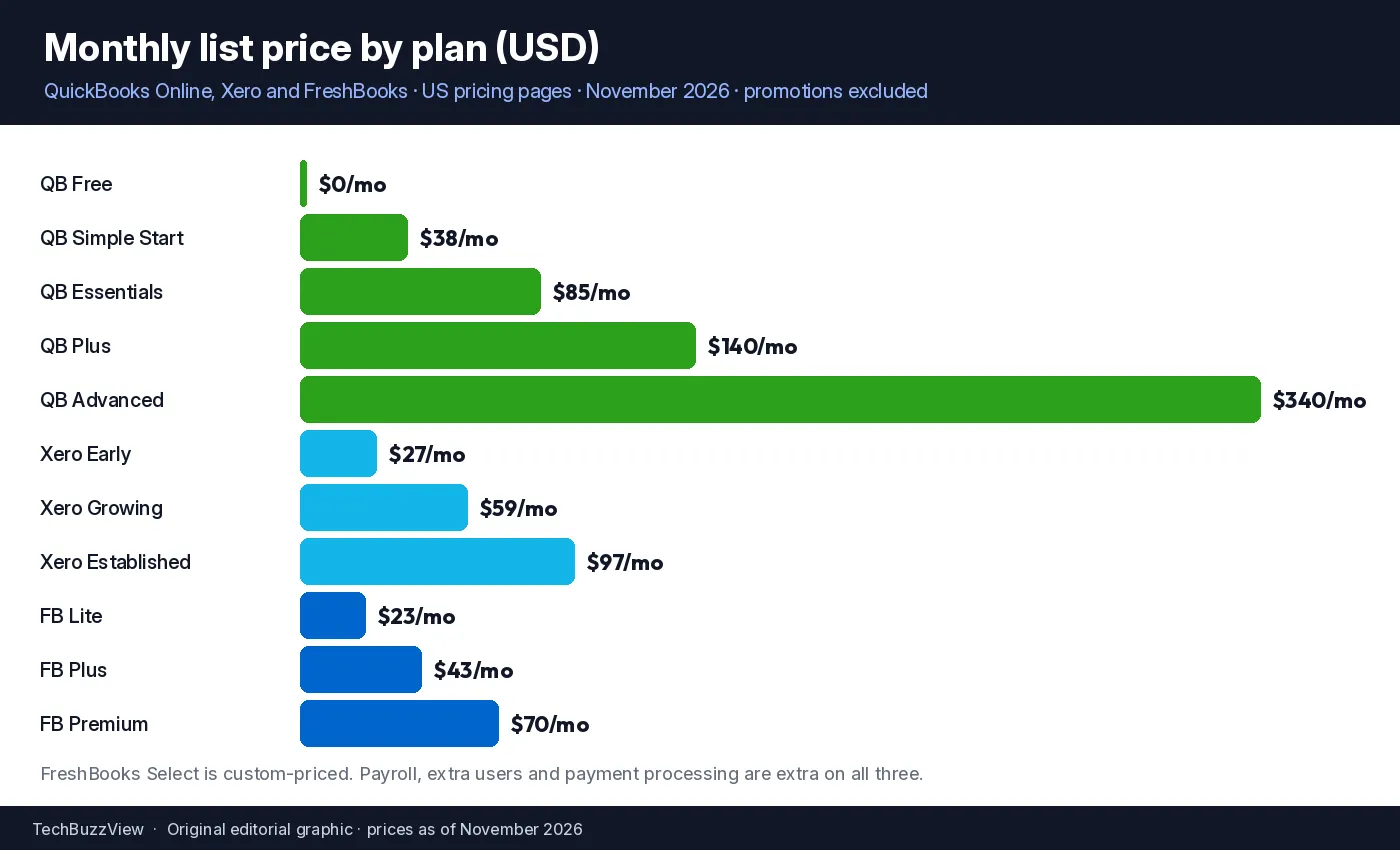
Comparing list prices only tells half the story. Here is how the real monthly bill changes for three common US setups, using list prices only (no promotions):
- Solo freelancer with 20 clients: FreshBooks Plus is $43/mo, because Lite stops at 5 clients. Xero Growing is $59/mo, since Early’s 20-invoice cap is tight. QuickBooks Simple Start is $38/mo. The QuickBooks Free plan works too if you enable QuickBooks Payments for unlimited invoices.
- Five-person agency where everyone needs access: Xero Growing is $59/mo with no per-user fees. QuickBooks needs Plus for more than 3 users ($140/mo). FreshBooks Premium is $70/mo plus $11/mo for each extra team member.
- Retailer with inventory and two locations: QuickBooks Plus ($140/mo) is the natural fit. Xero would usually need its Inventory Plus add-on or a third-party inventory app.
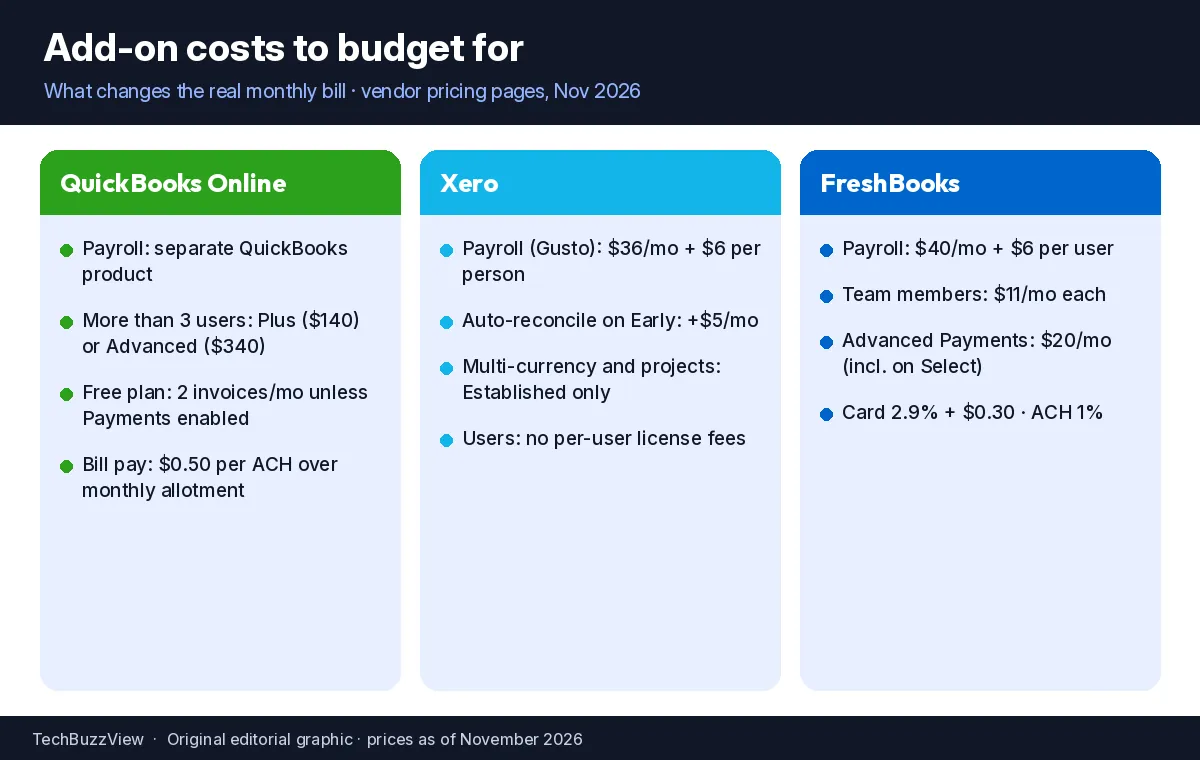
Then add payroll if you have W-2 employees. Xero’s Gusto-powered add-on is listed at $36/mo plus $6 per person, FreshBooks Payroll at $40/mo plus $6 per person, and QuickBooks Payroll is sold separately. Card processing fees apply on top of all three when clients pay online.
How We Evaluated
We compared the three tools on six criteria: core accounting features (bank feeds, reconciliation, reporting); invoicing and payments; pricing and plan limits from each vendor’s US pricing page on 24 November 2026; user and accountant access; payroll and add-on costs; and fit for common US small business types. We also considered each tool’s general reputation among accountants and on review sites such as G2 and Capterra. We have not run timed benchmarks or long-term hands-on tests, and we don’t quote invented test results. Pricing and promotions change often, so confirm on the vendor page before you subscribe.
Decision Guide: Which Should You Choose?
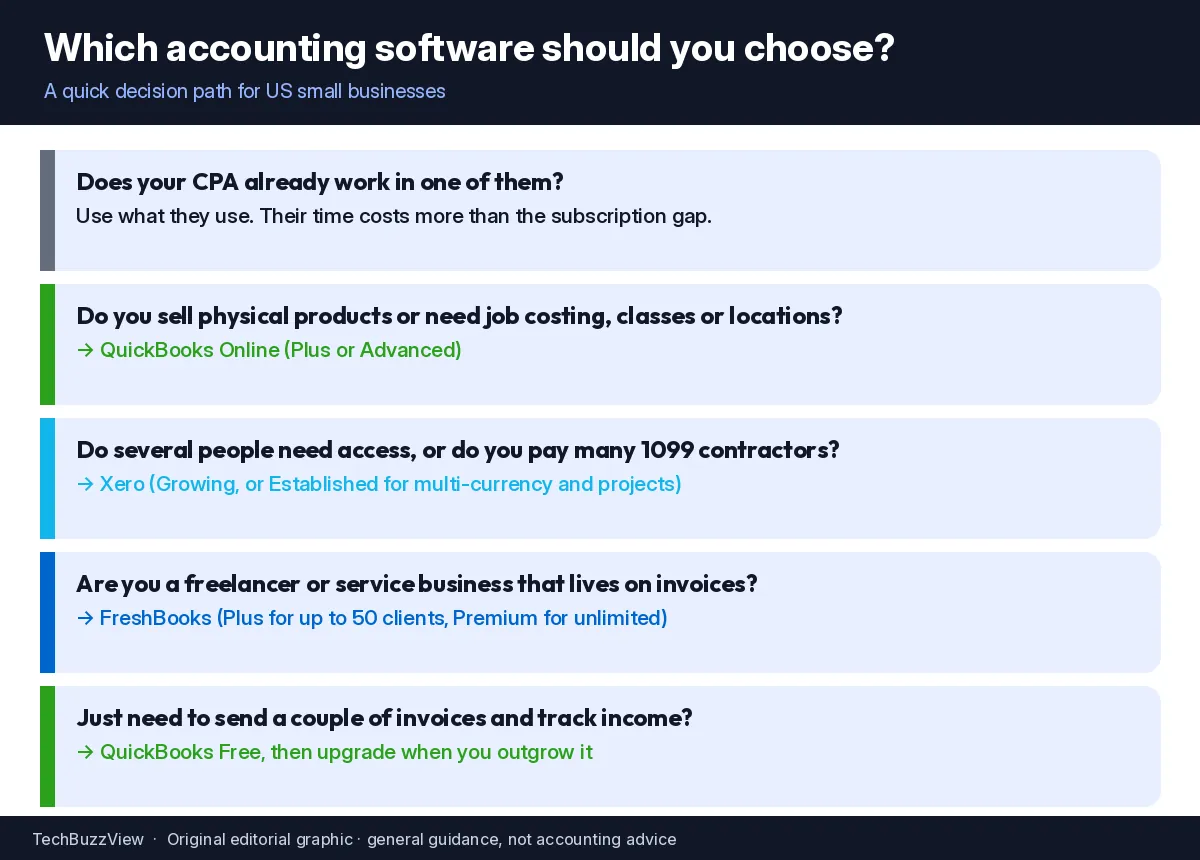
- Choose QuickBooks Online if your CPA uses it, you sell physical products, you need classes, locations or project costing, or you expect to grow past a handful of users and want everything in one ecosystem.
- Choose Xero if several people need access and you don’t want per-user pricing, you pay 1099 contractors regularly, or you invoice in multiple currencies (Established).
- Choose FreshBooks if you are a freelancer or service business, invoicing and getting paid is the main job, and you value time tracking, proposals and retainers over deep accounting features.
- Still unsure? Ask your accountant which one they prefer to work in. Their time costs more than the subscription difference.
Whatever you pick, lock down access the same way you would for email: turn on two-factor authentication for every user (see our guide to setting up 2FA) and store shared logins in a business password manager. Fake invoice and payment-request emails are among the most common small business scams, so it’s worth reading our guide on protecting your small business from phishing too.
FAQ
Is QuickBooks better than Xero for a small business?
Not automatically. QuickBooks Online has more features, inventory and job costing, and far more US accountants use it, so it is the safer default if your CPA works in it. Xero is often better value for teams, because it has no per-user license fees and includes 1099 management and sales tax on every plan. Choose based on your team size, inventory needs and your accountant’s preference.
Is FreshBooks real accounting software or just invoicing?
It is real accounting software. FreshBooks includes double-entry accounting reports, bank reconciliation and expense tracking (with accountant access from the Plus plan up), on top of its invoicing, estimates and time tracking. It is lighter than QuickBooks or Xero on inventory and complex multi-entity accounting, so it suits service businesses best.
Which accounting software do most accountants prefer?
In the US, QuickBooks Online is the most widely used by accountants and bookkeepers, which is why it is our overall pick. Many accountants also support Xero, and some work with FreshBooks for freelance clients. Ask your accountant before you choose, because their familiarity can cut your bookkeeping and tax-prep costs.
Is there a free version of QuickBooks, Xero or FreshBooks?
QuickBooks Online has a Free plan at $0/mo for one user, with up to 2 invoices a month (unlimited if you use QuickBooks Payments), but no accountant access, mobile app or integrations. Xero and FreshBooks don’t have a permanent free plan; both offer free trials, and FreshBooks lists a 30-day trial plus a 30-day money-back guarantee.
How much does small business accounting software cost per month?
As of November 2026, regular list prices start at $23/mo for FreshBooks Lite, $27/mo for Xero Early and $38/mo for QuickBooks Simple Start. Plans most growing businesses actually use run from about $43 to $140 a month, before payroll, extra users or payment processing fees. All three vendors were advertising large temporary discounts at the time.
Can I switch from QuickBooks to Xero or FreshBooks later?
Yes, but it takes work. You will need to move your chart of accounts, open invoices and bills, and historical balances, and many businesses switch at the start of a fiscal year to keep reporting clean. Xero and FreshBooks both offer migration help. Choosing the right tool now is cheaper than migrating later.
Related Reads
- Google Workspace vs Microsoft 365 for small business
- Best automation tools: Zapier, Make and n8n, for connecting your accounting app to the rest of your stack
- Best AI tools for small business in 2026
- How to set up business email on your own domain
- More how-to guides on TechBuzzView
Prices and plan details are from each vendor’s US pricing page on 24 November 2026 and can change at any time. This article is general information, not tax or accounting advice. Talk to your CPA about your specific situation.