
AI tools for small business are no longer experimental — they’re practical cost-savers when you pick the right one for the right job. This guide skips the hype ranking and organizes tools by what you actually need to do: writing, automation, meeting notes, customer support, design, CRM, and workspace AI. Jump to the section that matches your biggest time drain today.
Quick nav: Writing · Automation · Meetings · Support · Design · CRM · Workspace
How to Actually Choose an AI Tool for Your Business
Before spending anything, apply three filters:
- Does it fit your existing workflow? An AI tool that requires changing three other tools to work is a net drain. Prioritize tools that plug into what you already use — your email client, your project management app, your calendar.
- Is the ROI measurable? “Saves time” is not a measurement. Can you point to a specific task that takes you 2 hours and would take 20 minutes with AI? If yes, calculate the monthly cost versus the freed-up hours. If no, it’s a nice-to-have, not a need.
- Is the data privacy acceptable for your business type? If you work with patient data, legal contracts, or financial records, check the tool’s data retention policies and whether it uses your inputs to train models. Many enterprise plans offer zero data retention; consumer plans typically do not.
Some links in this article are affiliate links. If you purchase through them, TechBuzzView earns a small commission at no extra cost to you.
A. AI Writing & Content: ChatGPT vs Claude
What it’s actually useful for: first drafts of sales emails, blog post outlines, proposal boilerplate, job descriptions, and social captions. Neither tool replaces your brand voice or domain expertise — they remove blank-page paralysis.
ChatGPT Plus — $20/month
The default starting point for most businesses. ChatGPT’s main advantage is its breadth of integrations: it can search the web in real time, generate images via DALL-E, run code, and connect to dozens of apps through custom GPTs. If you need a generalist assistant that browses current information or runs calculations alongside writing, ChatGPT is the better fit.
Best for: Teams that need web browsing + writing in one tool, or who want to build custom internal chatbots via GPTs.
Claude Pro — $20/month
Claude’s key edge is its 200,000-token context window, which means it can read and work with an entire contract, transcript, or report in one session without losing track of earlier content. Its writing tends to sound less AI-generated out of the box, which matters for customer-facing copy. It’s also stronger at following nuanced instructions without drifting.
Best for: Longer documents, proposals, detailed analysis, and teams who want less editing required after the first draft.
Limitation for both: Neither tool knows your brand, your customers, or your past wins. Human editing is mandatory, not optional. Neither one can replace a skilled copywriter for high-stakes content.
B. Workflow Automation: Zapier vs Make
What automation actually saves time on: moving data between apps (lead from form → CRM → Slack notification), sending triggered emails when something changes in a spreadsheet, and routing files between cloud storage tools. What it doesn’t save time on: tasks that require judgment, exception handling, or human review every time.
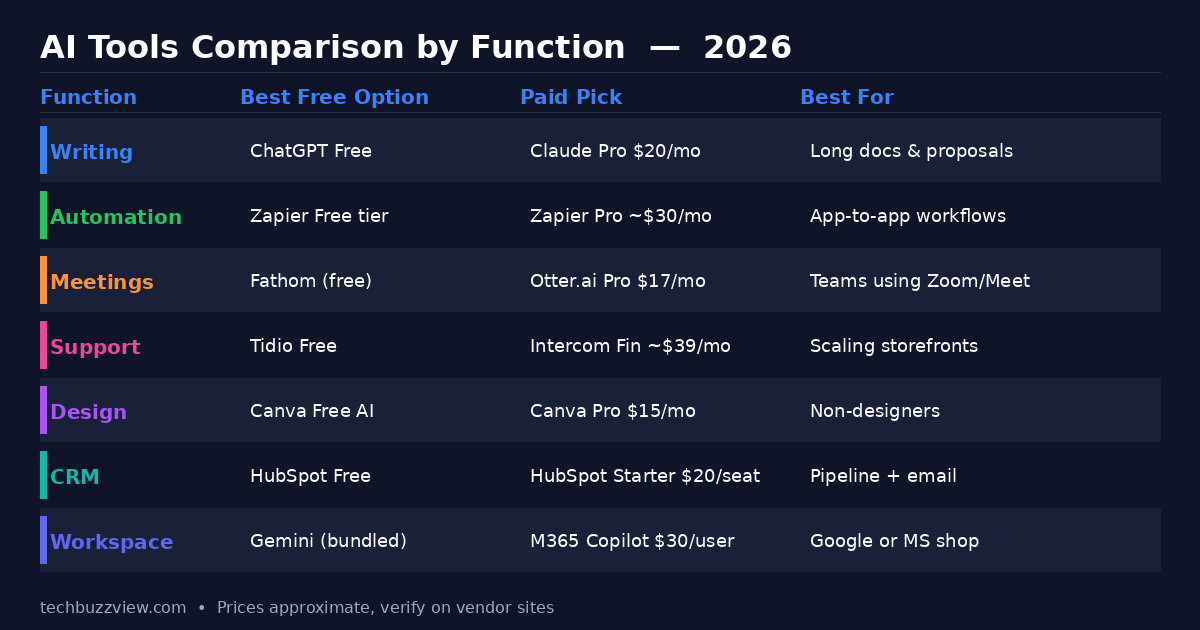
Zapier — Free tier available, Professional ~$29.99/month
Zapier connects over 9,000 apps and has by far the gentlest learning curve. As of 2026, it includes built-in AI steps — you can add a “draft a summary” or “classify this lead” step inside a Zap without writing any code. The tradeoff: costs add up quickly at scale, and each AI step now consumes 1×, 3×, or 5× your task quota depending on the model tier selected.
Best for: Small teams automating 1–10 high-value workflows, especially if the apps involved are mainstream (Gmail, Slack, HubSpot, Salesforce, Shopify).
Make (formerly Integromat) — Free tier, paid from $9/month
Make uses a visual canvas approach and is significantly cheaper for data-heavy workflows — operations are priced per data record, not per task. The tradeoff is a steeper learning curve. Error handling and conditional branching are more powerful than Zapier, which matters once your automations get complex.
Best for: Developers or ops-minded founders running data pipelines, e-commerce order processing, or high-volume automations where Zapier’s pricing would become prohibitive.
C. AI Meeting Notes & Transcription: Fathom vs Otter.ai
The job to be done: You finish a 45-minute sales call. Without a tool, you spend another 20 minutes writing notes, drafting a follow-up, and updating the CRM. With the right tool, the transcript, action items, and a draft follow-up email are ready by the time you close the browser.
Fathom — Free (unlimited recordings)
Fathom’s free tier is unusually generous: unlimited recordings, transcription, and AI summaries with no credit card. It supports Zoom, Google Meet, and Microsoft Teams. For revenue-generating meetings, it also includes call intelligence features (talk time ratios, keyword tracking) in paid tiers. If you’re on the fence, start here before paying for anything.
Best for: Sales teams and founders who want zero friction before committing to a paid plan.
Otter.ai — $16.99/month (Pro)
Otter’s strength is real-time transcription visible to meeting participants, plus a strong search interface for finding topics across past recordings. Its AI Chat lets you ask questions about meeting content. It integrates with Zoom, Google Meet, and Teams, and has stronger enterprise controls than Fathom.
Best for: Teams that need searchable transcription archives, real-time display, or stronger compliance controls.
D. Customer Support AI: Tidio vs Intercom Fin
The realistic expectation: AI handles tier-1 support (order status, FAQs, return policy, common troubleshooting) well. It still misses nuanced complaints, emotionally charged situations, and edge cases requiring business judgment. Any live chat deployment needs clear escalation paths to a human.
Tidio — Free tier, Lyro AI from $29/month
Tidio is built for small e-commerce stores and service businesses. Its Lyro AI chatbot trains on your website content and handles common questions. The free tier includes live chat. At $29/month for Lyro AI, it’s the most accessible option for businesses under $1M ARR.
Best for: Shopify stores, WooCommerce shops, and service businesses needing affordable 24/7 tier-1 coverage.
Intercom Fin — from ~$39/month per seat
Intercom’s Fin AI agent is built on large language models and is notably better at understanding varied phrasings of the same question. It connects to your knowledge base, previous tickets, and product data. The platform grows with you — from live chat to omnichannel (email, SMS, WhatsApp) with strong analytics. The tradeoff: pricing scales quickly, and it’s overkill for teams handling fewer than 50 conversations a week.
Best for: Scaling SaaS companies and service teams with 50+ weekly support interactions.
E. AI Design Tools: Canva AI vs Adobe Firefly
Canva Pro — $15/month
Canva’s Magic Studio AI features (text-to-image, background removal, Magic Write, Magic Resize) are layered into a tool non-designers already use for social posts and presentations. For small businesses without a dedicated designer, Canva Pro is the most practical choice: templates, brand kit, and AI outputs in one place.
Best for: Non-designers creating marketing assets, social content, and pitch decks without needing Photoshop-level control.
Adobe Firefly — Included in Creative Cloud plans
Adobe Firefly is built for designers who already use Photoshop, Illustrator, or Premiere. Its biggest advantage is style consistency: Firefly generates images that match an existing brand style guide rather than producing generic AI outputs. It’s also trained on licensed content, which matters if you’re concerned about IP issues with AI-generated images.
Best for: Creative professionals and marketing teams managing brand consistency across campaigns.
F. CRM with AI: HubSpot AI vs Notion AI
Important distinction: A CRM tracks customers, deals, and pipeline. A workspace tool tracks notes, tasks, and documents. These are different jobs. Using Notion as a CRM works fine for very small teams, but it doesn’t scale to pipeline forecasting, automated follow-ups, or deal scoring.
HubSpot — Free tier, Starter from $20/seat/month
HubSpot’s AI features in 2026 include email drafting, deal score predictions, and pipeline forecasting. The free tier covers contact management and basic email. The key limitation: Workflows (automated sequences based on CRM triggers) require Professional or higher. If your primary need is automating lead nurturing, budget for the Professional tier or look at the Starter + Zapier combination.
Best for: Sales teams managing an active pipeline with follow-up sequences and deal tracking.
Notion AI — Bundled in Business plan ($20/member/month)
Notion AI is excellent at summarizing meeting notes, drafting SOPs, managing knowledge bases, and helping with writing tasks inside a connected workspace. It is not a CRM. If you’re already a heavy Notion user and need AI for internal documentation, the Business plan’s bundled AI is excellent value.
Best for: Teams managing projects, documentation, and internal wikis who need AI inside their workspace — not pipeline tracking.
G. General AI Assistant: Gemini vs Microsoft 365 Copilot
This category is about AI embedded in the tools your whole team already uses every day.
Gemini for Google Workspace — Bundled in Workspace plans
If your team lives in Google Docs, Sheets, Gmail, and Meet, Gemini is the natural choice — it’s built into these tools at no additional cost on most Workspace business plans. In October 2026, Google added a small business hub to the Gemini app with brand style settings, finance help, and connections to Google Ads and third-party accounting tools.
Best for: Teams already on Google Workspace who want AI inside their existing tools without adding a subscription.
Microsoft 365 Copilot — $30/user/month (requires M365 Business plan)
Copilot is tightly integrated into Word, Excel, PowerPoint, Outlook, and Teams. If your team runs on Microsoft’s ecosystem, Copilot’s ability to draft in Word based on an email thread in Outlook, or summarize a Teams meeting into a PowerPoint slide, is genuinely useful. At $30/user/month on top of the M365 subscription, it’s a larger investment — justify it with specific high-frequency workflows.
Best for: Microsoft-first shops where the team spends most of their day in Office apps.
What Most Small Businesses Should Start With
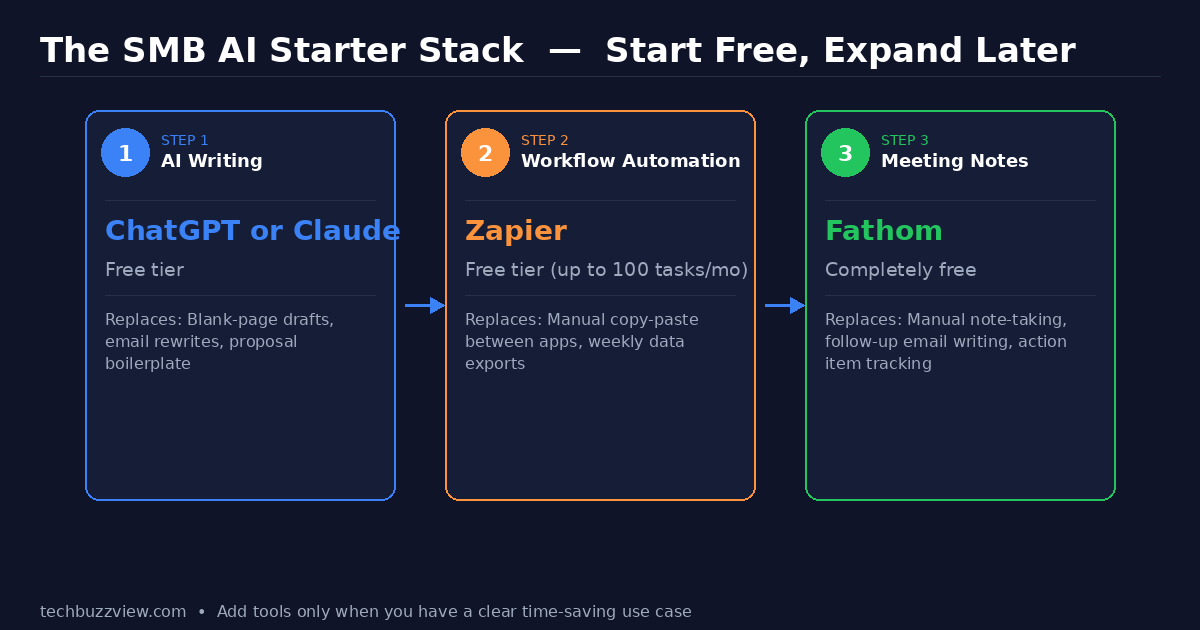
If you’re starting from scratch, resist the urge to build a full AI stack on day one. Begin with three free-tier tools and add paid plans only when a specific bottleneck is clear:
- AI Writing (ChatGPT or Claude free tier): Use it for one week to draft customer emails, proposals, or blog posts. If it saves more than 3 hours in that week, upgrade to a paid plan.
- Automation (Zapier free tier — up to 100 tasks/month): Identify one manual copy-paste task between two apps. Build one Zap. Measure the time saved before expanding.
- Meeting Notes (Fathom — completely free): Enable it on your next 10 customer or team calls. If you stop writing manual notes, it’s working.
The question isn’t which AI tool is best — it’s which specific task is consuming the most time right now. That answer should drive the choice.
What to Watch in Late 2026
Two developments are worth tracking: Claude Duet, Anthropic’s small business agent announced in preview on October 21, 2026, aims to connect Claude directly to business tools like Google Calendar, email, and project management apps as a persistent assistant. Google’s Gemini small business hub, launched October 20, 2026, adds brand style management and accounting integrations directly into the Gemini app — meaningful for businesses already on Google Workspace.
Prices listed are sourced from vendor sites and third-party guides as of November 2026 and may have changed. Always verify current pricing on the vendor’s official pricing page before purchasing.