
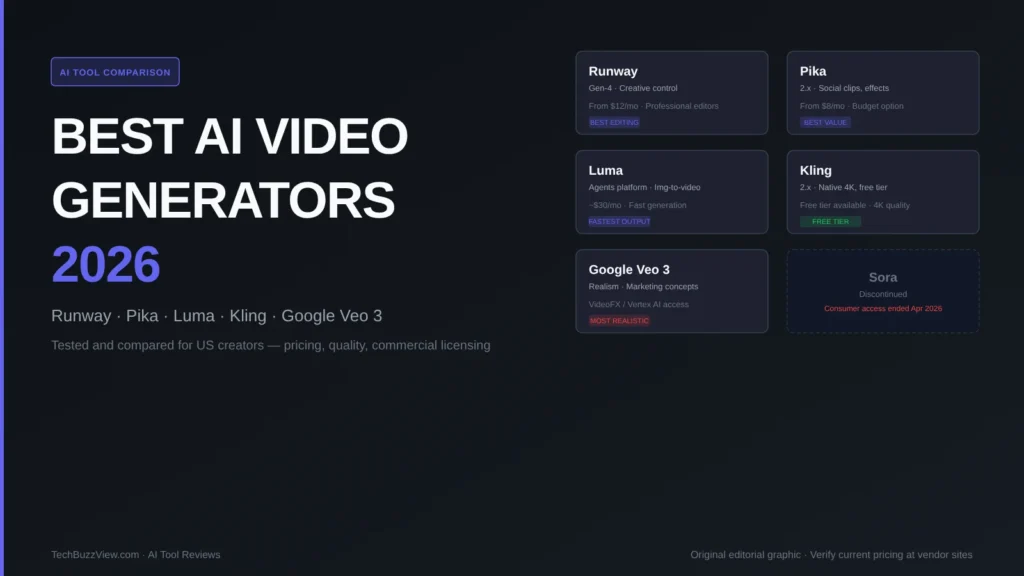
The best AI video generators for US creators in 2026 are Runway (professional editing control), Pika (social clips on a budget), Luma (cinematic image-to-video), Kling (native 4K with a usable free tier), and Google Veo 3 (the most realistic output currently available). OpenAI’s Sora was discontinued in 2026 — consumer access ended April 26, the API on September 24. Here is how each tool compares, what it costs, and which one to choose.
What to Look for in an AI Video Generator
Before comparing tools, five criteria actually matter for practical use:
- Motion quality and realism: Does the generated movement look plausible? Are physics and lighting consistent across frames?
- Input modality: Text-to-video only, or does it support image-to-video and video-to-video transformation?
- Output duration and resolution: Maximum clip length matters for long-form use; 4K vs 1080p matters for professional work.
- Commercial licensing: Every major tool has different terms for using generated content commercially. Verify the current license before publishing generated video.
- Pricing model: Credit-based vs subscription vs API. Credit-based models can be unpredictable at scale.
How AI Video Generation Works
AI video generators use diffusion models — the same underlying technology as AI image generators — applied across a temporal sequence of frames. A text or image prompt is encoded into a latent space, then the model iteratively removes noise across both spatial and temporal dimensions to produce a coherent video clip. The number of denoising steps per frame, the model’s training data, and the temporal attention mechanism together determine output quality and motion consistency.
Runway Gen-4
Runway is the professional-grade option for creators who need editing control alongside generation. By late 2026, Runway’s Gen-4 model builds on the Gen-3 Alpha architecture’s strength in camera motion control and inpainting, adding improved temporal consistency for longer clips.
What it does well: Runway remains the industry standard for creative professionals who need to combine AI generation with traditional editing — masking, motion tracking, and compositing within a single tool. The Gen-4 model handles complex camera paths and maintains object consistency across cuts better than most competitors. Its Editor interface gives you non-destructive control over generated clips that the other tools lack.
Limitations: Runway is not the cheapest option, and its credit model means high-volume users face unpredictable costs at higher resolutions. Output resolution maxes at 1080p on standard plans; 4K export requires the Max tier.
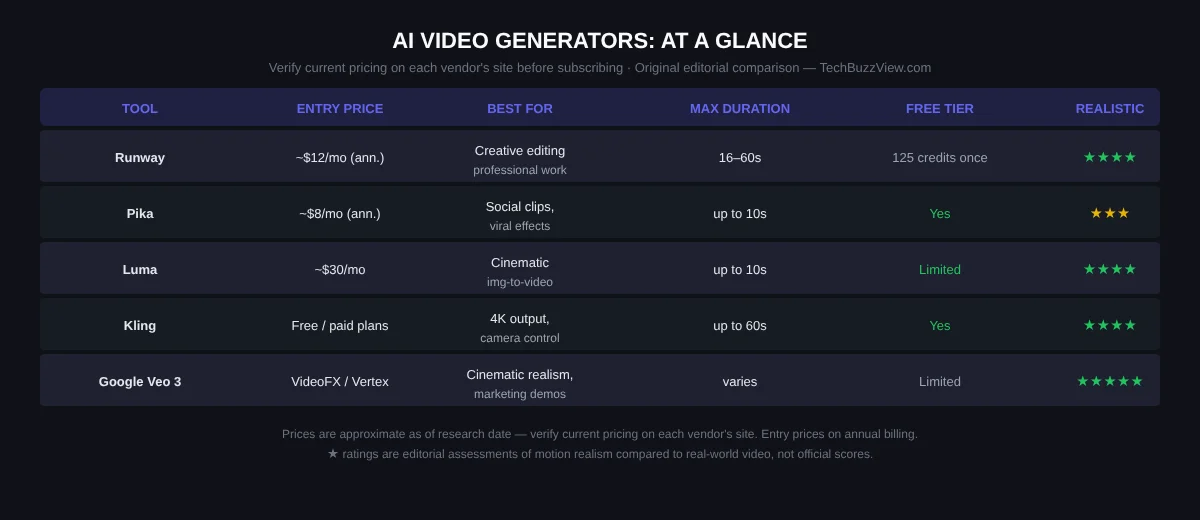
Pricing (verify at runwayml.com): Free plan includes 125 one-time credits. Standard approximately $12/month annual; Pro approximately $28/month annual; Max approximately $76/month annual. Pricing verified as of research date — check vendor site for current terms.
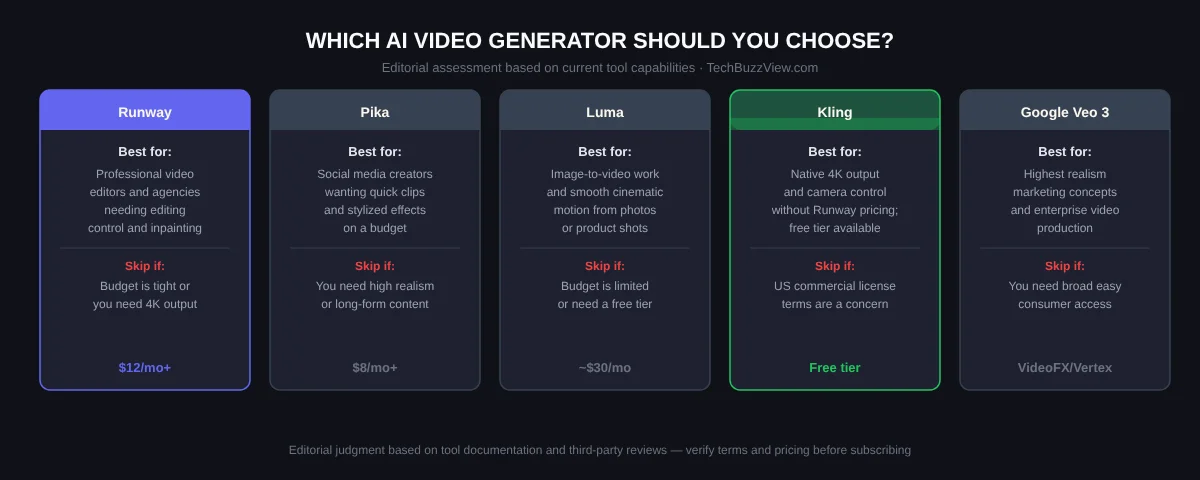
Best for: Professional video editors, motion designers, and marketing agencies producing branded content that requires editing precision alongside AI generation. If you need to composite AI footage with real footage, Runway is the clearest choice.
Pika 2.x
Pika positions as the accessible, social-media-first AI video tool. Its strength is speed, style flexibility, and a lower price point compared to Runway or Luma.
What it does well: Pika 2.x excels at short-form social clips, stylized effects, and transforming images into video. Its effects library — including “Pikaffects” that apply specific visual transformations — makes it useful for content creators who want distinctive, shareable clips without needing deep technical knowledge.
Limitations: Motion realism is lower than Runway, Luma, or Veo 3. Maximum clip duration is around 10 seconds on most plans, which limits long-form use. Physics accuracy — fluid motion, cloth, lighting — is noticeably weaker than the premium tier tools.
Pricing (verify at pika.art): Free tier available with limits. Paid plans from approximately $8/month on annual billing. Verify current pricing at vendor site.
Best for: Social media content creators, solo marketers, and creators who need fast, stylized short clips at a budget price. If realistic motion physics are not essential and you’re primarily making social-first content, Pika is the most cost-effective starting point.
Luma Dream Machine (Agents Platform)
Luma’s Dream Machine tool, now part of the Luma Agents platform (restructured June 2026), is best known for smooth, cinematic motion from image inputs. It is the go-to choice for creators who start with product photography or still images and want natural-looking video from them.
What it does well: Image-to-video quality, particularly for objects with natural movement (fabric, liquids, foliage). Luma’s physics simulation is notably smoother than Pika’s at a comparable price point, and its generation speed is fast — typically under a minute for a 5-second clip.
Limitations: Text-to-video quality is competitive but not consistently better than Runway or Veo 3. The Agents platform restructuring in June 2026 changed pricing and feature bundling; verify current terms before committing to a plan. No strong free tier relative to Kling or Pika.
Pricing (verify at lumaai.com): Plans approximately from $30/month as of research. Verify current pricing at vendor site — the Agents platform restructuring affected tiers.
Best for: Product marketers, e-commerce brands, and creators animating still photography into video. If your primary use case is bringing product shots to life, Luma is the most natural starting point.
Kling 2.x
Kling from Chinese AI company Kuaishou is a newer entrant that has gained significant traction among international creators because it offers native 4K output and camera control at a price point substantially below Runway — with a usable free tier.
What it does well: Kling 2.x produces native 4K resolution video with strong camera motion control — pan, tilt, and push-pull — that rivals Runway in certain use cases. Motion consistency over longer clips is notably strong. The free tier provides meaningful generation capacity for experimentation.
Limitations: US commercial licensing terms should be verified carefully before using Kling output in commercial projects — the terms differ from US-headquartered tools and have changed over time. Confirm current license terms at klingai.com before commercial use.
Pricing (verify at klingai.com): Free tier available. Paid plans vary; verify current pricing. Generally lower than Runway at comparable generation quality.
Best for: Creators who need 4K output and camera control without Runway’s pricing. Particularly well-suited for experimentation via the free tier before committing to a paid plan. Verify commercial license terms before professional use.
Google Veo 3
Google’s Veo 3 is the highest-realism AI video generation tool currently available to US creators, based on third-party reviews and head-to-head comparisons. It is accessible through Google’s VideoFX (consumer) and Vertex AI (enterprise API) platforms, and was included in Gemini Advanced in 2026.
What it does well: Veo 3 produces the most photorealistic motion of any publicly accessible AI video tool as of this research — particularly in areas like complex lighting, human movement, and scene consistency across cuts. It is the choice for marketing teams and studios that need video at a quality level close to real-world production.
Limitations: Access is less straightforward than consumer tools — Vertex AI requires a Google Cloud account and API setup; VideoFX access varies by region and account type. For individual creators used to web-app interfaces, the onboarding friction is higher than Runway or Pika.
Pricing: Variable by access path. Vertex AI is billed per generation; VideoFX consumer access is bundled with Gemini Advanced in some regions. Verify current access and pricing at Google DeepMind.
Best for: Marketing teams and enterprise creators producing high-realism commercial content — product demos, lifestyle visuals, marketing concepts — where quality cannot be compromised. If access friction is acceptable, Veo 3 currently produces the best results for realistic motion.
What Happened to Sora?
OpenAI discontinued Sora in 2026. Consumer access ended April 26, 2026; the API was shut down September 24, 2026. The tool was initially released broadly to ChatGPT Plus and Pro subscribers in December 2024, but was removed without a direct replacement announced. If you are researching AI video tools based on 2024 or early 2025 information, Sora is no longer an option.
How to Choose the Right AI Video Generator
The decision comes down to four variables:
- Need realistic motion physics? → Google Veo 3 first, Runway second
- Need 4K output on a budget? → Kling (verify commercial license)
- Need fast image-to-video? → Luma Dream Machine
- Need social-first clips cheaply? → Pika
- Need professional editing + generation in one tool? → Runway
Related: Best AI image generators for US creators · Best screen recording tools 2026 · Claude Projects vs ChatGPT vs Gemini Gems compared
Frequently Asked Questions
Can I use AI-generated video commercially?
It depends on the tool and plan. Most major AI video generators permit commercial use on paid plans, but the specific terms — exclusivity, attribution, usage restrictions — vary. Runway, Pika, and Kling each have different commercial license terms. Always verify the current license agreement on the vendor’s official site before using generated video in paid advertising or commercial productions.
Is there a truly free AI video generator?
Kling has the most useful free tier as of this research — it provides meaningful generation capacity, not just a trial watermark. Pika also offers a free tier with limits. Most professional-grade tools (Runway, Luma) have minimal free tiers or one-time starter credits that do not support ongoing use without a paid plan.
How long does AI video generation take?
Generation time varies by tool, resolution, and server load. A 5-second clip typically renders in 30 seconds to 3 minutes on paid plans. During peak usage periods, queue times can extend significantly. Luma is generally cited as the fastest; Runway and Veo tend toward the slower end, trading speed for quality. Plan for generation time in your production workflow, especially for time-sensitive commercial projects.