
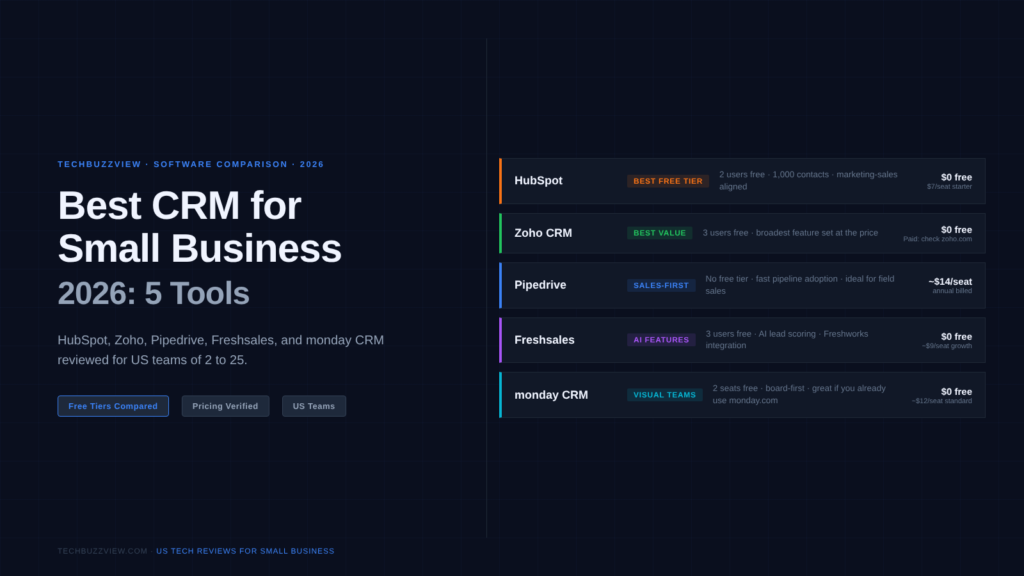
The right CRM keeps your team from dropping leads, missing follow-ups, and losing track of deals that were this close to closing. The wrong one adds friction and collects dust. This guide reviews the five CRM tools that come up most often for US small businesses in 2026 — HubSpot, Zoho CRM, Pipedrive, Freshsales, and monday CRM — with a focus on what each one actually delivers at the price point that matters for a team of 2 to 25 people.
Pricing was verified on official vendor pages in November 2026 where accessible. For tools where the pricing page required interactive input (Zoho) or was unavailable, I’ve included the best-available figures from multiple sources and indicated where you should confirm current pricing directly.
At a Glance: Which CRM Suits Which Team
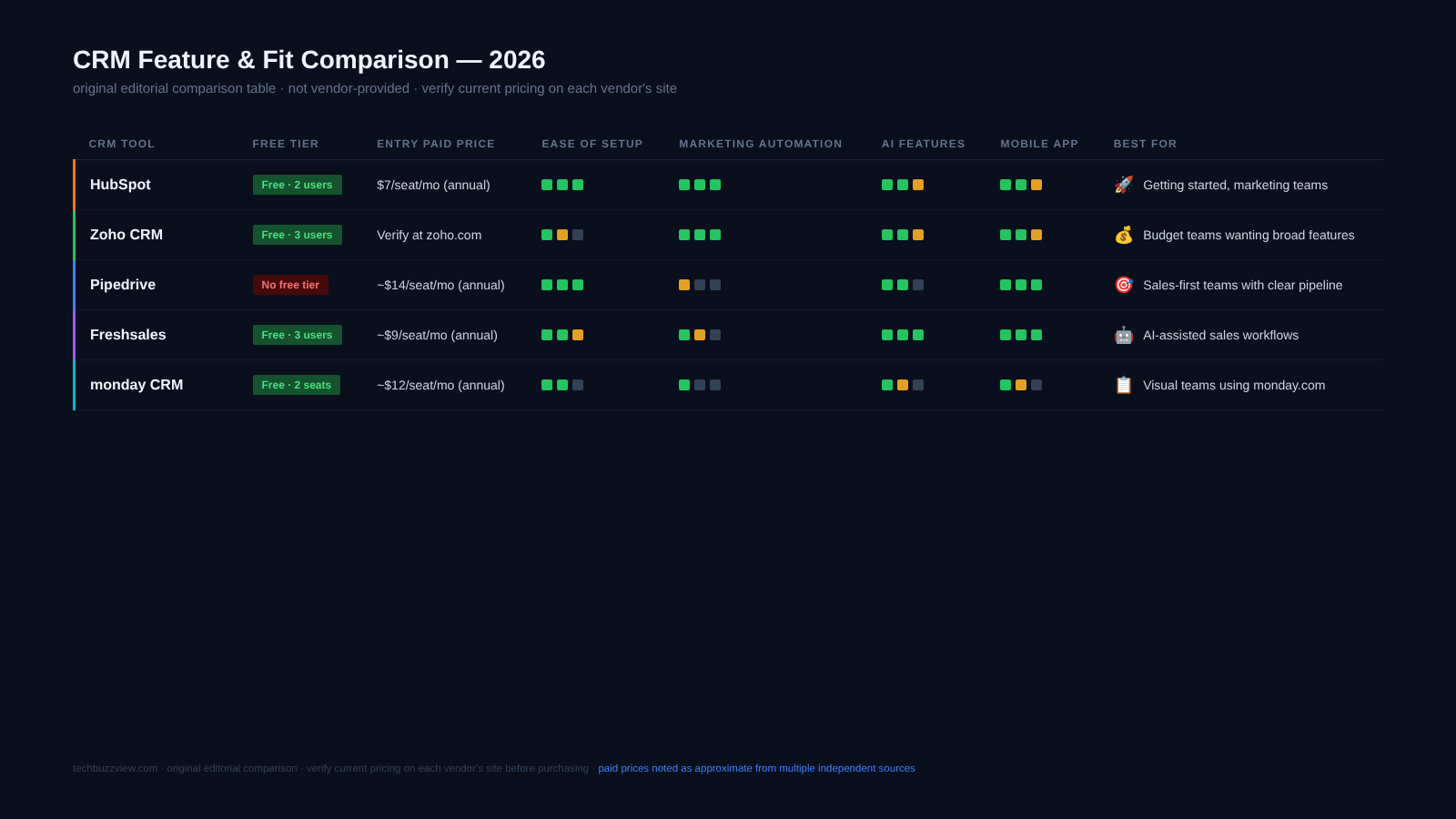
| CRM | Best For | Free Tier | Entry Paid Price |
|---|---|---|---|
| HubSpot | Getting started, marketing-sales alignment | Yes (2 users, 1,000 contacts) | From $7/seat/mo (annual) |
| Zoho CRM | Budget-conscious teams wanting broad features | Yes (3 users) | Standard — verify at zoho.com |
| Pipedrive | Sales-first teams with a clear pipeline | No | From ~$14/seat/mo (annual) |
| Freshsales | AI-assisted sales workflows | Yes (3 users) | From ~$9/seat/mo (annual) |
| monday CRM | Visual teams already using monday.com | Yes (2 seats) | From ~$12/seat/mo (annual) |
1. HubSpot CRM — Best for Getting Started Without Paying Upfront
HubSpot’s free CRM is the most complete no-cost option for a small team beginning to organize contacts and track deals. It includes a contact and deal pipeline, Gmail and Outlook integration, meeting scheduling, live chat, a form builder, and basic email tracking — all without a credit card.
What You Get on the Free Plan
- Up to 2 users
- Up to 1,000 contacts (tightened from the previous 1 million — verify current limit at hubspot.com)
- Deal pipeline with drag-and-drop stages
- Email and call logging
- HubSpot branding on emails and forms
- Community support only
What Paid Plans Add (Starter from $7/seat/month, annual billing)
The Starter plan — confirmed at $7/seat/month when billed annually upfront for new customers, $10/seat/month on a monthly term — removes HubSpot branding, raises usage limits, adds automation for simple sequences, includes email and chat support, meeting scheduling, e-signatures, and multi-currency support.
The jump to Professional is significant: advanced automation, custom reporting, predictive lead scoring, and A/B testing become available but at a substantially higher per-seat cost. For most small businesses, Starter is the relevant paid tier.
Who Should Use HubSpot
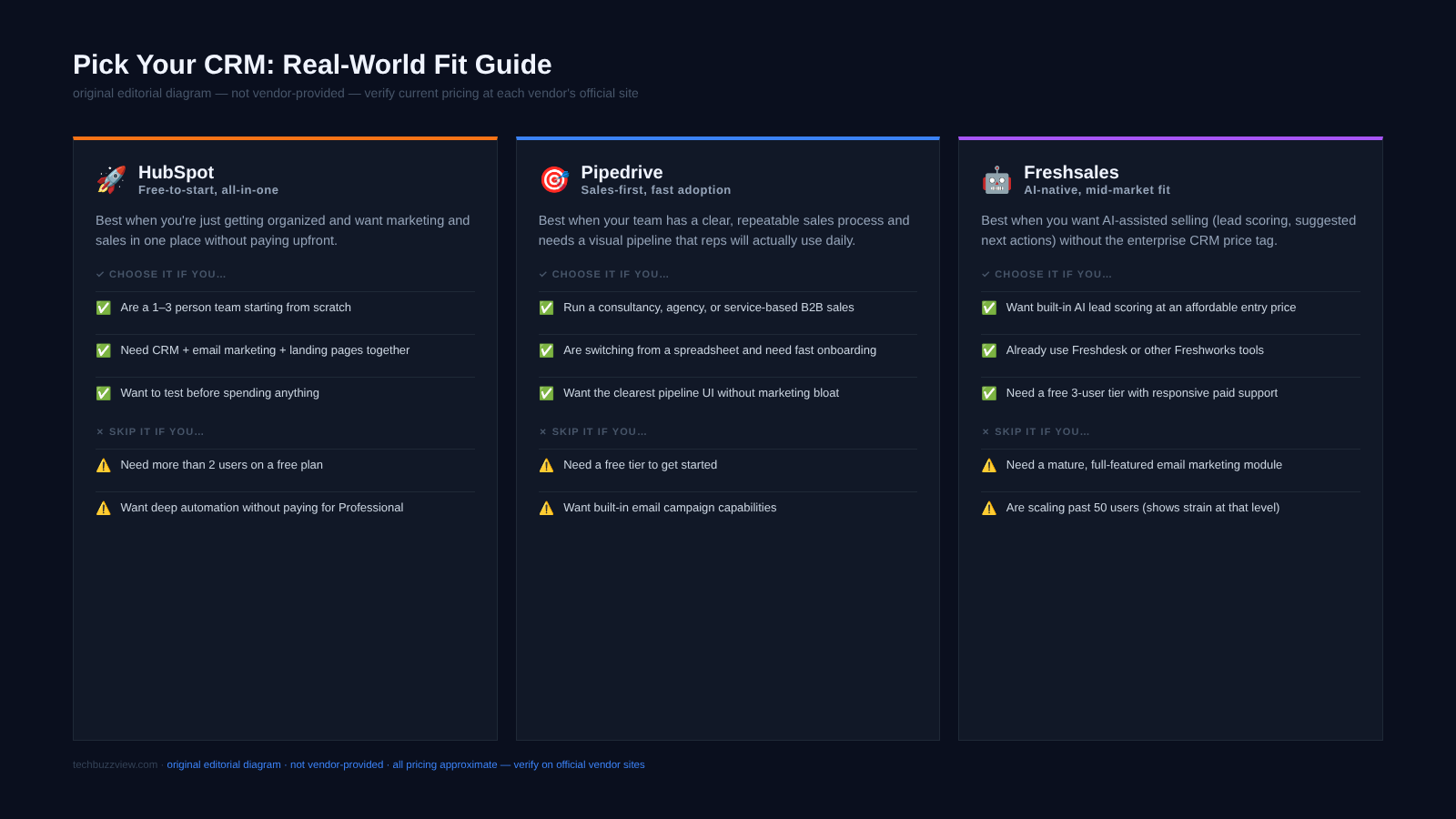
- Teams of 1–5 that are starting from scratch and want to test before spending
- Businesses where marketing and sales share the same system
- Teams that need native integration between CRM, email marketing, and landing pages
Who Should Look Elsewhere
- Teams with more than 2 people who need collaboration features on the free tier — the 2-user cap is a hard limit
- Businesses that need deep customization without paying for Professional
- Teams that need offline or mobile-first field sales tools
See HubSpot CRM features and current pricing →
2. Zoho CRM — Best for Feature Breadth at a Lower Cost
Zoho CRM offers a wider feature set than HubSpot at the same or lower price point, particularly for teams that want sales automation, multi-channel communication (email, phone, social), and workflow management without upgrading to an enterprise tier.
Free Tier
Zoho’s free plan supports up to 3 users. It includes lead and contact management, standard pipeline views, basic workflow rules, email templates, and mobile apps. It is more functional than many free tiers and genuinely useful for a solo operator or a very small team testing the tool.
Paid Plans
Zoho CRM offers Standard, Professional, Enterprise, and an Ultimate edition. Exact pricing requires the interactive calculator on Zoho’s pricing page — check zoho.com/crm/zohocrm-pricing.html for current USD prices. At the time of writing, independent sources most commonly cite Standard at approximately $14/user/month (annual billing), but this figure should be treated as indicative and verified directly.
Zoho One — which bundles 45+ Zoho apps including CRM, campaigns, analytics, and project management — is priced separately at approximately $37/user/month for all employees, billed annually. For teams already using multiple business tools, it is worth evaluating as an all-in-one alternative.
Who Should Use Zoho CRM
- Businesses with 3–20 people who want more automation than HubSpot’s free tier allows
- Teams that want tight integration between CRM, email, analytics, and customer support in one vendor
- Price-conscious teams comparing feature-per-dollar across the market
Who Should Look Elsewhere
- Teams that prioritize interface simplicity — Zoho’s UI has a steeper learning curve than Pipedrive or HubSpot
- Teams that need top-tier customer support responsiveness (support quality receives mixed reviews at the Standard tier)
See Zoho CRM features and current pricing →
3. Pipedrive — Best for Sales-Focused Teams With a Clear Pipeline
Pipedrive is built specifically for sales teams that think in stages: lead → qualified → proposal → negotiation → closed. Its interface centers on a visual pipeline that most sales reps can adopt in a day, and its workflow is optimized for speed-to-action rather than broad marketing capability.
No Free Tier
Pipedrive does not offer a permanent free plan. A 14-day free trial is available on all plans. If your decision depends on a free-forever option, Pipedrive is not it.
Paid Plans
The entry plan (currently named Lite) starts at approximately $14/seat/month when billed annually; monthly billing is higher at approximately $24/seat/month. Confirm current plan names and prices at pipedrive.com/en/pricing — plan tier names and pricing changed during 2026.
Higher tiers add smart contact data, workflow automation, custom fields, revenue forecasting, and AI-assisted sales coaching. The mid-range tier is where most growing sales teams land.
Who Should Use Pipedrive
- Sales-first teams of 2–15 reps who need a clean, fast pipeline view without marketing complexity
- Service businesses (agencies, consultants, SaaS) where the sales cycle is well-defined and repeatable
- Teams switching from spreadsheets that need fast adoption without an onboarding program
Who Should Look Elsewhere
- Teams that need marketing automation alongside CRM without a third-party integration
- Businesses with complex account management or team-based selling that needs account hierarchy
- Teams on a tight budget that need a free tier to start
See Pipedrive features and current pricing →
4. Freshsales — Best for AI-Assisted Sales Workflows
Freshsales (part of the Freshworks suite) positions itself as the AI-native CRM for teams that want built-in lead scoring, next-action suggestions, and an intelligent assistant baked into the sales workflow. It is a reasonable middle path between HubSpot’s breadth and Pipedrive’s sales simplicity.
Free Tier
Freshsales offers a free plan supporting up to 3 users. It includes contact and account management, a visual pipeline, mobile CRM, and basic email sync. It is a viable starting point for a team of 2 or 3 that expects to need more in 6–12 months.
Paid Plans
Freshsales Growth — commonly cited at approximately $9/user/month (annual billing) — adds email campaigns, workflows, sales sequences, pipeline stage gates, and AI-powered contact scoring. Pro and Enterprise tiers add multi-currency, advanced reporting, and predictive deal scores. Verify current pricing at freshworks.com/freshsales-crm/pricing.
Who Should Use Freshsales
- Teams that want AI lead scoring without paying Salesforce or HubSpot Professional prices
- Businesses already using other Freshworks tools (Freshdesk, Freshservice) that benefit from the unified data
- US teams that value a clean interface and responsive live support at the Growth tier
Who Should Look Elsewhere
- Teams that need deep marketing automation — Freshsales’s campaign capabilities are limited compared to HubSpot Marketing Hub
- Large teams — the tool shows strain as team sizes grow past 50 users, based on user reviews
See Freshsales features and current pricing →
5. monday CRM — Best for Visual Teams Already Using monday.com
monday CRM is a CRM built on the monday.com Work OS — a flexible, board-based platform that many small businesses already use for project management. If your team runs other work in monday.com, using its CRM means unified data across projects, deals, and client deliverables in one tool.
Free Tier
monday CRM has a free plan covering up to 2 seats. It is functional for a solo operator or a two-person founding team needing basic contact and deal tracking. Beyond 2 users, a paid plan is required.
Paid Plans
The Standard plan is commonly cited at approximately $12/seat/month (annual billing). It adds unlimited pipelines, 250 AI credits, 20 column types, and integration with 72+ tools. Pro and Enterprise tiers add more automations, deeper analytics, and custom permissions. Verify current pricing at monday.com/crm.
Who Should Use monday CRM
- Teams that already use monday.com and want unified work + sales management
- Visual, project-driven businesses (agencies, creative studios, construction) where deals are attached to deliverables
- Teams that want the flexibility to build their own pipeline fields and views without developer involvement
Who Should Look Elsewhere
- Pure sales teams that need a battle-tested sales methodology built in — Pipedrive or Freshsales fit better
- Teams that want deep email marketing integration natively
- Businesses that have never used monday.com and are evaluating it solely as a CRM — the learning curve is higher than Pipedrive for a sales-only use case
See monday CRM features and current pricing →
How to Choose the Right CRM for Your Team
Five questions will narrow your decision faster than a 30-tool comparison:
- How many users need access immediately? If you need more than 2 today, HubSpot and monday free tiers won’t cover you. Zoho and Freshsales give 3 free users.
- Do you need marketing automation in the same system? If yes, HubSpot is the clearest choice. If no, Pipedrive or Freshsales keep it cleaner.
- How defined is your sales process? A clear, repeatable pipeline → Pipedrive. Complex or flexible workflows → Zoho or monday. Just getting started → HubSpot free.
- What tools do you already use? A team deep in the Google Workspace ecosystem will get more out of HubSpot’s native integrations. A team using other Freshworks tools benefits from Freshsales’s unified data.
- What’s your budget per seat in year one? Below $10/seat/month: HubSpot Starter or Freshsales Growth. $10–$15: Zoho Standard or Pipedrive Lite. Higher: Professional tiers of any of the above.
Start with the free tier of your top candidate, run your team on it for 30 days with real data, and evaluate based on what actually gets used versus ignored. The best CRM is the one your team opens every day.
Frequently Asked Questions
Is HubSpot really free forever?
Yes — HubSpot’s free CRM has no time limit and requires no credit card. The key limitations are the 2-user cap and the 1,000-contact ceiling on the free tier (verify the current contact limit at hubspot.com/pricing/crm, as this has changed in recent years).
Which CRM has the best free tier?
For pure functionality, Zoho’s free plan (3 users, broader feature set) edges out HubSpot’s (2 users, 1,000 contacts, branding on emails). For ease of setup and integration with existing tools, HubSpot wins for most US small businesses.
Do any of these CRMs have a good mobile app?
All five have dedicated iOS and Android apps. Pipedrive and Freshsales receive consistently higher mobile app ratings for field sales use. monday CRM’s mobile app covers project-linked deal management well but is more tablet-friendly than phone-first.
Can a small business use Salesforce?
Salesforce Starter (formerly Essentials) is designed for small teams, but its minimum cost and onboarding complexity make it overkill for most businesses under 15 people. The five tools in this guide are purpose-fit for small teams without a dedicated CRM administrator.
What’s the difference between a CRM and a marketing automation platform?
A CRM manages your contacts, deals, and sales pipeline. Marketing automation sends campaigns, scores leads, and runs nurture sequences. Some tools (HubSpot, Zoho, Freshsales) offer both; others (Pipedrive, monday CRM) are primarily CRMs that connect to separate marketing tools via integrations.