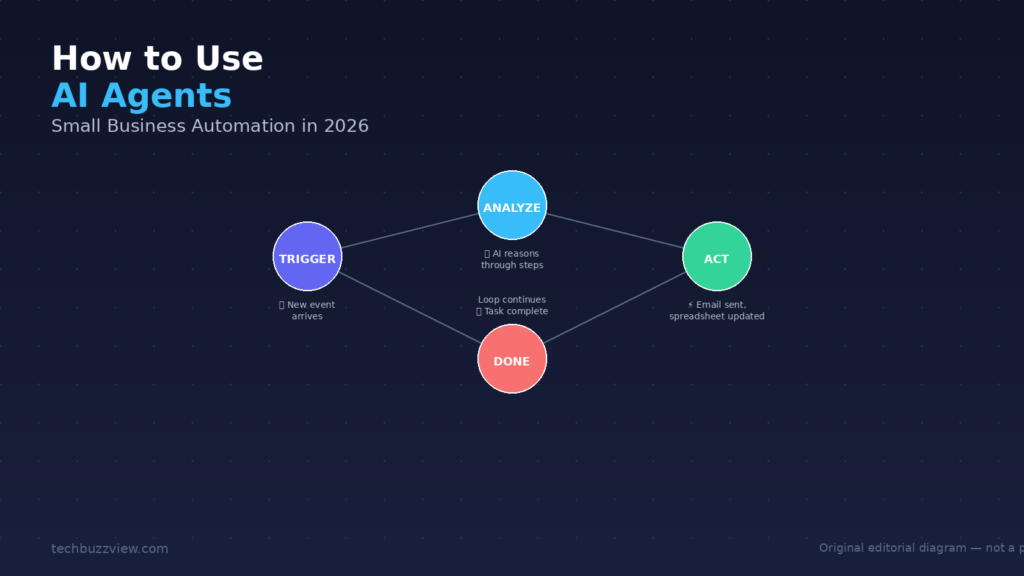
AI agents in 2026 let small businesses automate repetitive multi-step tasks—customer email triage, appointment scheduling, invoice follow-ups, social post drafting—without hiring more staff. Unlike chatbots that answer one question and stop, agents observe a trigger, reason through a sequence of steps, take real actions (sending emails, updating spreadsheets, posting to Slack), and loop back for the next item. Most businesses can get a first working automation live in 2–4 hours. Here’s how to do it correctly.
What AI Agents Actually Are
A chatbot waits for you to ask something. An AI agent watches for an event—a new customer form submission, an overdue invoice flag, a keyword in an email subject line, a calendar event starting in 15 minutes—and then executes a defined sequence of actions without being prompted each time.
The key difference is autonomy over steps. An agent can read a new support email, classify its urgency, draft a reply in your brand voice, check your FAQ database for relevant answers, and add it to your CRM—all triggered by a single incoming message. The best setups keep a human in the loop for external communications until you’ve validated accuracy over at least 50 real examples. That review step is not optional.
5 Tasks Small Businesses Should Automate First
Start with high-volume, low-stakes tasks where a wrong AI output is easy to catch. These five categories reliably deliver time savings within the first week:
- Customer inquiry triage and first-response drafting. The agent reads incoming email, classifies the inquiry type (billing question, product issue, general info, refund request), pulls the relevant FAQ or policy, and drafts a response for a human to review and send. Teams running 30+ inquiries per day typically save 60–90 minutes daily.
- Meeting scheduling and follow-up reminders. Connect your calendar and CRM. When a meeting ends, the agent creates a follow-up email draft summarizing action items extracted from your brief notes or a connected notetaker. No more forgotten follow-ups.
- Invoice follow-up sequences. Trigger from your accounting tool (QuickBooks, FreshBooks, Wave) when an invoice passes 7, 14, and 30 days overdue. The agent sends progressively firmer reminders in your tone—none of which go out without your approval on the first run.
- Social media content drafting from a brief. You write a 2-sentence brief (“announce our Black Friday sale, highlight free shipping, friendly tone”). The agent expands it into LinkedIn, Instagram, and X variations. You pick and edit before posting.
- Weekly competitive and news monitoring summary. The agent runs a defined set of searches (competitor blog posts, industry news, relevant keyword alerts), pulls excerpts, and delivers a digest to your inbox or Slack every Monday morning.
For a broader overview of AI tools that complement these workflows, see our guide to the best AI tools for small business in 2026.
Best AI Agent Tools in 2026
Five tools dominate the small business AI automation space. Each suits a different technical profile and budget.
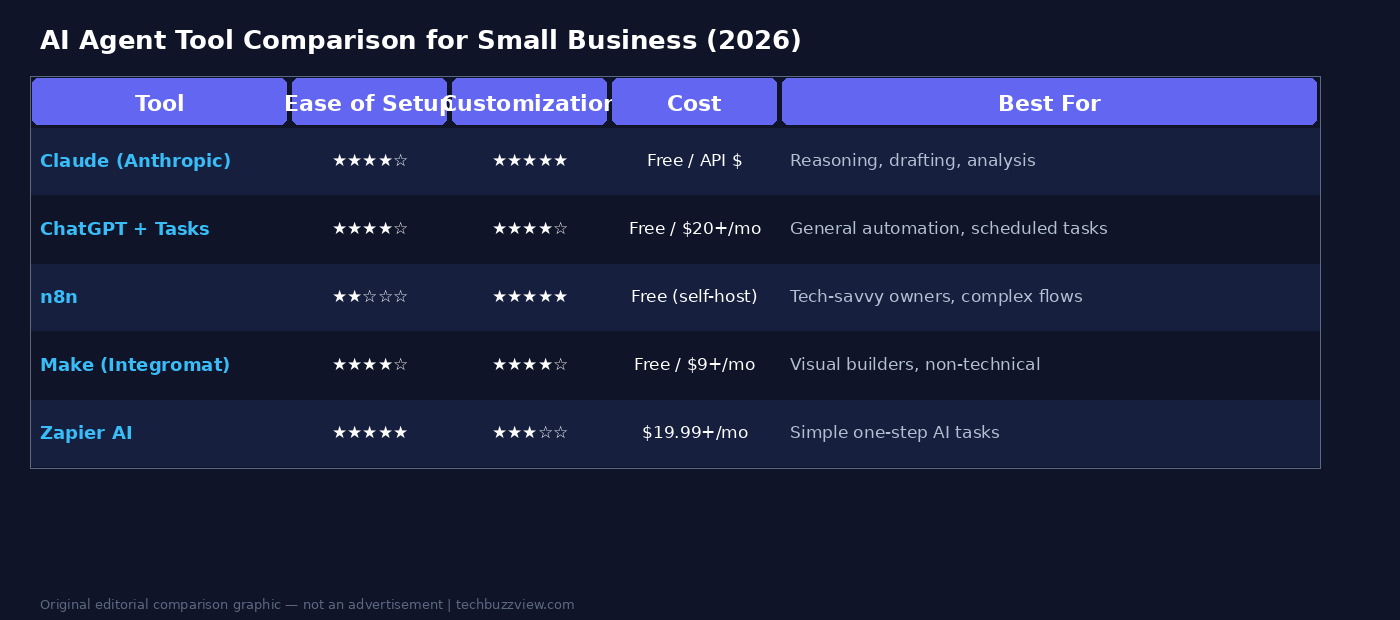
- Claude (Anthropic): Strongest at reasoning-heavy tasks—writing, analysis, complex multi-step instructions. The API suits developers building custom integrations; claude.ai Projects works for small teams without coding. As of late 2026, Claude handles long-document context better than most alternatives, which matters for contract review or policy drafting automations.
- ChatGPT with Tasks (OpenAI): GPT-4o with memory and scheduled Tasks handles general automation well. Good for businesses already using the OpenAI ecosystem. The Tasks feature lets you set recurring prompts on a schedule without an external workflow tool.
- n8n (open source): The most powerful option for technically inclined owners or anyone with a developer on staff. Self-hosted or cloud. Connects 400+ apps, supports custom JavaScript nodes, and runs complex branching workflows with AI steps. Steep learning curve but no per-task pricing.
- Make (formerly Integromat): Visual drag-and-drop workflow builder with native AI modules. Far easier to learn than n8n, with solid app connectivity. The free tier supports 1,000 operations per month—enough to test before committing.
- Zapier AI: Easiest to get started; least customizable of the five. Zapier’s AI features (AI Actions, AI by Zapier) let you embed an LLM step inside a Zap without code. Best for simple, single-step AI tasks (summarize → send, classify → route).
Step-by-Step: Set Up Your First AI Automation
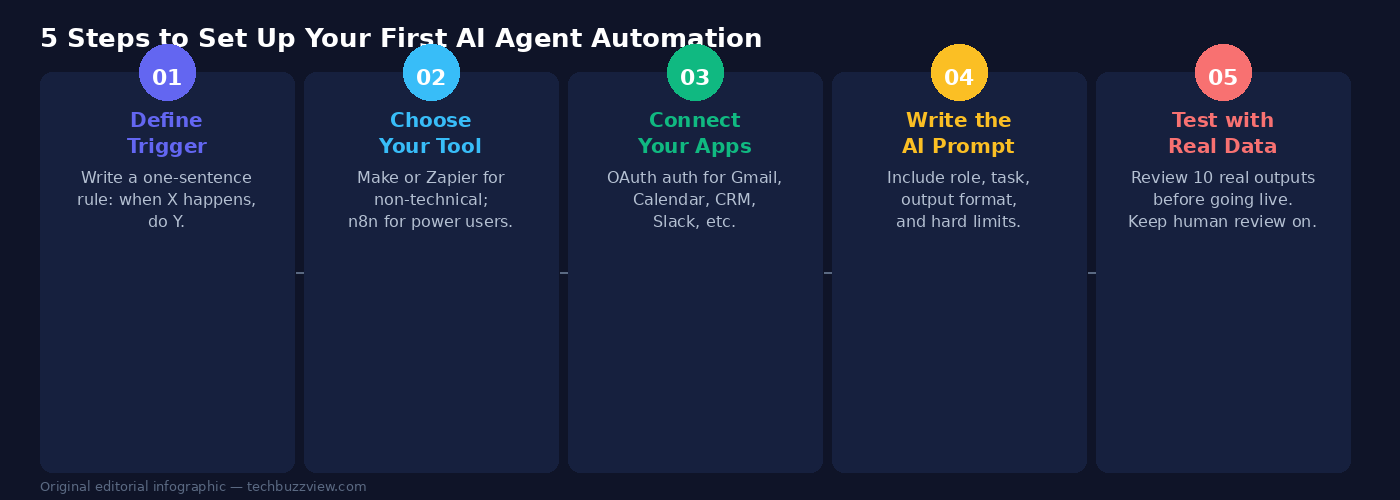
- Define the trigger and expected output precisely. Write it as a one-sentence rule: “When a new contact form submission arrives in Gmail with the subject line containing ‘inquiry’, classify its type and draft a reply.” Vague triggers produce unreliable automations.
- Choose your tool. If you’re comfortable with code or have a developer: n8n. If you want a visual builder with minimal coding: Make. If you want the absolute fastest start: Zapier AI. If the task is primarily writing/reasoning: start with a Claude-based workflow.
- Connect your apps. Every tool uses OAuth to connect Gmail, Google Calendar, Notion, HubSpot, QuickBooks, Slack, etc. Set up connections before building any logic—auth issues derail more automations than bad prompts.
- Write the AI instruction clearly, with constraints. Include: the role (“You are a customer service assistant for [business name]”), the task, the output format, and hard limits (“Never quote prices. Never promise refunds. Keep replies under 150 words”). Constraints prevent costly mistakes.
- Test with real data, review 10 outputs before going live. Run the automation on 10 real historical examples. Check every output manually. Only go live when you’re confident in accuracy—and keep human review enabled for all external-facing outputs for the first 30 days.
Common Pitfalls to Avoid
Skipping human review for external communications. AI agents can confidently generate plausible-sounding but wrong information. Any output that goes to customers—emails, quotes, support responses—needs a human check until you have 200+ verified correct outputs.
Over-automating too fast. Pick one task, run it for two weeks, measure the time saved and error rate. Then add a second. Businesses that automate five things simultaneously end up debugging all five at once.
Not checking data storage terms. Every tool that processes your customer data stores it somewhere. Read the privacy policy for your chosen tool’s AI features before connecting customer email or CRM data. For regulated industries (healthcare, finance), verify HIPAA/SOC 2 compliance before using any AI automation tool on customer records. For data security best practices, see our overview of VPN and security tools for small business.
Getting Started
The clearest path for a non-technical small business owner: start with Make’s free tier (1,000 operations/month) and build one customer inquiry drafting workflow. It takes about 2 hours to set up, and the visual builder is genuinely intuitive. If you need more power or want to self-host, n8n’s cloud trial gives you a full environment to explore without infrastructure overhead.
For AI-generated visuals to accompany your automated social drafts, our roundup of best AI image generators for marketing covers the current field. And if you’re concerned about privacy when running automations through cloud tools, verifying US data residency options with your vendor is a step worth taking before connecting customer data.
The goal isn’t to automate everything—it’s to free up 60–90 minutes per day on tasks that don’t require your judgment, so you can spend that time on the work that does.