
Transparency note: this article contains no affiliate links. Every outbound link goes to the vendor’s own site. Prices below were read from the official pricing pages on 27 November 2026 and can change.
Anyone who has chased a client for a signature by email knows the cost of doing it the old way. You print, they print, somebody scans on a phone at an angle, and the contract finally arrives three days late. Electronic signature software fixes that. The hard part is that there are a dozen of them, and the pricing pages are written to make comparison difficult.
This guide narrows it to four tools that US small businesses actually shortlist: DocuSign, Dropbox Sign, PandaDoc and SignNow. I read each vendor’s pricing page on 27 November 2026 and kept to what the pages say. I did not run my own test sends, so there are no invented benchmark numbers or fake customer quotes here. What you get is a clear comparison of price, sending limits and fit, plus a few traps worth knowing before you enter a card number.
TL;DR
- Lowest cost on paper: SignNow Business at $8 a month billed annually, but it includes 100 signature invites per account per year.
- Best for sending a lot without counting: Dropbox Sign, which states unlimited signature requests on its paid plans.
- Best for proposals and quotes: PandaDoc, though its API and automation features can need usage credits.
- Best known name: DocuSign, with the highest list prices and a 100 envelope per user per year allowance on Standard.
How We Compared Them
I looked at four things that decide whether a small business is happy a year later. First, the real monthly cost for a team, not the headline price. Second, the sending limit, because it can turn a cheap plan into an expensive one. Third, the features that matter for everyday contracts: templates, reminders, bulk send, payments and an audit trail. Fourth, security basics that a client or insurer might ask about, such as SOC 2 reports.
A word on method. When a pricing page did not say something, I wrote that it did not say it. A missing line on a pricing page does not prove a feature is missing. It means you should check before you buy, and I flag those spots so you can ask a sales rep or start a trial and look.
Quick Comparison Table
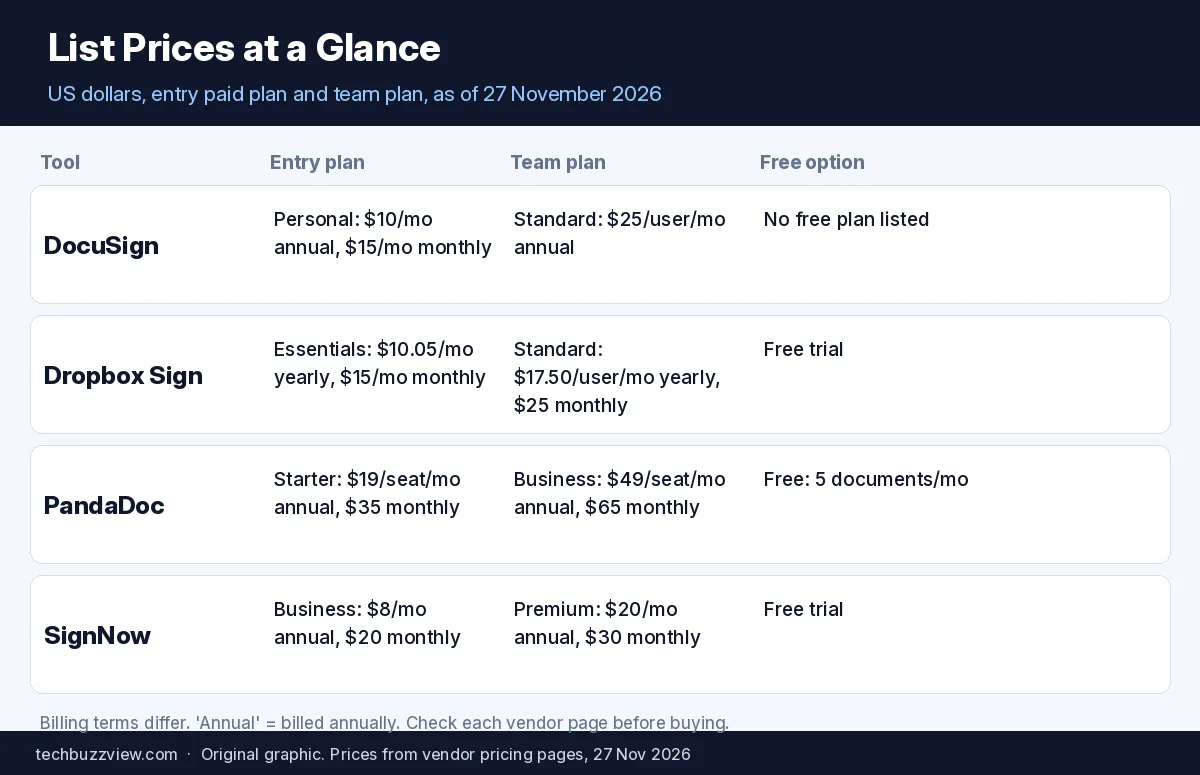
| Tool | Entry paid plan (annual billing) | Team plan (annual billing) | Sending limit stated |
|---|---|---|---|
| DocuSign | Personal $10/mo ($120/yr) | Standard $25/user/mo ($300/user/yr) | Personal: 5 envelopes/mo. Standard and Business Pro: 100 per user per year on annual plans |
| Dropbox Sign | Essentials $10.05/mo ($120.60/yr) | Standard $17.50/user/mo, starting at $420/yr | Unlimited signature requests |
| PandaDoc | Starter $19/seat/mo | Business $49/seat/mo | Unlimited uploads and e-signatures on Starter. Free plan: 5 documents/mo |
| SignNow | Business $8/mo, unlimited users | Premium $20/mo, unlimited users | Annual plans: up to 100 invites per account per year |
Sources: the four vendor pricing pages, read 27 November 2026. Monthly billing costs more on every one of them. Taxes are extra.
DocuSign: The Name Everyone Recognizes
Most clients have signed a document through DocuSign at some point, and that familiarity is its biggest selling point. Nobody has to wonder whether the email is a phishing attempt. Per DocuSign’s pricing page, the self-serve eSignature plans are Personal, Standard and Business Pro. DocuSign’s own plan guide, updated October 2026, lists annual-billing prices of $10 a month for Personal, $25 per user a month for Standard and $40 per user a month for Business Pro. Pay month to month and the list prices are higher: $15, $45 and $65 respectively.
The catch most small teams miss is the envelope limit. Personal includes five envelopes a month. Standard and Business Pro annual plans include up to 100 envelopes per user per year, and monthly plans up to 10 per user per month. An envelope is one send, no matter how many documents or signers it holds, and it counts whether or not anyone signs it. If you go over, DocuSign bills extra envelopes pay-as-you-go. A real estate team sending two or three documents a day would blow through 100 a year in weeks.
What you get on each tier
Standard adds team features: shared templates, real-time commenting, your own branding, delegated signing, and a one-time bonus of five SMS deliveries and five identity verifications. Business Pro adds mobile-friendly web forms, payment collection during signing, interactive form fields, real-time data verification and bulk send. SMS delivery starts at $0.40 per delivery and ID verification at $2.50 per attempt on the pricing page, so those extras add up if you use them heavily.
Who DocuSign suits
It fits teams that sign relatively few high-stakes documents, or that work with clients and lenders who expect DocuSign specifically. It is the least obvious choice for a small business that wants to send dozens of routine agreements a month at a low price.
Dropbox Sign: Unlimited Sends and Simple Pricing
Dropbox Sign (the product once known as HelloSign) is the easiest of the four to price. According to Dropbox Sign’s pricing page, Essentials for one person costs $15 a month on monthly billing or $10.05 a month billed yearly, which works out to $120.60 a year. Standard, for small teams, costs $25 per user per month, or $17.50 per user per month billed yearly, with the page showing a starting price of $420 a year on yearly billing. Premium for larger teams is a custom quote.
The headline feature is the lack of a meter. The page states unlimited signature requests, so you do not have to count sends. It also lists templates, reminders, an audit trail, in-person signing on a mobile device, bulk send, branding, and signing in 22 languages. For security, the page names SOC 2 Type II, ISO 27001, eIDAS and GDPR compliance, with documents encrypted at rest using AES 256-bit encryption and 2FA available.
The page’s tier breakdown for advanced items like SMS authentication and single sign-on is not fully clear from the text, so if you need either one, confirm which plan includes it before you buy. The page also lists an integrations story with Dropbox, Google and Microsoft, which helps if your documents already live there. For a broader look at where those files might sit, see our guide to the best cloud storage for US remote teams.
Who Dropbox Sign suits
A five-person dental practice sending consent forms, a small agency collecting statements of work, or a property manager sending leases. If volume is steady and you do not want to watch a counter, this is the plain choice.
PandaDoc: Better When the Document Is a Proposal
PandaDoc started as a proposal and quote tool and the e-signature is one part of a bigger document workflow. On PandaDoc’s pricing page, there is a Free plan for up to 5 documents a month, Starter at $19 per seat per month billed annually ($35 billed monthly), Business at $49 per seat per month billed annually ($65 billed monthly), and a custom Enterprise tier. A 14 day free trial is mentioned in the FAQ.
Starter lists unlimited document uploads and e-signatures, a drag and drop editor, real-time tracking and 24/7 support. Business adds custom quotes and sales agreements, CRM integrations, custom branding and a content library, deal rooms, approval workflows, web forms and bulk send. Several of those come with an asterisk: the page says some features require usage credits or are paid add-ons.
The usage credit trap
This is the part to read twice. A usage credit is consumed when a document is created through an integration or automated workflow, such as the API, Zapier, Make, forms or bulk send. Starter and Business plans include trial credits for first-time customers, then you buy a recurring credit pack. For automations other than the API, usage can continue past your credits and gets billed as overage, and if your order form has no per-unit price the page says you could be charged up to $5 per document created. API document creation simply pauses when credits run out. If you plan to connect PandaDoc to your CRM or send in bulk, ask for the per-unit price before you commit.
If your sales team lives in a CRM, our CRM software comparison covers which systems pair naturally with document tools like this one.
Who PandaDoc suits
A consulting firm or agency that sends proposals with pricing tables and wants clients to accept and sign in one flow. If all you need is a signature on a one-page agreement, you will be paying for features you do not use.
SignNow: The Cheapest Sticker Price
SignNow is the budget option, and SignNow’s pricing page shows why. Business costs $8 a month billed annually, or $20 on monthly billing. Business Premium is $20 a month annually ($30 monthly), and Enterprise is $30 a month annually ($50 monthly). Each plan is listed with unlimited users, which is unusual: you pay per account, not per seat. There is also a Site License option from $1.50 per signature invite for high-volume users, and the page notes a refund window of 30 days from the invoice for dissatisfied new customers.
The limit that matters is invites. The page says annual plans include up to 100 signature invites per account per year, and monthly plans include up to 10 per account per month. Beyond that, the plan moves to pay-as-you-go. A signature invite counts when it is completed, and sending a document group to several recipients at once counts as one invite. So the cheap price suits low volume. A firm sending 20 documents a week would pass 100 invites in five weeks.
Feature-wise, Business Premium adds bulk send, signing links, payment collection, scheduled sending and team reports. Enterprise adds custom branding, SMS delivery, advanced signer authentication, formula and conditional fields, and approval workflows. For compliance, the page lists SOC 2 Type II, HIPAA through a BAA, PCI DSS, GDPR, CCPA and 21 CFR Part 11.
Who SignNow suits
A freelancer, a solo CPA, or a tiny team signing a few agreements a month where cost matters most. A team that wants an unmetered plan should look elsewhere.
What a Three-Person Team Would Pay
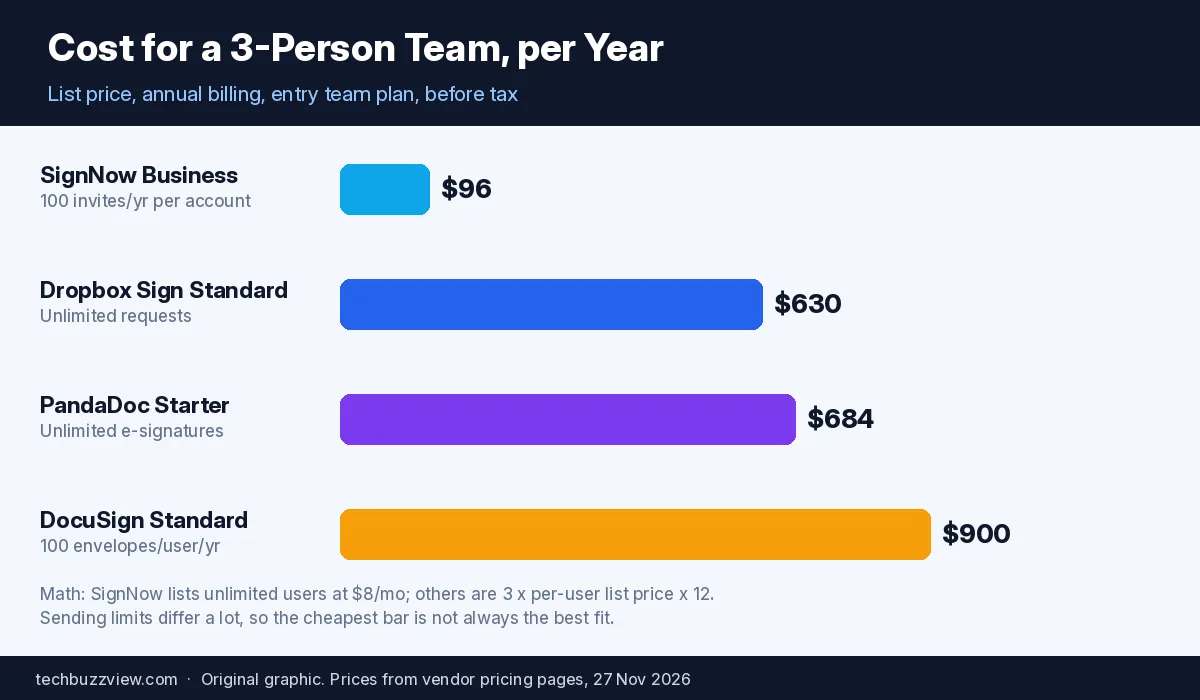
Take a three-person team and the entry team plan on annual billing, at list price. DocuSign Standard comes to 3 x $300, so $900 a year. Dropbox Sign Standard comes to 3 x $17.50 x 12, so $630. PandaDoc Starter comes to 3 x $19 x 12, so $684. SignNow Business, which lists unlimited users at $8 a month, comes to $96 a year.
That chart makes SignNow look like a bargain, and for the right team it is. But look at what each price buys. DocuSign includes about 300 envelopes a year for that team. SignNow includes 100 invites for the whole account. Dropbox Sign and PandaDoc Starter state unlimited signing. Cost per document depends entirely on how many documents you send, which is why the next step is to count your own volume. These are list prices before tax, and discounts or promotions can change them.
Feature Differences That Actually Matter
Bulk send
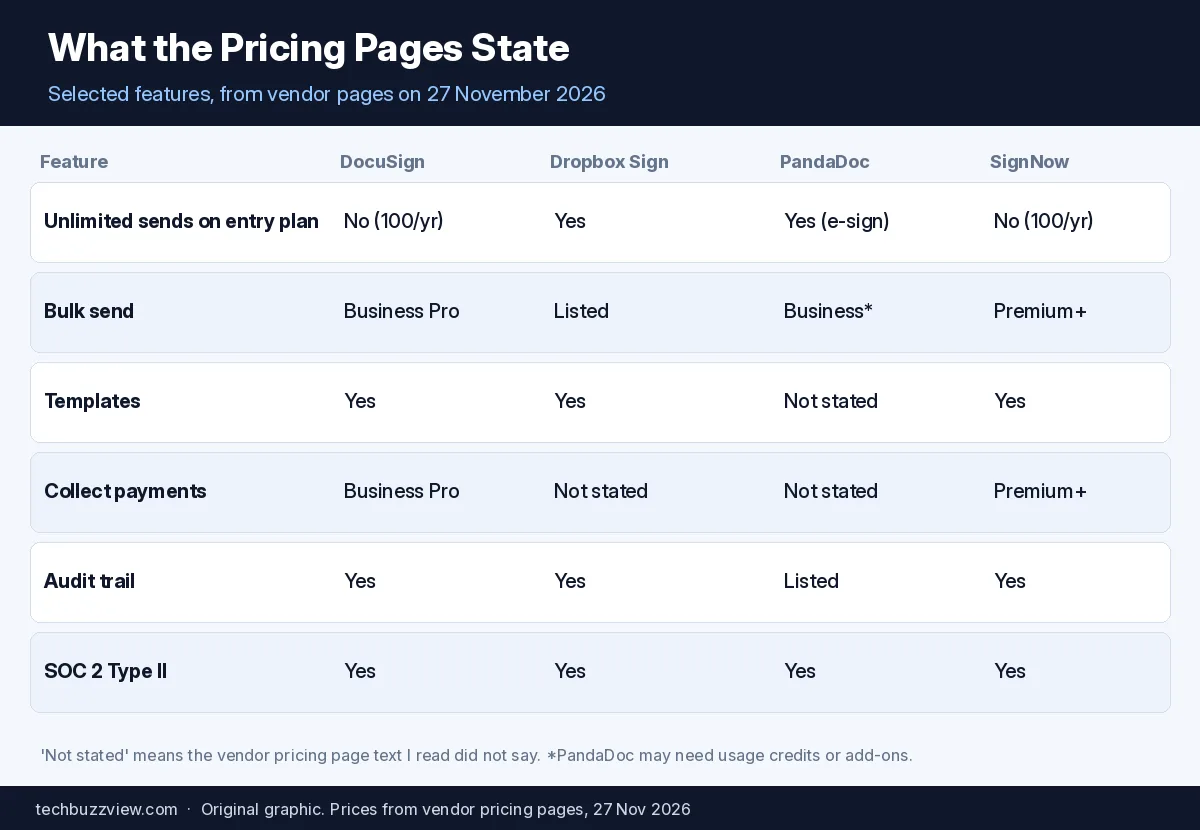
If you send the same form to many people, like a policy update or a rent increase notice, bulk send saves hours. DocuSign puts it in Business Pro, SignNow in Business Premium, PandaDoc in Business (with possible usage credits), and Dropbox Sign lists it among its features without making the tier obvious in the page text.
Payments
DocuSign Business Pro and SignNow Business Premium both mention collecting payments during signing. For a contractor collecting a deposit with a signed estimate, that is one less step. I could not confirm payment collection for Dropbox Sign or PandaDoc from the pricing page text, so check if you need it.
Templates and reuse
All of these tools let you save a document as a template, and that is where the real time savings are. Put your standard client agreement, NDA or work order in a template once and a send takes under a minute. DocuSign shares templates with teams on Standard, SignNow lists unlimited templates, and Dropbox Sign has a template gallery and template links.
Security and compliance
All four vendors list SOC 2 Type II on their pages. If your clients send security questionnaires, ask each vendor for its current report. For healthcare practices, SignNow’s page says HIPAA compliance is available through a Business Associate Agreement. That is a contract matter, so have it reviewed before sending patient information.
Whatever tool you pick, the signing link itself is a target. Fake signature requests are a common phishing trick, so teach your team to check the sender before they click. Our guide on protecting a small business from phishing is a good starting point, and a shared vault from our best password managers for teams roundup helps keep vendor logins safe.
Are E-Signatures Legally Valid in the US?
In general, yes. The federal ESIGN Act and the state-level UETA give electronic signatures the same legal standing as ink for most commercial contracts, and PandaDoc’s page lists compliance with the ESIGN Act. There are exceptions, such as wills and certain court or utility notices, and rules vary by state and industry. This is not legal advice. If a contract is high stakes, ask your attorney how it should be signed.
How to Choose: Four Short Scenarios
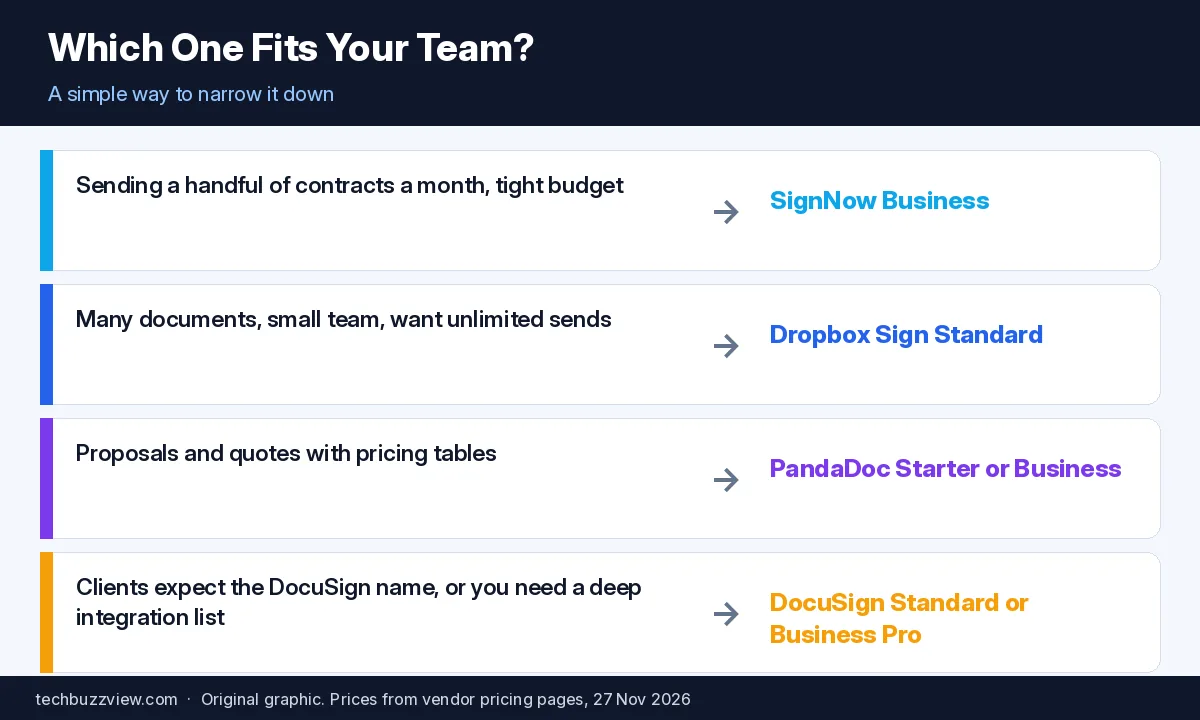
You send fewer than eight documents a month and cost matters most. SignNow Business is the cheapest on paper and 100 invites a year covers you. Keep an eye on the count so overage does not surprise you.
You run a small office that signs something almost every day. Dropbox Sign Standard is the simplest answer because the page states unlimited requests and the pricing is easy to forecast.
You send proposals with line items and want the client to sign on the same page. PandaDoc fits that workflow. Read the usage credit rules before you wire it into automations.
Your clients or lender ask for DocuSign by name. Then DocuSign Standard is worth it, even at the higher price, because the friction of explaining another tool costs more than the subscription. If you only send a handful of documents a year, DocuSign’s Personal plan may do.
Before You Pay: A Short Checklist
- Count how many documents you sent last quarter and multiply by four. Compare that number to each plan’s limit.
- Check whether you pay per user or per account. SignNow lists unlimited users, while DocuSign, Dropbox Sign and PandaDoc price per user or seat.
- Choose annual or monthly billing on purpose. Annual is cheaper on every tool here, but monthly lets you leave.
- Run the free trial or free plan with a real document, not a sample. Send it to yourself on your phone.
- Ask about the refund or cancellation terms. DocuSign mentions a 30-day refund on annual plans bought on its site, and SignNow mentions 30 days from the invoice for new customers.
- Confirm the exact plan for any feature you cannot live without, such as SMS verification, SSO, payments or API access.
Our Verdict
There is no single winner, and that is the honest answer. If I had to name one for a typical five-person US office that signs often, I would start with Dropbox Sign for its unmetered sending and straightforward pricing. If volume is low and the budget is tight, SignNow’s $8 plan is hard to ignore. PandaDoc earns its place when the document is a proposal. DocuSign makes sense when your counterparties expect it, and you accept paying more per envelope.
Start with the free plan or trial of your top two, send a real contract through each, and read the signed copy and audit trail as your client would. A tool is only worth the money if the people on the other end find it easy to sign.
Frequently Asked Questions
Which is cheaper, DocuSign or Dropbox Sign?
On list prices checked on 27 November 2026, Dropbox Sign is cheaper. Its Standard team plan is $17.50 per user per month billed yearly, compared with DocuSign Standard at $25 per user per month billed annually. Dropbox Sign also states unlimited signature requests, while DocuSign Standard includes 100 envelopes per user per year.
Is there a free e-signature option among these four?
PandaDoc lists a Free plan with up to 5 documents a month. Dropbox Sign and SignNow offer free trials, and DocuSign Personal is a paid plan that starts at $10 a month on annual billing.
What is the difference between an envelope and a signature invite?
Both are the way a vendor counts a send. DocuSign calls a package of documents sent for signature an envelope, and it counts as soon as it is sent. SignNow counts completed signature invites. In both cases a limit applies on lower tiers.
Is PandaDoc an e-signature tool or a proposal tool?
It is both. PandaDoc’s Starter plan lists unlimited uploads and e-signatures, while the Business plan adds proposals, quotes, CRM integrations and approval workflows.
Are electronic signatures legally binding in the United States?
For most commercial contracts, yes, under the federal ESIGN Act and state UETA laws. Certain documents like wills have exceptions, and rules vary. Ask an attorney about anything high stakes.
Which tool is best for a very small team on a budget?
SignNow has the lowest list price at $8 a month billed annually, but includes 100 invites per account per year. If you send more than that, compare the cost of pay-as-you-go invites against a flat plan like Dropbox Sign.