
If you run a small US business, such as a six-person design studio in Denver, a landscaping crew with seasonal hires or a dental practice with a front desk and two hygienists, payroll is the one task you cannot get wrong. A late tax deposit or a bad W-2 costs real money, and the software you choose decides how much of that risk lands on you.
This guide compares four popular options, Gusto, OnPay, Patriot Software and Rippling, using each vendor’s own US pricing page as of November 2026. We focus on what you will pay, what is included and who each tool fits. We did not run payroll in these products for this article, so we only state what the vendors publish.
TL;DR: quick verdict
- Best overall for most small teams: Gusto. Month-to-month, three clear tiers and the broadest set of built-in benefits, insurance and HR tools. It is not the cheapest.
- Best value for multi-state or growing teams: OnPay. One flat $49 base plus $6 per worker, with multi-state payroll and local taxes included.
- Best for tight budgets: Patriot Software. Full Service payroll starts at $37 a month plus $5 per worker, and the self-service Basic plan is cheaper still.
- Best for companies that also want HR and IT in one system: Rippling. Pricing is a custom quote, so expect a sales conversation.
Some payroll vendors run partner or referral programs. The links in this article are plain vendor links, and we do not earn a commission from them today.
Gusto vs OnPay vs Patriot vs Rippling at a Glance
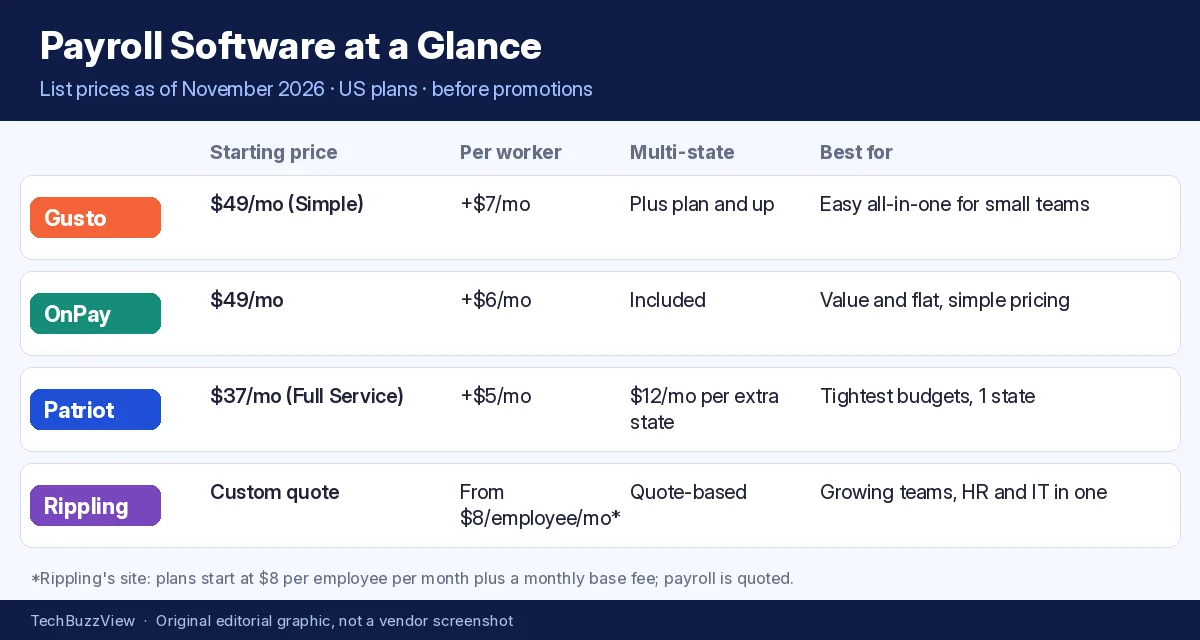
| Tool | Best for | Starting price (USD, Nov 2026) | Per-worker fee | Key differentiator | Notable limit |
|---|---|---|---|---|---|
| Gusto | Small teams that want payroll, benefits and HR in one place | $49/mo Simple; $99 Plus; $179 Premium | $7, $12 or $22 per person per month | Month-to-month, no long-term contract; benefits and insurance built in | Simple covers one state; multi-state starts at Plus |
| OnPay | Value seekers and multi-state teams | From $49/mo | $6 per worker per month | Multi-state payroll, local taxes and year-end filings included | HR and time tracking are paid add-ons |
| Patriot Software | Budget-conscious employers | $17/mo Basic; $37/mo Full Service | $4 (Basic) or $5 (Full Service) per worker | Lowest list prices of the four; 30 days free plus 50% off 3 months promo at time of writing | Basic does not file taxes for you; $12/mo for each extra state on Full Service |
| Rippling | Growing companies that want HR, IT and finance together | Custom quote (site says plans start at $8 per employee per month plus a base fee) | Quote-based | Modular platform with many products and integrations | No public payroll price list |
How We Compared Them
Every number in this article comes from the vendor’s own pricing page, read in late November 2026. We looked at six things:
- Price transparency: can you see the cost before talking to sales?
- Base fee and per-worker fee: the two numbers that make up your monthly bill.
- Tax filing: whether federal, state and local filings are handled for you.
- Multi-state support: a common reason small teams outgrow a tool, especially with remote employees.
- Contractor payments: how 1099 workers are handled.
- Add-on and upgrade costs: fast pay, extra states, support tiers and HR tools.
We do not quote star ratings, because they change often and come from different review sites. We also do not claim any hands-on payroll test. Treat this as a research-based shortlist and take the finalists through their free trials or demos with your own employees and pay schedule.
One more limit: ADP and Paychex are well-known payroll providers, but they did not show public pricing on the pages we could load, so we left them out rather than guess. If you have more than about 50 employees or complex union or multi-entity needs, add them to your own shortlist.
Gusto: Best Overall for Small Teams
Overview
Gusto is the name many US small business owners hear first, and its pricing page explains why. It sells payroll, benefits and HR as one product with three plans, no long-term contract and the ability to upgrade immediately or downgrade at the start of the next billing period. If you are a first-time employer, that flexibility lowers the risk of choosing wrong.
Pricing (as of Nov 2026)
- Simple: $49/mo plus $7 per person. Runs basic payroll in one state, with unlimited payrolls, tax filings and payments, and basic PTO policies.
- Plus: $99/mo plus $12 per person. Adds time tracking and scheduling, multi-state payroll, unlimited next-day pay and contractor invoice management.
- Premium: $179/mo plus $22 per person. Adds a named account advisor, HR guidance, Gusto Business Compliance, same-day and instant pay and project-based costing.
What stands out
Beyond payroll, Gusto’s page lists health benefits, 401(k) plans, workers’ compensation and other business insurance, HSAs and FSAs and an optional fractional HR service. Health insurance has no Gusto administration fee, so you pay only premiums. If you are a small employer who does not want to patch together a broker, a 401(k) provider and a payroll app, that bundle is the main reason to pay Gusto’s higher per-person price.
Watch the add-ons. Instant pay is $100 per payroll, same-day pay is $90 per payroll on plans that do not include it and the Priority Support add-on is $30/mo plus $3 per person on Simple and Plus. Gusto Business Compliance is $85/mo per state on an annual contract and is included in Premium.
Pros
- Month-to-month with no long-term contract
- Three clear tiers with prices published on the site
- Benefits, insurance and HR tools available in the same account
- Contractor and S corp owner payroll supported
Cons
- Highest per-person price of the four at Plus and Premium
- Simple is limited to one state
- Fast-pay options and priority support cost extra on lower tiers
Who should choose it: a US employer with 2 to 40 people who wants a polished all-in-one product and will use the benefits and HR features. Who should skip it: a one-state business with a very tight budget and no interest in benefits.
OnPay: Best Value for Multi-State and Growing Teams
Overview
OnPay keeps pricing simple. Its pricing page lists payroll at a $49 base plus $6 per worker per month, and its site says the essentials are included: federal, state and local tax filings, W-2s and 1099s, unlimited pay runs and pay in as many states as you need. OnPay also states there are no implementation or integration fees.
Pricing (as of Nov 2026)
- Payroll: $49/mo base plus $6 per worker. For example, 10 workers would be $49 + $60 = $109 a month.
- Add-ons: time tracking, HR tools, benefits and compliance resources are available as optional extras. Check the current price of each on OnPay before you buy.
What stands out
For a small remote team, the multi-state inclusion matters. A five-person agency with employees in Texas, Colorado and North Carolina does not need a plan upgrade just to pay everyone. OnPay also says all clients get the same phone, chat and email support, with a US-based team, and it offers free migration of prior-wage and employee data when you switch. The company pairs this with an accuracy guarantee on its payroll product.
Awards listed on OnPay’s homepage (such as PCMag and Business.com 2026 picks) are the vendor’s own claims, so treat them as marketing and not as independent testing.
Pros
- Flat, published price with multi-state and local taxes included
- Support is not locked behind a premium tier
- Free data migration when you switch
- Supports both W-2 employees and 1099 contractors
Cons
- HR and time tracking add to the bill
- Fewer built-in insurance and finance tools than Gusto
- Smaller brand, so fewer accountants may already know the interface
Who should choose it: a team with employees in more than one state, or an owner who wants one predictable price. Who should skip it: anyone who wants an all-in-one finance and spend product.
Patriot Software: Best for Tight Budgets
Overview
Patriot Software is the budget pick. It sells payroll in two versions: Basic Payroll, where you handle tax filings yourself, and Full Service Payroll, where Patriot files and deposits taxes for you. Its pricing page lists both with a promotion of 30 days free plus 50% off for three months at the time of writing. We use regular prices below, because promotions end.
Pricing (as of Nov 2026)
- Basic Payroll: $17/mo plus $4 per worker paid. Includes unlimited payrolls, free direct deposit, an employee portal and the ability to pay contractors in payroll.
- Full Service Payroll: $37/mo plus $5 per worker paid. Adds federal, state and local tax filings and deposits, plus year-end filings at no additional fee.
- Extra states: $12 per month for each additional state on Full Service.
- Add-ons: Time & Attendance and HR software are each $6/mo plus $2 per employee.
Patriot’s own example table puts 10 workers at $57 a month on Basic and $87 on Full Service, and 25 workers at $117 and $162. In the months you do not run payroll, you only pay the base price.
What stands out
Patriot says it handles penalties and interest if its own error causes a tax filing problem, under a reliability guarantee. Check Patriot’s current support hours and channels before you commit. The product also offers accounting software, which could suit a very small business that wants one vendor for books and payroll, though the accounting side is outside this comparison.
Pros
- Lowest list prices of the four
- Full Service files federal, state and local taxes
- Only the base fee applies in months without payroll
- No setup fees according to Patriot
Cons
- Basic leaves tax filing to you
- Extra states cost $12/mo each on Full Service
- Fewer benefits and insurance options than Gusto
Who should choose it: a one-state employer with a few workers and a tight budget. Who should skip it: a team with employees in many states or one that wants benefits built into the same product.
Rippling: Best for Companies That Want More Than Payroll
Overview
Rippling is a different kind of product. Its pricing page describes a platform for HR, IT and finance, where you choose the products you need and receive a custom quote. Most products are priced per employee per month, and some include a monthly base fee. The site says plans start at $8 per employee per month with a base fee, but it publishes no payroll price list.
Pricing (as of Nov 2026)
- Payroll: custom quote based on headcount and the products you choose.
- Startups: Rippling says eligible US VC-backed startups can get free access for six months, depending on funding status and stage.
- Switching: the site says you can switch mid-year and that Rippling can import year-to-date payroll data from your previous provider.
What stands out
The draw is breadth: payroll, benefits, device management, app provisioning and reporting in one system. For a 30-person software company that already needs to onboard laptops and apps for each new hire, that can be a real time saver. For a three-person shop that only needs to pay people twice a month, it is probably more than you need, and the lack of public pricing makes budgeting harder.
Rippling’s site shows customer stories and review-site ratings, which are vendor-selected. Read independent reviews on G2 or Capterra before deciding.
Pros
- Payroll, HR, IT and finance can live in one platform
- Modular, so you add products as you grow
- Switching help and year-to-date data import
- Startup program for eligible companies
Cons
- No published payroll price, so you must request a quote
- Likely overkill for very small teams
- A sales process before you can compare real costs
Who should choose it: a growing company that wants HR, IT and payroll tied together. Who should skip it: a micro-business that wants to see a price and sign up the same day.
What Each Tool Really Costs a Small Team
The base fee matters less than the per-worker fee as you add people. The chart below uses each vendor’s regular list prices and simple arithmetic: base fee plus per-worker fee times the number of workers. It does not include add-ons, promotions, state registration fees or taxes.
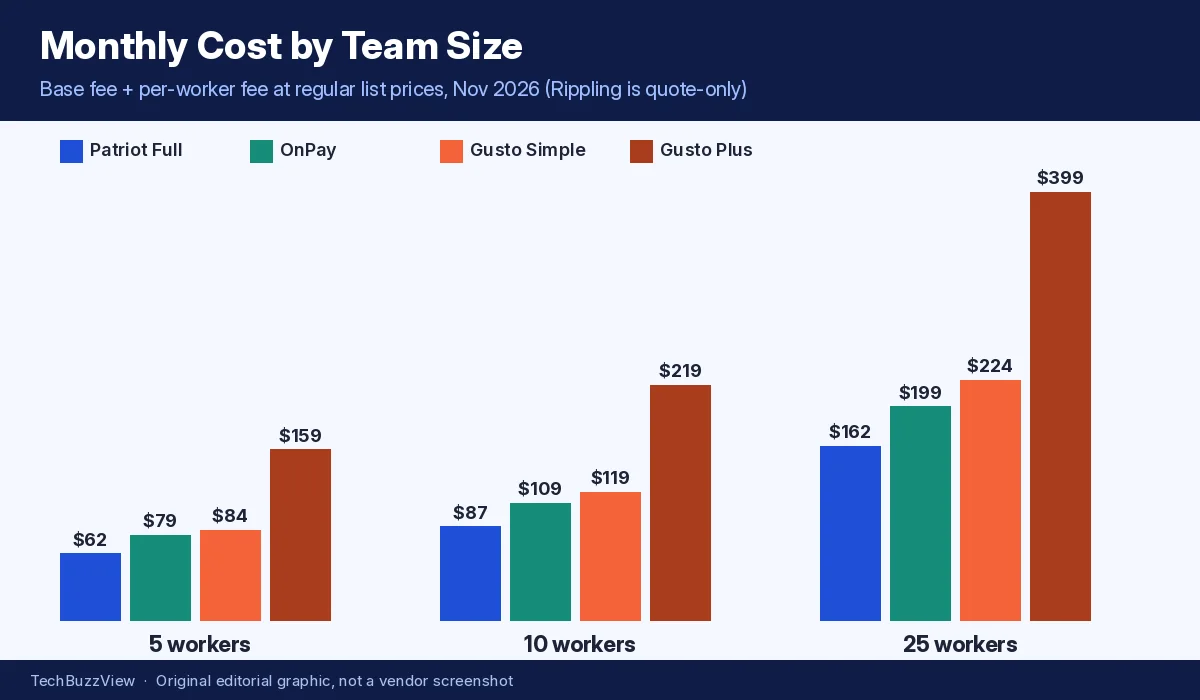
| Team size | Patriot Full Service | OnPay | Gusto Simple | Gusto Plus |
|---|---|---|---|---|
| 5 workers | $62/mo | $79/mo | $84/mo | $159/mo |
| 10 workers | $87/mo | $109/mo | $119/mo | $219/mo |
| 25 workers | $162/mo | $199/mo | $224/mo | $399/mo |
Two cautions. First, Gusto Simple covers one state, so a multi-state team must compare OnPay against Gusto Plus, which is a larger gap. Second, Patriot adds $12 a month for each extra state on Full Service, so a three-state team adds $24 a month to the figures above, which still keeps Patriot cheapest on list price.
Fees That Change the Real Bill
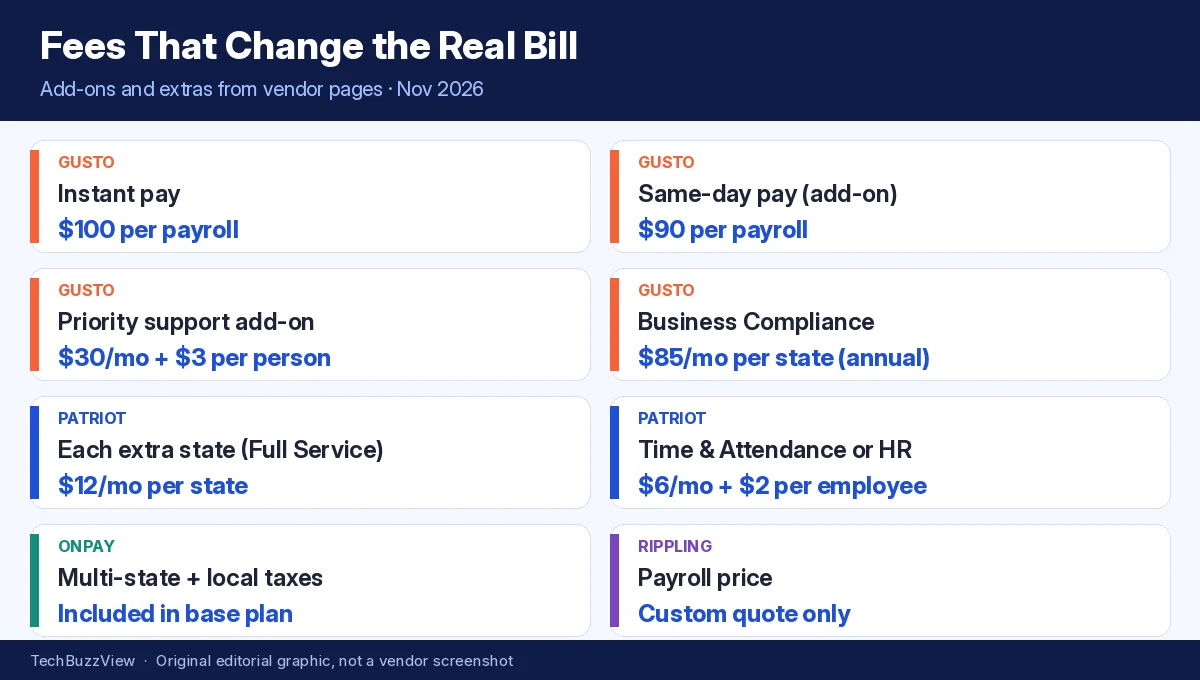
Payroll software pricing rarely ends at the base plan. Here is what to check before you sign up:
- Fast pay: Gusto lists instant pay at $100 per payroll and same-day pay at $90 per payroll. If your team is paid every two weeks, that is a lot of money for speed you may not need.
- Extra states: Patriot charges $12/mo per extra state on Full Service. OnPay says multi-state is included. Gusto includes multi-state from Plus.
- Support tiers: Gusto sells Priority Support as an add-on on Simple and Plus. OnPay says all clients get the same support.
- HR and time tracking: Patriot lists each at $6/mo plus $2 per employee. Gusto includes time tracking in Plus; OnPay and others sell it as an add-on.
- Benefits: health insurance premiums are separate from software fees on every platform, and some benefit services have their own charges.
- Year-end forms: OnPay includes W-2 and 1099 filings in its plan, and Patriot Full Service includes year-end filings. Confirm what any vendor charges for 1099 e-filing.
Choose X If: A Simple Decision Guide
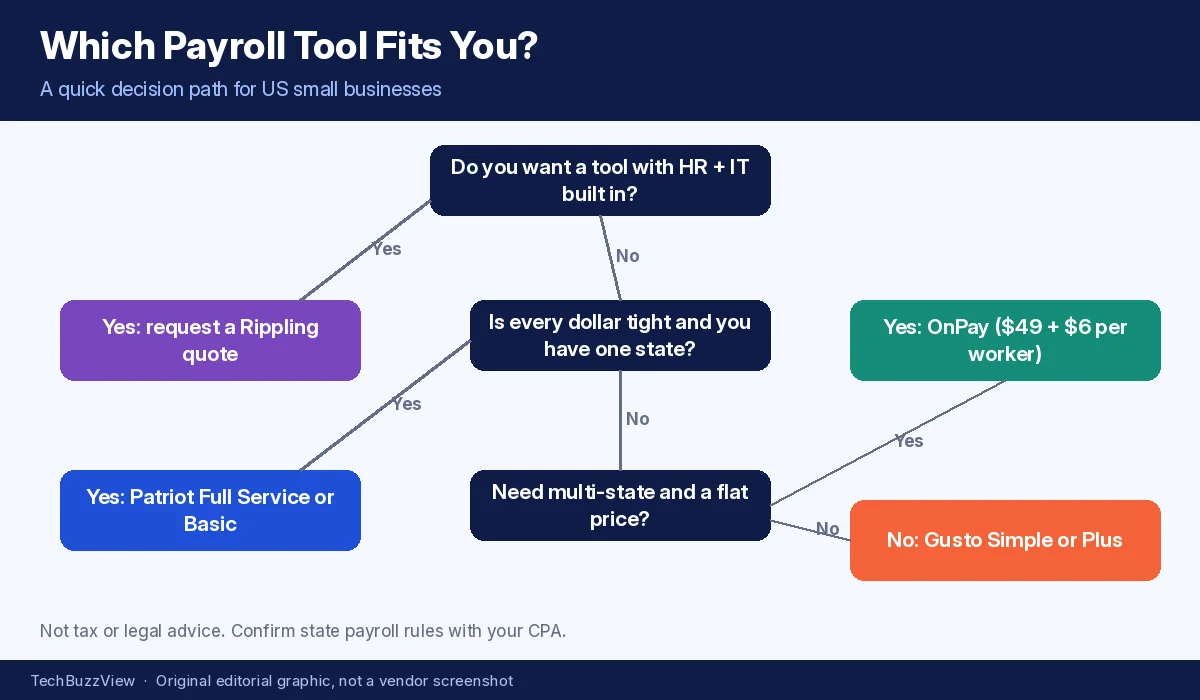
Use these shortcuts, then confirm with a free trial or demo:
- Choose Gusto if you want one provider for payroll, benefits and HR, you are a first-time employer and you value month-to-month flexibility.
- Choose OnPay if you have employees in more than one state, you want a flat price and you do not need the broader insurance and finance tools.
- Choose Patriot if you have one state, a handful of workers and the lowest monthly bill is your top priority. Pick Full Service unless you are comfortable filing taxes yourself.
- Choose Rippling if you are scaling fast, need HR and IT workflows alongside payroll and are happy to get a custom quote.
- Talk to your CPA first if you have employees in several states, pay S corp owners or manage 1099 contractors in a gray area.
Whichever you pick, run one pay cycle in parallel with your old method if you are switching, and check that taxes are filed to the right agencies. Switching at the start of a quarter often keeps your filings cleaner, but your accountant can advise on timing.
Common Payroll Mistakes to Avoid
- Choosing on the base fee alone. A $17 base looks cheap until you add workers, extra states and the time tracking you actually need.
- Misclassifying workers. The IRS and state agencies look closely at 1099 contractor versus W-2 employee status. Software can pay both, but it cannot decide which one a person is.
- Ignoring state registration. Hiring in a new state usually means registering for payroll withholding and unemployment insurance there. Some vendors help for a fee.
- Skipping accountant integration. Check that payroll syncs with your accounting software. Our QuickBooks vs Xero vs FreshBooks comparison covers the books side.
- Forgetting security. Payroll data includes Social Security numbers and bank details. Use a team password manager and two-factor authentication, as covered in our guide to the best password managers for teams.
Frequently Asked Questions
What is the best payroll software for a small business in 2026?
It depends on your team. Gusto is our overall pick for small teams that want payroll with benefits and HR. OnPay is a strong value pick for multi-state teams, Patriot is the budget pick, and Rippling suits growing companies that want HR and IT in one platform.
How much does payroll software cost for a small business?
As of November 2026, published list prices start at $17/mo for Patriot Basic (plus $4 per worker), $37/mo for Patriot Full Service, and $49/mo for both Gusto Simple (plus $7 per person) and OnPay (plus $6 per worker). Rippling does not publish payroll prices and quotes each business. For 10 workers, list prices work out to roughly $87 to $219 a month for the plans we calculated.
Does payroll software file my taxes for me?
Most full-service plans do. Patriot Full Service says it files and deposits federal, state and local payroll taxes, and OnPay lists federal, state and local filings as included. Patriot Basic does not file for you. Always confirm which taxes and forms are covered by the plan you choose.
Can I pay 1099 contractors with these tools?
Yes. Patriot says you can pay contractors in payroll and offers a free contractor portal, OnPay says it supports 1099 workers, and Gusto’s Plus plan lists contractor invoice management. Whether a worker should be a contractor is a legal question, so ask your CPA or an employment lawyer.
Is Gusto better than OnPay?
Gusto offers more built-in benefits, insurance and HR options, while OnPay is often cheaper for multi-state teams because multi-state payroll is included in its base price. Compare both on your actual headcount and states with a trial or demo.
Is Rippling worth it for a small business?
It can be if you want payroll, HR and IT management in one system and expect to grow. For a very small team that only needs payroll, a simpler tool with public pricing is usually easier to budget for.
Can I switch payroll providers mid-year?
Generally yes. Rippling says it can import year-to-date payroll data from your previous provider, and OnPay offers free migration of prior-wage data. Many employers prefer to switch at the start of a quarter, so ask your accountant what is best for you.
Final Verdict
For most small US employers, Gusto is the safest all-round choice if you can justify the price for the benefits and HR tools. If you have a multi-state team or want a simple flat price, start with OnPay. If cash is tight and you operate in one state, Patriot Full Service is hard to beat on list price. If you are building a bigger company and want HR and IT alongside payroll, request a Rippling quote. Pick two finalists, run each through a trial or demo with your real pay schedule and then decide.
Related Reads
- QuickBooks vs Xero vs FreshBooks: best accounting software for small business
- Google Workspace vs Microsoft 365 for small business
- Best AI tools for small business in 2026
- How to set up business email on your own domain
- Best password managers for teams
- More how-to guides on TechBuzzView
Prices and plan details are from each vendor’s US pricing page in late November 2026 and can change at any time. This article is general information, not tax, legal or HR advice. Talk to your CPA for your specific situation.