
Transparency note: this article contains no affiliate links. Every outbound link goes to the vendor’s own site. Details were read from the official pricing pages on 29 November 2026 and can change.
If you are a US small business owner picking a website platform, the shortlist usually comes down to the same three names: Squarespace, Wix and Shopify. They all promise a site you can launch without a developer. They are not built for the same job, and the wrong pick tends to show itself six months later, when the shop needs a feature the plan does not have or the monthly bill looks nothing like the price on the first page.
I read Squarespace’s pricing page, Wix’s plans page and Shopify’s pricing page on 29 November 2026 and stuck to what they say. I did not build a site on each platform, so there are no invented speed tests, conversion numbers or customer quotes here. What follows is a plain comparison of pricing, store fees, plan limits and fit, with the gaps in the public pages marked as gaps.
TL;DR
- Best overall for a service business or portfolio: Squarespace. Every plan includes hosting, a free trial and no card required to start, and the Core plan adds unlimited contributors and a free year of Google Workspace email.
- Best for flexibility on a budget: Wix. It has a free plan, four paid tiers and a 14-day money-back guarantee, so you can test before you commit.
- Best for serious online selling: Shopify. It is built around the store, with unlimited products, abandoned checkout recovery and card rates that drop as you move up plans.
- The catch: the entry price is not the whole price. Store fees, plan limits and apps decide what you really pay.
How We Compared Them
I looked at five things that decide whether a business is still happy with its platform a year in. First, the real cost, including what you pay per sale. Second, the plan limits, such as staff accounts, storage and store tools. Third, how well each platform handles selling products or taking bookings. Fourth, how easy it is to test before paying. Fifth, who each platform is clearly built for.
A word on method. The three vendors do not use the same plan names or the same limits, so I only compare like with like where I can. Whenever a page did not say something, I wrote that it did not say it. A missing line is not proof that a feature is missing. It means you should ask before you pay. I also did not rate things like template quality or editor ease, because those are matters of taste that you should judge in a free trial.
Squarespace vs Wix vs Shopify at a Glance
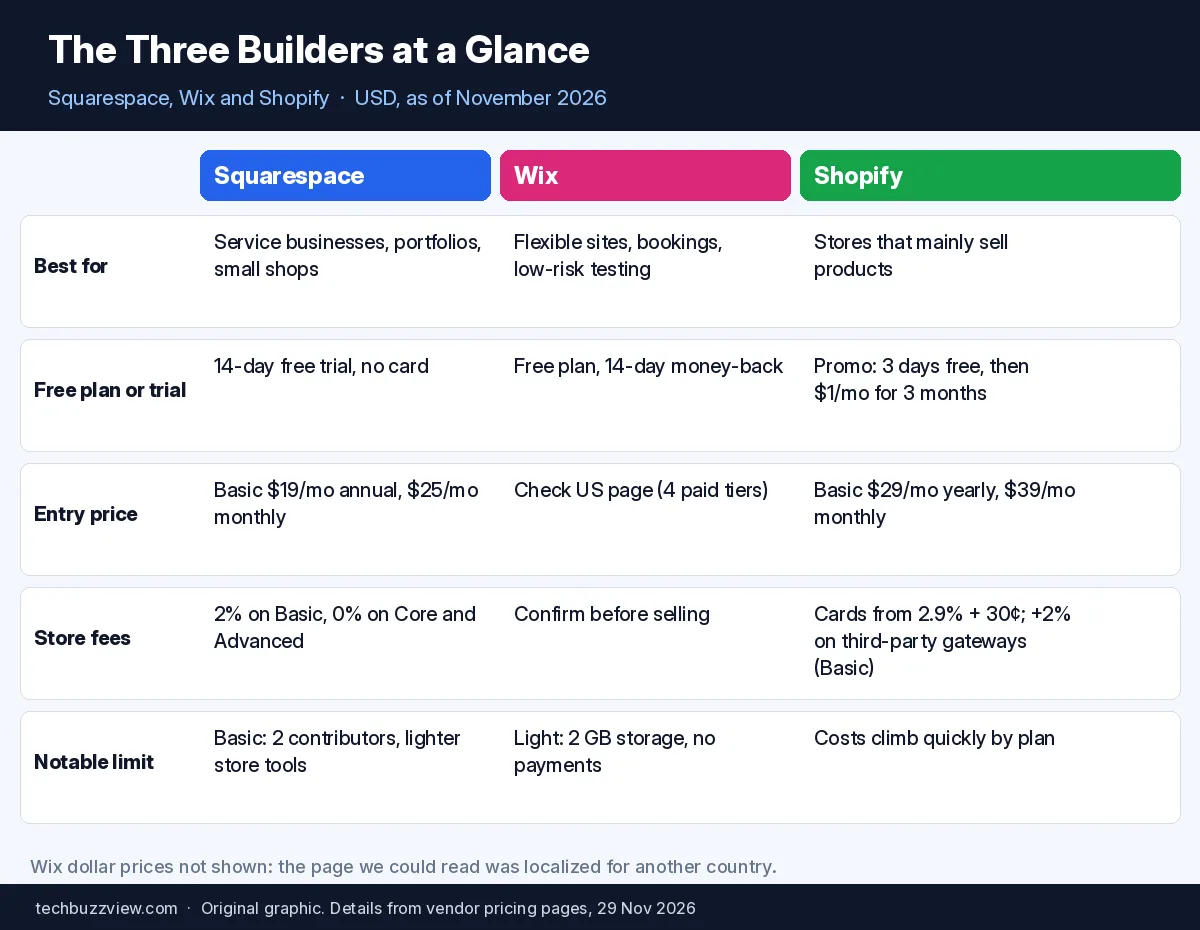
| Platform | Best for | Free plan or trial | Entry price (USD, as of Nov 2026) | Store fees | Notable limit |
|---|---|---|---|---|---|
| Squarespace | Service businesses, portfolios, small shops | 14-day free trial, no card required | Basic $19/mo billed annually, $25/mo billed monthly | 2% store fee on Basic, 0% on Core and Advanced | Basic has 2 contributors and lighter store tools |
| Wix | Flexible sites, bookings, testing on a budget | Free plan, plus 14-day money-back guarantee on paid plans | Four paid tiers, Light to Business Elite (see the Wix page for US pricing) | Not stated on the plans page I read | Light plan has only 2 GB storage and no payment tools |
| Shopify | Stores that are mainly about selling | Promotional trial shown on the page: 3 days free, then $1 a month for 3 months | Basic $29/mo billed yearly, $39/mo billed monthly | Card rates from 2.9% + 30¢ on Basic, plus 2% if you use a third-party gateway | Gets expensive as you scale up plans |
A note on Wix. The copy of the Wix plans page I could read was localized for another country and priced with local tax, so I am not quoting dollar prices for Wix. Open the US version of the page before you decide, and compare the same billing term across all three platforms. Squarespace and Shopify both show a lower monthly figure for annual billing than for month to month billing, and Wix says its displayed prices are for yearly subscriptions paid up front.
Squarespace Review: Best for Design-Led Service Businesses
What it is
Squarespace is an all-in-one site builder with hosting included. Its pricing page lists built-in AI tools, secure hosting, unlimited bandwidth, selling functionality and what it calls industry-leading design on every plan. That last phrase is the company’s own claim, so judge it yourself by trying the templates during the free trial. Think of it as the platform for a dental practice, a photographer, a consultant or a small boutique that cares how the site looks.
Pricing and plans
Squarespace has three plans: Basic, Core and Advanced. Basic is $19 a month billed annually or $25 a month billed monthly, based on the page I read. Every site starts with a 14-day free trial and no card is required to start. Annual plans include one year of free domain registration on available domains, and the domain renews at the standard rate after the first year. Core and Advanced cost more, and I am leaving their dollar figures out because the version of the page I could read was priced for another country.
Features that matter
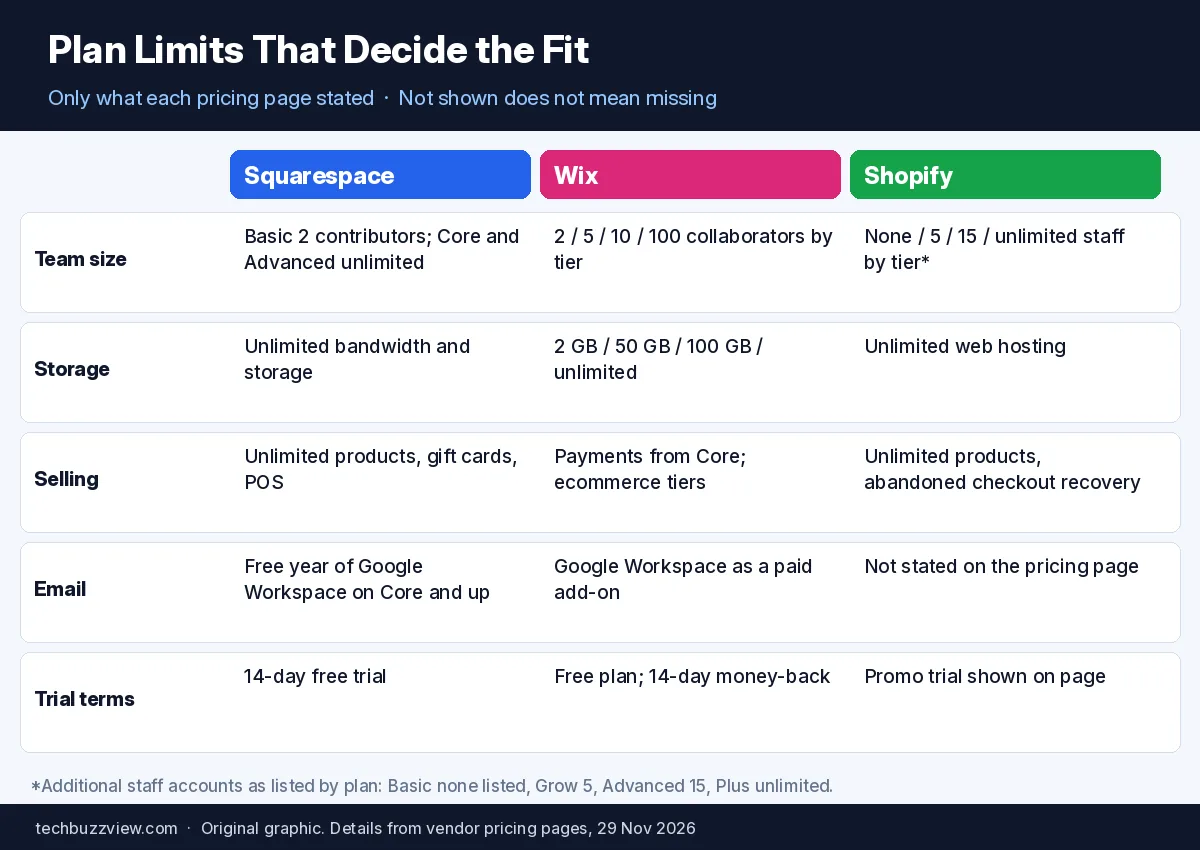
- Contributors: Basic allows 2 contributors, while Core and Advanced allow unlimited.
- Store fees: the online store transaction fee is 2% on Basic and 0% on Core and Advanced. For digital content and memberships it is 7% on Basic, 5% on Core and 0% on Advanced.
- Email: Core and Advanced include one year of professional email from Google Workspace for a new account set up through Squarespace. Basic does not.
- Selling tools: all plans list unlimited products, gift cards, abandoned cart recovery and in-person selling. Core adds discounts, shipping labels for US orders, carrier-calculated shipping and Google Shopping display.
- Code and integrations: code injection, advanced code blocks and Zapier and Mailchimp integrations are on Core and Advanced, not Basic.
- AI credits: 10 one-time credits on Basic, 20 a month on Core, 120 a month on Advanced.
Pros and cons
Pros
- Everything is in one place: hosting, domain offer, store and scheduling tools.
- Free trial with no card required
- Core and Advanced drop the store transaction fee to 0%
Cons
- Basic has a 2% store fee and fewer tools, so a growing shop outgrows it quickly
- No free plan
- Automated sales tax calculation is not on Basic
Who should choose it, and who should skip it
Choose Squarespace if you run a service business, a studio or a small shop and want one bill, one dashboard and a site that looks good without much tinkering. Skip it if your main goal is a large catalog, complex shipping rules or heavy app customization.
Wix Review: Best for Flexibility and Low-Risk Testing
What it is
Wix is a drag-and-drop site builder that can create a site from a single prompt using its AI tool. Its plans page lists more than 2,000 templates, built-in hosting with a stated 99.99% uptime, and marketing and SEO tools. As with the other vendors, those are the company’s own descriptions.
Pricing and plans
Wix is the only one of the three with a true free plan. No credit card is required, and you can build a site before you pay. The paid plans are Light, Core, Business and Business Elite. Wix says you can cancel within 14 days of the first paid upgrade for a full refund. Most yearly or multi-year plans include a one-year free domain voucher, valid for 60 days after purchase and only for a new domain bought from Wix.
Features that matter
- Storage: 2 GB on Light, 50 GB on Core, 100 GB on Business and unlimited on Business Elite.
- Collaborators: 2 on Light, 5 on Core, 10 on Business and 100 on Business Elite.
- Payments and store: the Light plan does not list payment tools. Core adds accepting payments, basic ecommerce and scheduling. Business moves to standard ecommerce and Business Elite to advanced ecommerce and an advanced developer platform.
- Email: Wix points to Google Workspace for a custom email address on your domain. That is a separate paid purchase on top of your plan.
Pros and cons
Pros
- A real free plan and a 14-day money-back window on paid plans
- Four paid tiers give you more steps to grow into
- Bookings, scheduling and other business tools sit in the same product
Cons
- The Light plan is limited, with 2 GB storage and no payment tools
- The plans page does not spell out store transaction fees, so confirm them before you sell
- Pricing varies by location, so check the US page
Who should choose it, and who should skip it
Choose Wix if you want to start free, test the editor and add services such as bookings as you go. Skip it if you already know your business is mostly a large online store, where Shopify is built around that job.
Shopify Review: Best for Businesses That Mainly Sell Products
What it is
Shopify is a commerce platform first and a website builder second. The pricing page highlights a checkout it says converts 15% better on average than other platforms, AI-assisted store design and selling in person with a phone or card reader. Treat that conversion claim as the company’s marketing, not a test result I have verified.
Pricing and plans
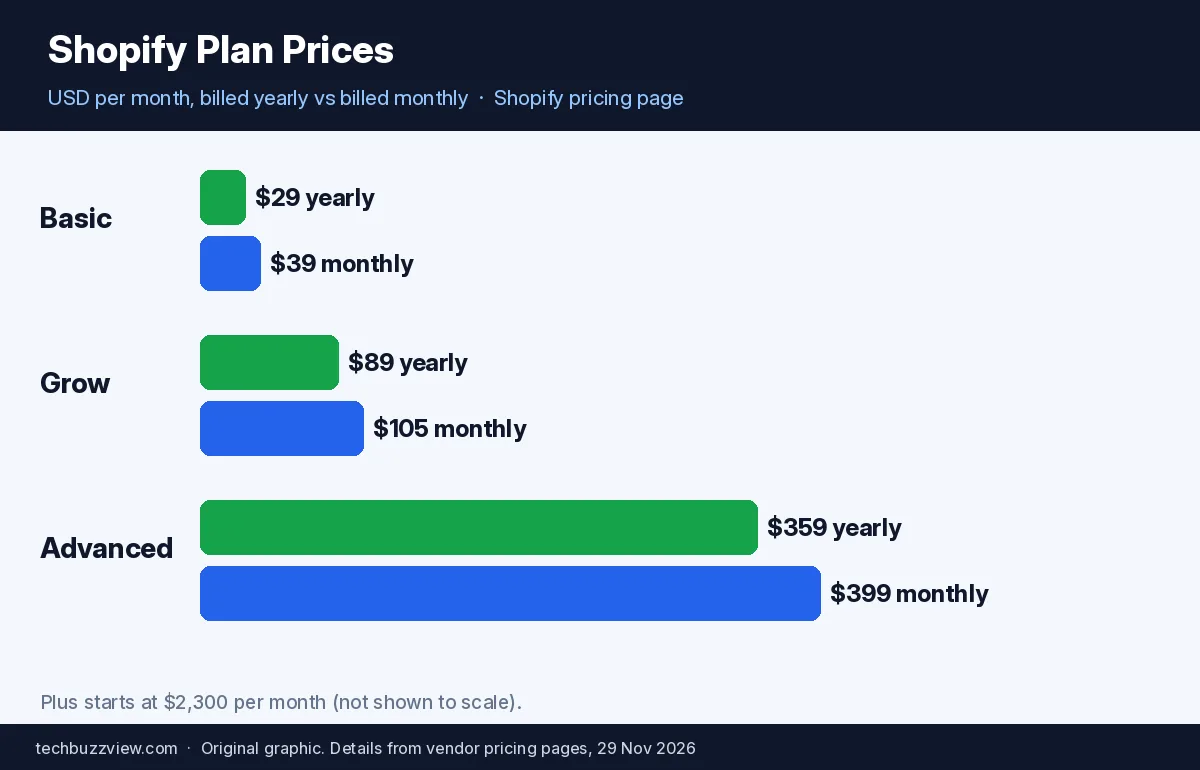
Shopify’s plans step up quickly. Based on the page I read:
- Basic: $29 a month billed yearly, or $39 a month billed monthly.
- Grow: $89 a month billed yearly, or $105 monthly.
- Advanced: $359 a month billed yearly, or $399 monthly.
- Plus: starts at $2,300 a month, aimed at larger businesses.
The page was also showing a promotional offer of 3 days free, then $1 a month for 3 months. Promotions change, so check what is live when you sign up.
Where the fees come from
This is where Shopify comparisons usually go wrong. The monthly plan price is only one part. Shopify Payments card rates drop as you move up: online standard card rates are 2.9% + 30¢ on Basic, 2.7% + 30¢ on Grow, 2.5% + 30¢ on Advanced and 2.25% + 30¢ on Plus. If you use a third-party payment gateway instead of Shopify Payments, there is an additional transaction fee of 2% on Basic, 1% on Grow, 0.6% on Advanced and 0.2% on Plus. In-person card rates start at 2.6% + 10¢ on Basic.
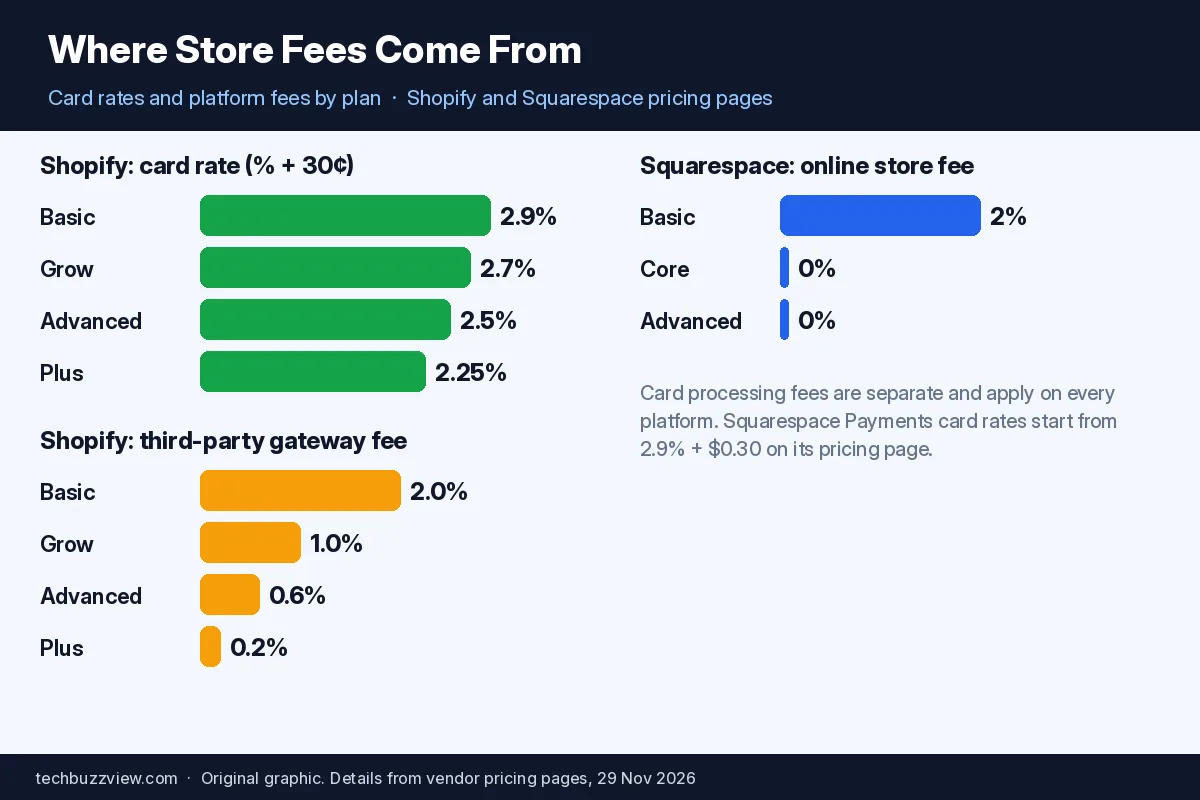
Squarespace is different. It charges a platform transaction fee on Basic only (2% for online store sales), and its card processing rates through Squarespace Payments start from 2.9% + $0.30 on its pricing page. Because payment processors charge their own fees on every platform, the fair way to compare is to estimate your monthly sales, apply the card rate and the platform fee, and add the plan price.
Features that matter
- Products and inventory: unlimited products, up to 10 inventory locations on Basic, Grow and Advanced.
- Staff accounts: no additional accounts listed on Basic, 5 on Grow, 15 on Advanced and unlimited on Plus.
- Marketing: email campaigns, discount codes, gift cards and abandoned checkout recovery are listed on all plans.
- Tax: automated sales tax calculations are listed, with a 0.35% tax calculation fee on Basic, Grow and Advanced after an introductory discount.
- Apps: the page says you can integrate with thousands of apps, which usually means extra monthly costs for the ones you add.
- In-person selling: POS Pro is an add-on at $89 a month per location.
Pros and cons
Pros
- Built around selling, with unlimited products and abandoned checkout recovery
- Card rates fall as you move up plans
- Strong in-person selling options
Cons
- Costs climb steeply from Basic to Grow to Advanced
- A 2% extra fee on Basic if you use a third-party gateway
- Basic lists no additional staff accounts
Who should choose it, and who should skip it
Choose Shopify if selling products is the main goal and you expect order volume to grow. Skip it if you mostly need a brochure site with a handful of services, because you would be paying for commerce tools you will not use.
Head to Head: The Questions That Decide It
Which is cheapest to start?
Wix, because it has a free plan. After that, Squarespace Basic at $19 a month billed annually is the lowest dollar figure I could confirm. Shopify Basic is $29 a month billed yearly. Remember that cheapest to start is not cheapest to run once you sell.
Which is best for selling online?
Shopify, if selling is the core of the business. Its pricing page lists store features, a large app ecosystem and falling card rates on every plan step. Squarespace is a good fit for a small catalog and Wix for a store that sits alongside bookings or content.
Which is best for a service business?
Squarespace and Wix both fit. Squarespace lists scheduling and invoicing among its tools, and Wix lists scheduling and services on its Core plan and above. Choose based on which editor feels better in the trial.
Which is best for SEO?
All three list built-in SEO tools, and all give you mobile-optimized sites. Nothing on the pricing pages proves one ranks better than another. Content, page speed and links matter more than the platform. If SEO is a major goal, our guide to WordPress SEO plugins and AI SEO tools for US businesses may help you plan.
What about professional email?
You will want an email address that matches your domain. Squarespace Core and Advanced include one year of Google Workspace for a new account set up through it. Wix and Shopify point you to separate products. Our guides on setting up business email on your domain and setting up Google Workspace cover the steps.
What about leaving later?
Every platform makes it easier to stay than to go. If you think you will outgrow a hosted builder, it is worth reading about self-hosted options too. Our guide to web hosting for small business and the comparison of Kinsta vs WP Engine cover the WordPress route, which gives you more control but also more responsibility.
A Simple Way to Choose
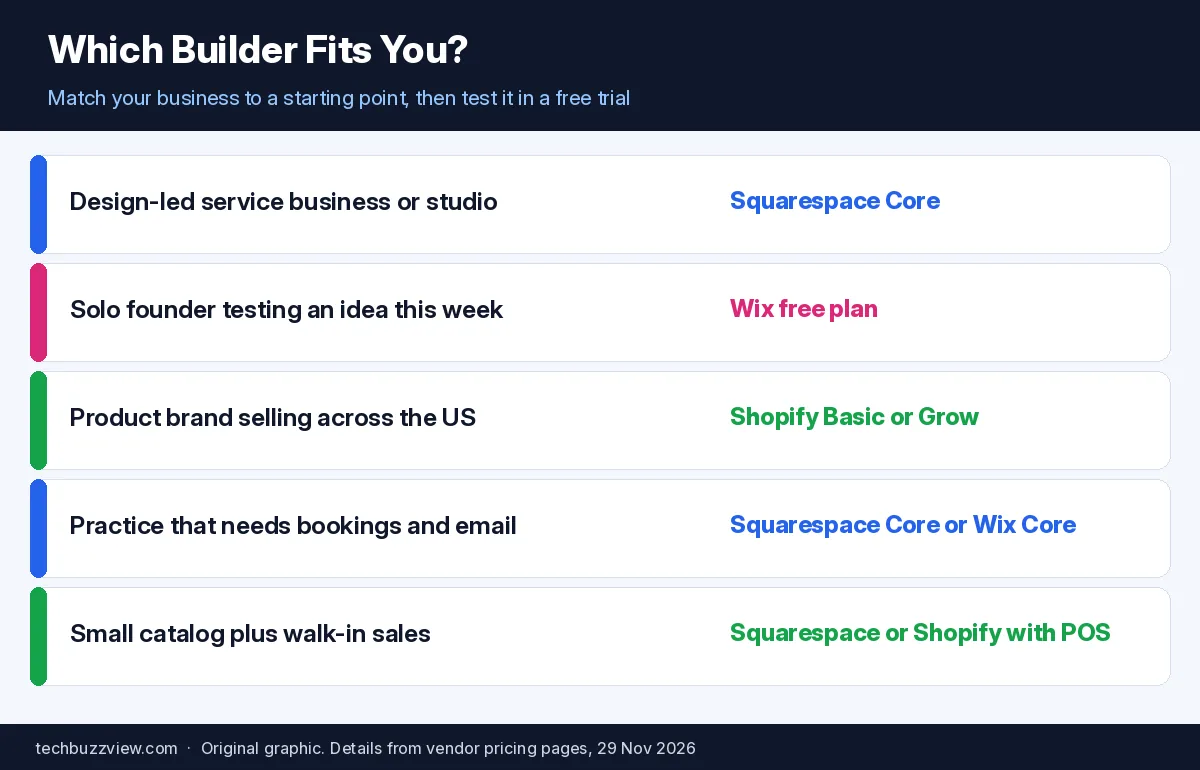
Start with one question: is your site mainly for showing a business or for selling products? If it is for showing a business, trial Squarespace and Wix side by side and pick the editor you prefer. If it is for selling, start with Shopify and work out the fees on your expected monthly sales before you commit.
- A 10-person agency in Austin that needs a polished site and a contact form: Squarespace Core or Wix Core.
- A solo coach who wants to test an idea this week: Wix free plan.
- A product brand shipping across the US: Shopify Basic or Grow.
- A dental practice that needs bookings and a professional email: Squarespace Core or Wix Core, plus Google Workspace.
- A boutique with a small catalog and walk-in sales: Squarespace or Shopify with in-person selling.
Before you pay, spend an hour in each free trial. Build your homepage, add three products or services, connect a domain and test checkout. That one hour will teach you more than any comparison, including this one.
Our Verdict
For most US service businesses, Squarespace is the cleanest choice because it is all-in-one and the Core plan removes the store fee and adds email. For flexibility and a low-risk start, Wix is hard to beat, especially with its free plan and 14-day money-back window. For a business that lives or dies on online sales, Shopify is the one built for the job, as long as you plan for its fees. None of them is wrong. The wrong choice is picking on price alone.
Frequently Asked Questions
Which is better for a small business, Squarespace, Wix or Shopify?
It depends on what the site does. Squarespace suits design-led service businesses, Wix suits flexible sites and low-risk testing, and Shopify suits businesses whose main goal is selling products online.
Is Shopify more expensive than Squarespace or Wix?
Shopify’s entry plan is $29 a month billed yearly, and its higher plans cost much more. Squarespace Basic is $19 a month billed annually. Wix has a free plan, but US prices for its paid plans should be checked on its US page. Store fees on every platform change the real cost.
Does Wix have a free plan?
Yes. Wix lets you create a site for free with no credit card, and its paid plans include a 14-day money-back guarantee on the first upgrade.
Does Squarespace charge transaction fees?
Yes on Basic: 2% on online store sales. Core and Advanced list 0% store transaction fees. Squarespace Payments card processing fees apply separately.
Can I use my own domain with these platforms?
Yes. Squarespace says you can attach unlimited domains to any plan, and Wix and Shopify both list custom domain support. Annual plans on Squarespace and most yearly Wix plans include a free domain for the first year.
Which platform is best for SEO?
The pricing pages list built-in SEO tools on all three and none proves one ranks better than another. Content quality, site speed and backlinks matter more than the platform choice.