The YouTube Burnout Problem Is Real
Ask any YouTuber what they fear most, and it is not algorithm changes or demonetisation. It is burnout. The pressure to post consistently — 3-4 videos per week if you want to grow — is exhausting when you are scripting, filming, editing, captioning, making thumbnails, and managing comments all by yourself.
But something interesting is happening in 2026. A growing number of creators — from tech reviewers to cooking channels — are using AI to handle the repetitive parts of content creation. And they are not just surviving the algorithm. They are thriving.
Here is exactly how they are doing it — and which AI tools are making it possible.
1. Writing Scripts with AI in Under 10 Minutes
The most time-consuming part of making a YouTube video is not filming — it is writing the script. Most creators spend 2-3 hours per script. AI has cut that down to under 15 minutes for many creators.
Tools being used:
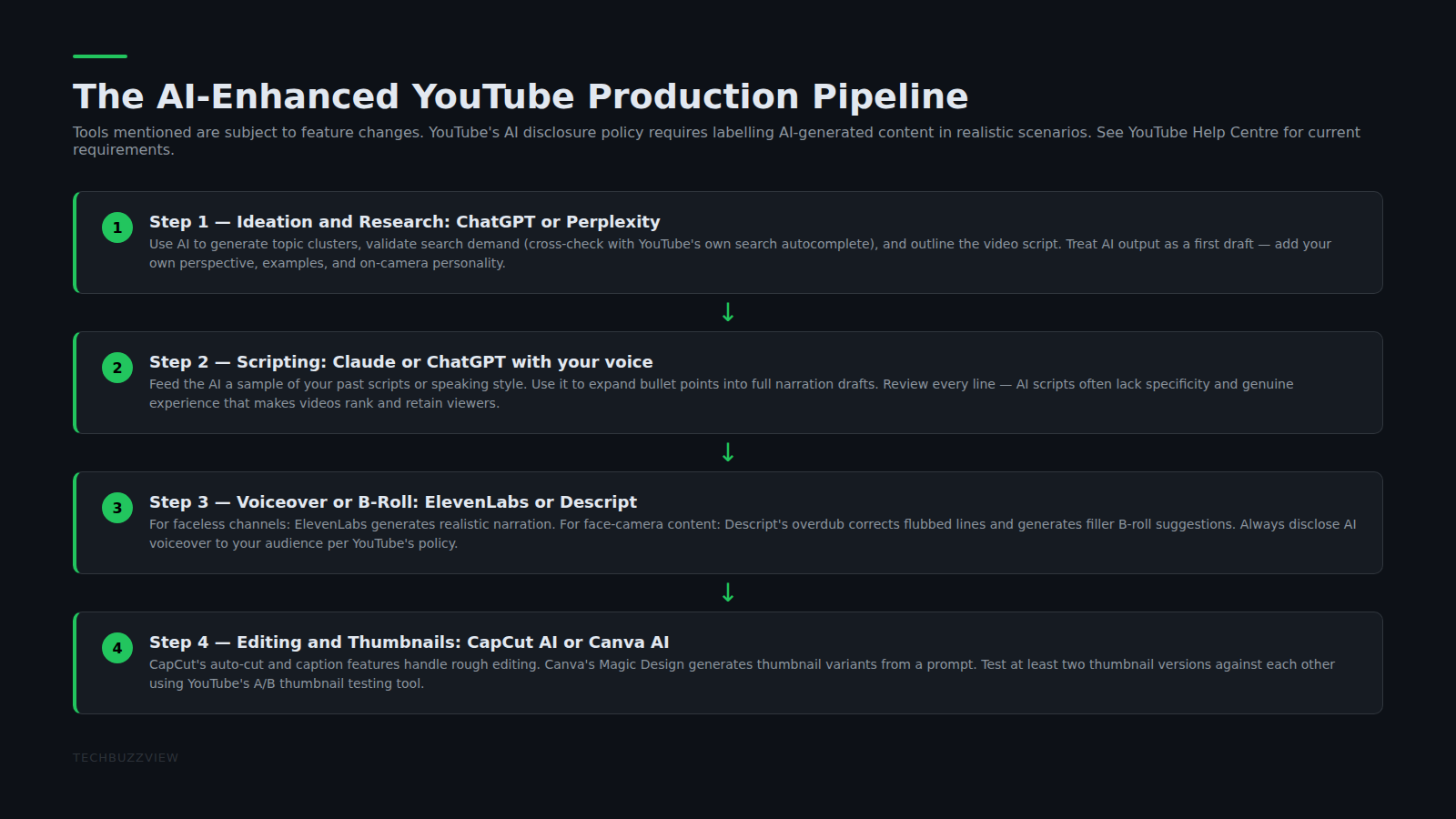
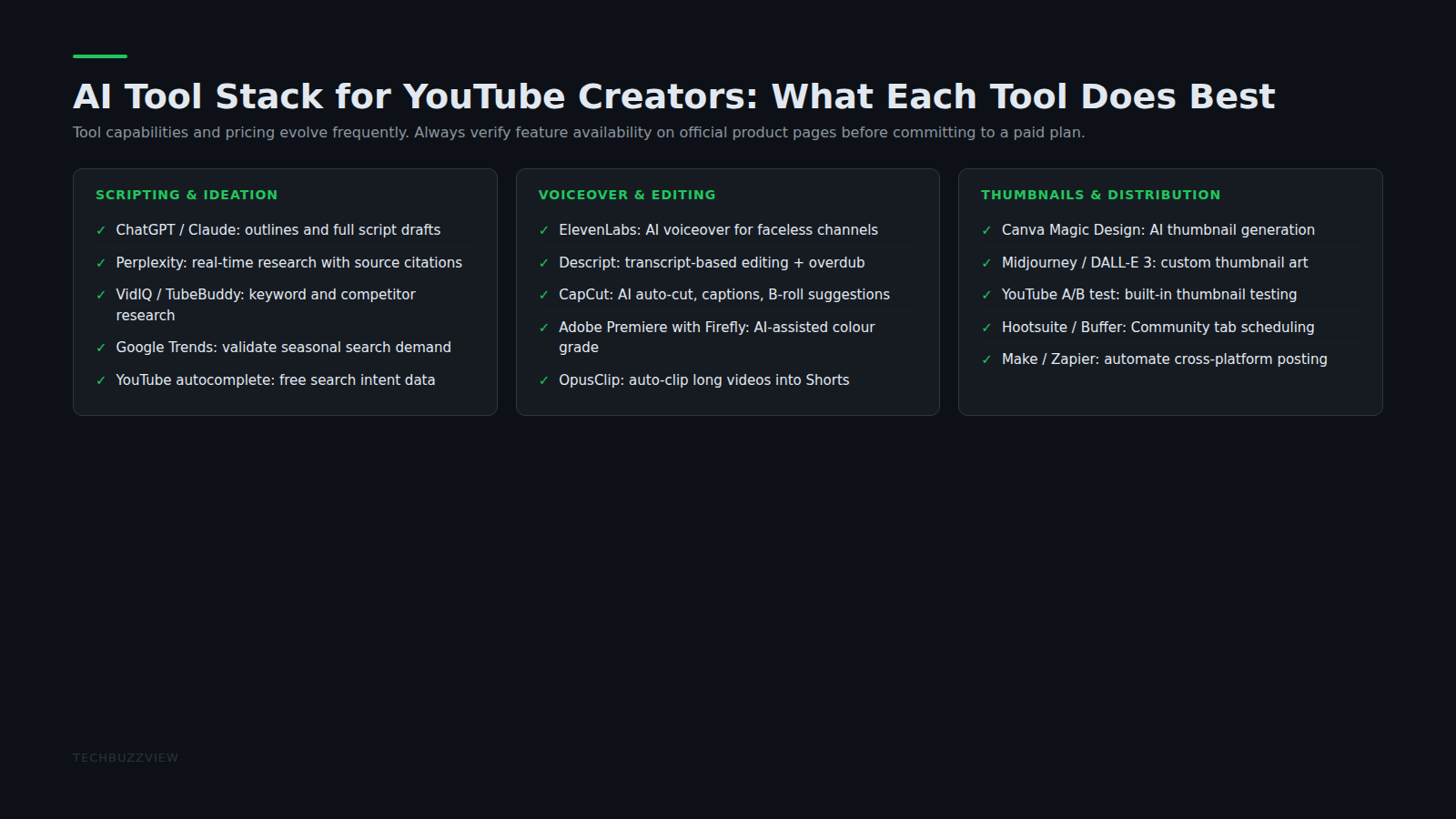
- ChatGPT Plus — creators feed it a topic, outline, and their own tone style, and get a ready script. Many paste in 2-3 previous scripts so the AI learns their voice.
- Jasper AI — better for creators who want more structured long-form scripts with intro hooks, mid-roll retention tactics, and strong CTAs baked in.
- Claude AI — growing in popularity among fact-heavy creators (finance, tech, science) because it reasons more carefully and produces fewer factual errors.
Pro tip: Write your raw notes or rough outline first in plain text, then ask the AI to expand and polish it. This produces more authentic scripts than prompting from a blank page.
2. Auto-Generating Thumbnails and Titles
Click-through rate (CTR) is everything on YouTube. A bad thumbnail means a good video dies. Traditionally, creators spend 30-60 minutes designing thumbnails in Photoshop or Canva manually.
In 2026, creators are using Canva Pro’s AI features — specifically Magic Design and the AI background remover — to create thumbnails in under 5 minutes. Some are also using Midjourney and Adobe Firefly to generate custom backgrounds and scene art.
For titles and descriptions, tools like VidIQ and TubeBuddy now have AI title generators trained specifically on YouTube data — they suggest high-CTR title formats based on what is actually ranking in your niche.
3. Editing Videos Faster with AI Tools
Video editing used to be the biggest bottleneck for solo creators. A 15-minute video could take 4-6 hours to edit. AI has changed this dramatically.
What creators are using in 2026:
- CapCut AI — popular because it is free, works on mobile, and can auto-cut silences, add captions, and suggest B-roll. Best for creators making short-form content.
- Descript — used by creators with talking-head videos. You edit the video by editing the transcript — delete words to cut clips. Also has an overdub feature to fix audio mistakes without re-recording.
- Runway ML — used by more advanced creators for background removal, object tracking, and AI-generated B-roll. Great for tech and science channels.
Creators report that what used to take a full day of editing now takes 1.5-2 hours with AI assistance.
4. Repurposing One Video into 5 Pieces of Content
This is the biggest mindset shift among creators who have figured out AI. Instead of creating separate content for YouTube, Instagram, LinkedIn, and X — they create one YouTube video and repurpose it into everything else using AI.
The workflow looks like this:
- Record the YouTube video (main piece of content)
- Use Opus Clip or CapCut AI to auto-generate 3-5 short clips for Reels and Shorts
- Use ChatGPT to turn the transcript into a blog post and LinkedIn carousel
- Use Canva Pro to turn key stats into quote cards for Instagram and X
- Schedule everything via Buffer or Publer
One video. Five platforms. Done in under 2 hours total. This is how creators with sub-100K subscriber channels maintain a daily posting cadence without hiring a full team.
5. AI for Community Management and Comments
Responding to comments is important for YouTube watch time and subscriber loyalty — but it is also time-consuming. In 2026, some creators are using ChatGPT with a custom system prompt to draft comment replies that sound like themselves, then posting manually after a quick review. Others use community management tools with built-in AI like Brandwatch or native YouTube Studio’s suggested replies for common question patterns.
The goal is not to automate engagement — it is to reduce the cognitive load of responding to 200 comments after a video goes live.
6. AI-Powered Research and Trend-Spotting
Figuring out what to make next is one of the hardest parts of running a channel. AI tools are changing the research layer too:
- Perplexity AI — gives sourced, researched summaries on any topic in seconds, useful for fact-heavy video prep
- VidIQ’s Trend Alerts — monitors rising search queries in your niche and sends alerts before topics peak
- Claude or ChatGPT for angle brainstorming — describe your channel and topic, ask for 10 video angles, and evaluate which ones match your audience best
What AI Cannot Replace (And Should Not)
There are parts of YouTube success that AI tools genuinely cannot automate:
- The creator’s specific point of view and lived experience
- Authentic reactions, interviews, and on-camera presence
- Community trust built through consistent, genuine engagement over time
- Identifying which topics are actually interesting to your specific audience
The creators who are thriving with AI in 2026 are not using it to replace themselves — they are using it to protect their time and creative energy for the parts only they can do.
How to Start Without Overwhelming Yourself
Pick one bottleneck — the part of your content workflow that takes the most time or drains the most energy — and test one AI tool for it. For most creators, that is scripting. Spend one week using ChatGPT or Claude for your script drafts before adopting more tools.
AI tools have a real learning curve in how you prompt them. The creators who get the most out of them are the ones who invested time in figuring out how to get the AI to sound like them. That skill compounds quickly once you have it.
For more on AI tools that improve creator and developer productivity, see our review of ElevenLabs for AI voiceovers and our Cursor AI code editor review.
Sources and Further Reading
- YouTube Creator Academy — official YouTube guidance on consistency, channel growth, and community building.
- VidIQ Help Centre — documentation on AI title generation, trend alerts, and keyword research features.
- Descript Blog — editorial content on AI-powered video editing and overdub features.