
If you have ever stayed up until 1 AM formatting slides before a client pitch or a college presentation, you already know the real problem with presentations: it is never the ideas, it is the hours lost to alignment, fonts, and “which template looks less boring.” In 2026, AI presentation tools have quietly solved most of that. You type a topic or paste an outline, and a fully designed deck appears in under two minutes.
We tested three of the most talked-about AI presentation makers right now — Gamma, Tome, and Beautiful.ai — to see which one actually saves time without making your deck look like every other AI-generated presentation on LinkedIn. Here is what we found, with specific use cases for students, freelancers, and small business owners.
Why AI Presentation Tools Are Taking Over in 2026
Three things changed in the last year that made these tools genuinely useful instead of gimmicky:
- Better layout engines — slides now auto-adjust spacing and image placement instead of overlapping text like early 2023-era tools.
- One-click rebranding — upload your logo and brand colors once, and every future deck follows your style automatically.
- Outline-to-deck in seconds — paste a Word doc, a blog post, or even a rough notes file, and the AI restructures it into slide-ready points.
For freelancers charging per pitch deck, or students preparing a final-year project review, this is the difference between a 3-hour task and a 20-minute task.
1. Gamma — Best for Speed and Simplicity
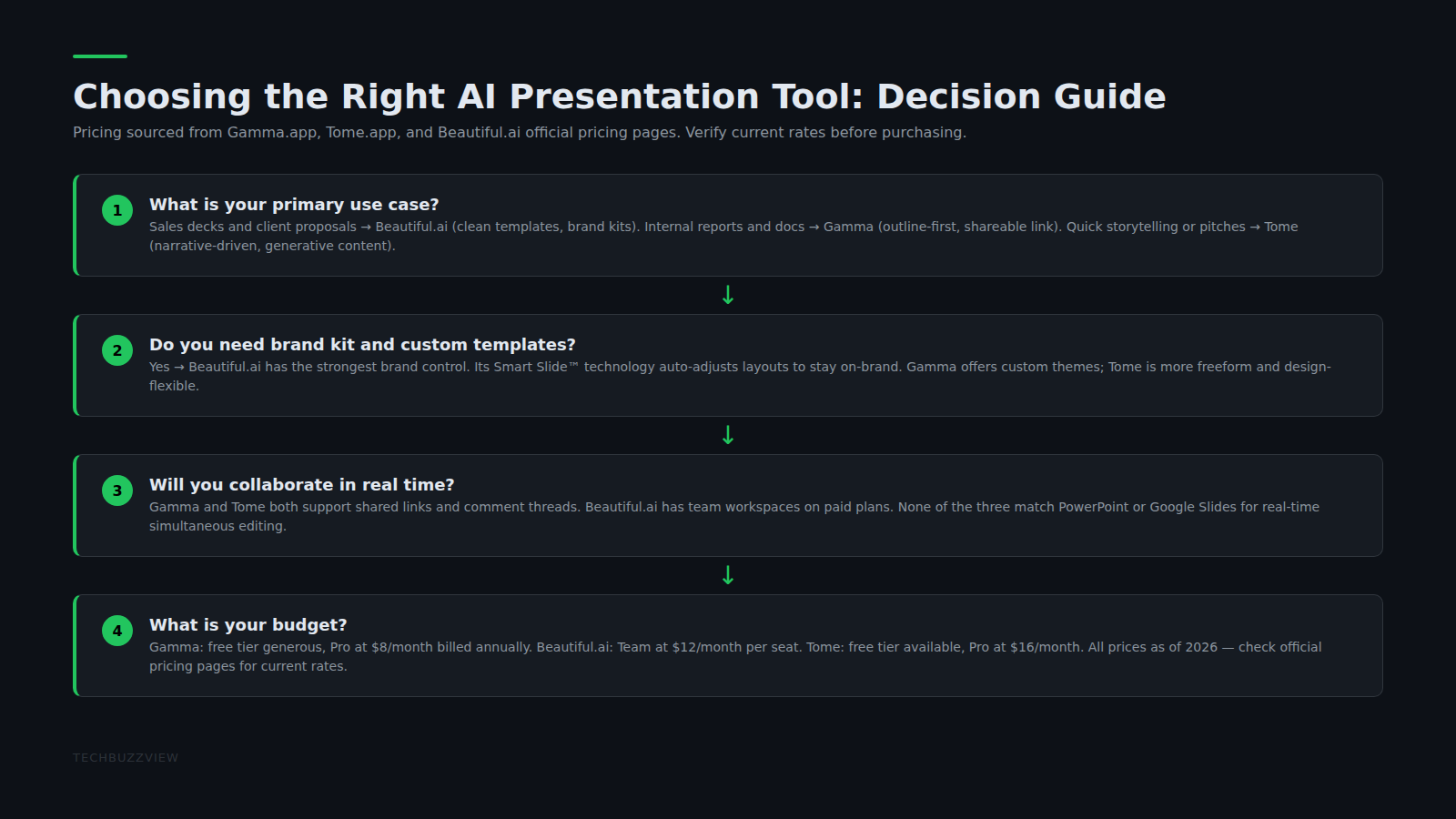
Gamma is the fastest of the three. Paste a rough outline or even a single sentence describing your topic, and it generates a complete deck with images, icons, and a consistent theme. The free plan is genuinely usable for occasional decks, but the paid plan unlocks unlimited AI credits, custom branding, and analytics that show who opened your shared deck and how long they spent on each slide — useful if you are sending pitch decks to investors or clients.
2. Tome — Best for Storytelling and Visual Design
Tome leans harder into narrative structure. Instead of just generating slides, it suggests how to pace your story — which slide should carry the emotional hook, where to place data, and when to slow down. This makes it a strong pick for founders building investor decks or marketers building brand presentations. The free version is limited in exports; the paid tier removes watermarks and adds team collaboration, which matters if you are working with a content or design team.
3. Beautiful.ai — Best for Teams and Brand Consistency
Beautiful.ai is built differently — it uses “smart templates” that auto-resize and re-balance every element as you edit, so your slides never look lopsided even if you are not a designer. It is the strongest option for small agencies and growing teams that need every team member’s decks to look like they came from the same brand guideline, without a designer manually checking every file. The paid plan adds team libraries, custom fonts, and PowerPoint export that keeps formatting intact.
Quick Comparison: Which One Should You Pick?
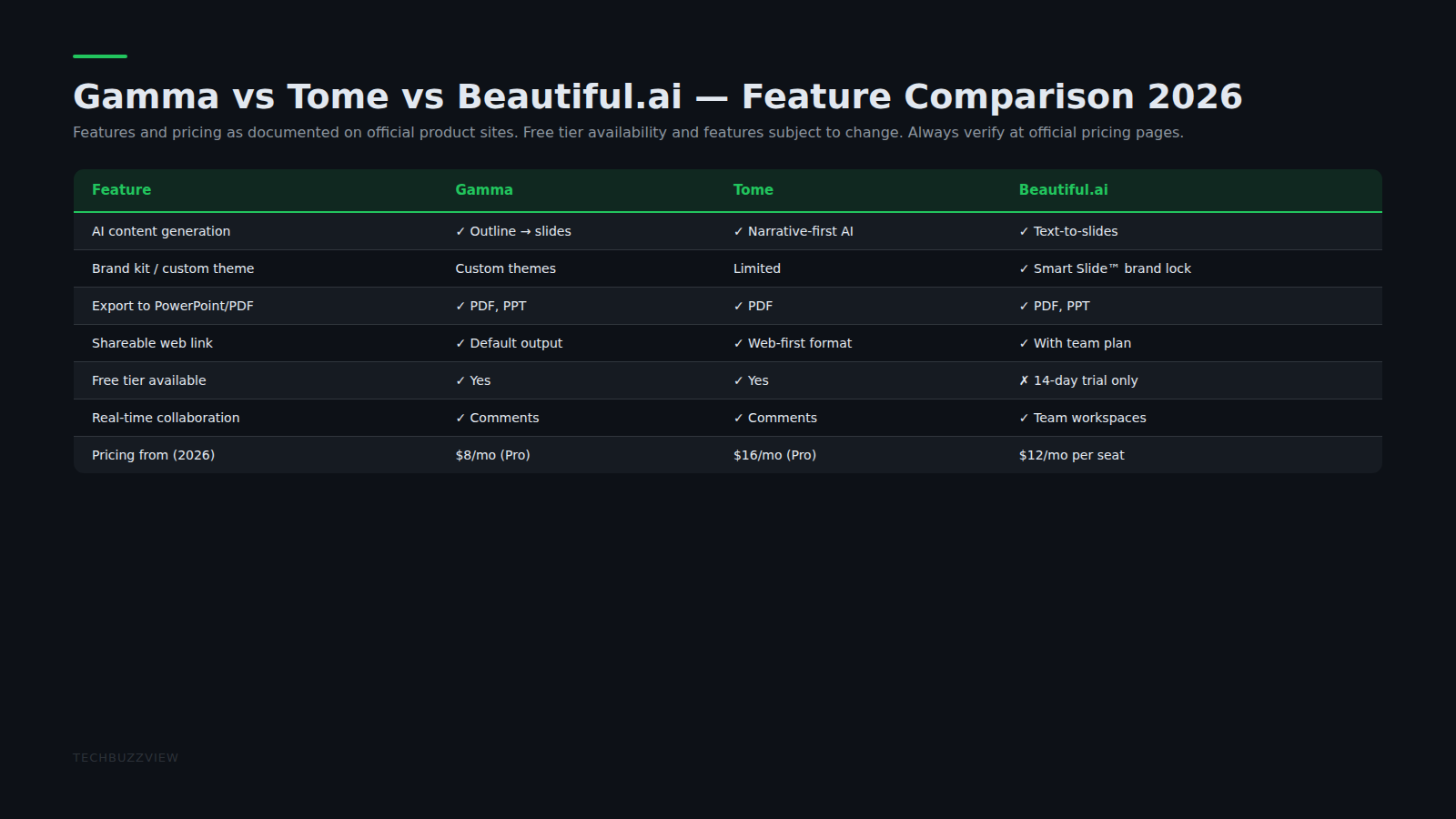
- Need a deck in under 5 minutes? Go with Gamma — it is the fastest from blank page to finished deck.
- Pitching investors or telling a brand story? Go with Tome — its pacing suggestions genuinely improve how a pitch flows.
- Running a small team that needs consistent branding? Go with Beautiful.ai — the smart templates keep everyone’s slides on-brand automatically.
- On a tight budget? All three have usable free tiers — start free, and only upgrade once you are sending decks to paying clients or investors.
How Professionals and Students Are Actually Using These Tools
Freelance consultants use Gamma to turn a single client call’s notes into a proposal deck the same evening. MBA students prepping for case study competitions use Tome to restructure dense Excel analysis into a 10-slide story that judges can follow in the first two minutes. Small D2C brands use Beautiful.ai to keep their investor updates and partner pitch decks visually consistent every month without hiring a designer.
Tips to Get the Best Results From Any AI Presentation Tool
- Write your outline in plain bullet points first — the AI restructures messy input far better than a single wall of text.
- Always swap at least 2–3 stock images for real screenshots or product photos; it instantly makes the deck feel less templated.
- Keep one sentence per slide for the main point, and let the speaker notes carry the detail — judges, clients, and investors skim slides, they do not read paragraphs.
- Export to PDF before sending over email so formatting never breaks on the recipient’s device.
AI presentation tools will not replace good storytelling, but in 2026 they have genuinely removed the busywork that used to eat an entire evening before every pitch. Start with the free tier of whichever tool matches your use case above, and only pay once a deck is actually generating you income or results.
For more on AI tools that boost productivity for creators and developers, see our reviews of Grammarly 2026 and Cursor AI 2026.
Sources
- Gamma App — official site for the Gamma AI presentation tool.
- Tome — official site for Tome AI presentation builder.
- Beautiful.ai — official site for Beautiful.ai smart slide builder.

