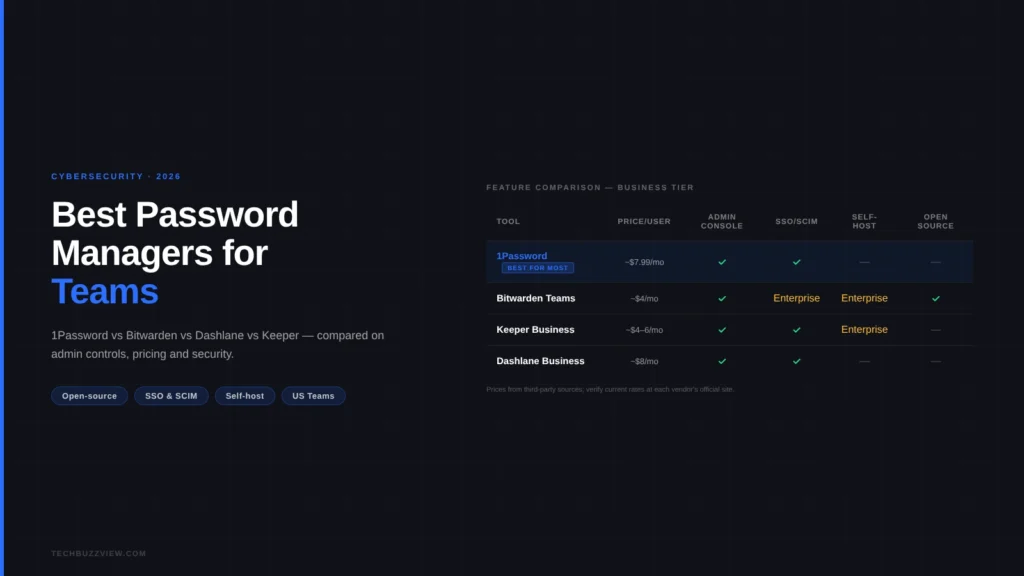
For most US business teams, 1Password Business is the clearest default: consistent cross-platform apps, an admin console that non-technical staff can actually use, and solid provisioning support. Bitwarden Teams is the right pick for budget-conscious or security-forward teams that want an open-source, audited codebase — and self-hosting in the Enterprise tier. Keeper suits regulated industries and enterprises with compliance requirements. Dashlane earns consideration specifically when breach monitoring and dark-web alerting matter most to the business. LastPass remains available but its 2022 breach — in which encrypted vaults were exfiltrated — is a reason to choose a different provider.
Quick Comparison
| Tool | Best For | Price (approx.) | Self-Host | SSO/SCIM | Free Trial |
|---|---|---|---|---|---|
| 1Password Business | Most teams, mixed-skill staff | ~$7.99/user/mo | No | Yes | 14 days |
| Bitwarden Teams | Cost-sensitive, open-source preference | ~$4/user/mo | Enterprise only | Enterprise | 7 days |
| Keeper Business | Compliance, regulated industries | ~$4–6/user/mo | Enterprise | Yes | 14 days |
| Dashlane Business | Breach monitoring focus | ~$8/user/mo | No | Yes | 14 days |
Pricing figures sourced from third-party review sites (Capterra, CostBench, TemperStack) and may not match current official rates — verify directly on each vendor’s pricing page before purchasing.
What to Look For in a Business Password Manager
The features that matter for individual users differ from what a team actually needs. Before evaluating tools, identify your requirements in four areas:
- Provisioning: How do users get added and removed? For teams with Active Directory, Okta, or Google Workspace, SCIM provisioning automates onboarding and offboarding — eliminating the manual “remember to remove the ex-employee’s access” risk.
- Admin visibility: Can an admin see which employees haven’t enabled 2FA? Which accounts are using weak or reused passwords? Which team vaults have shared credentials? Without audit capability, a password manager is just a suggestion.
- Vault policies: Can you enforce minimum password strength, require MFA, and restrict which devices can access the vault? Enterprise-grade policy controls matter significantly for regulated industries.
- Emergency access and recovery: If a key employee leaves or is unavailable, how does the team recover access to their shared vaults? Recovery policies need to exist before you need them.
1Password Business: Best for Most Teams
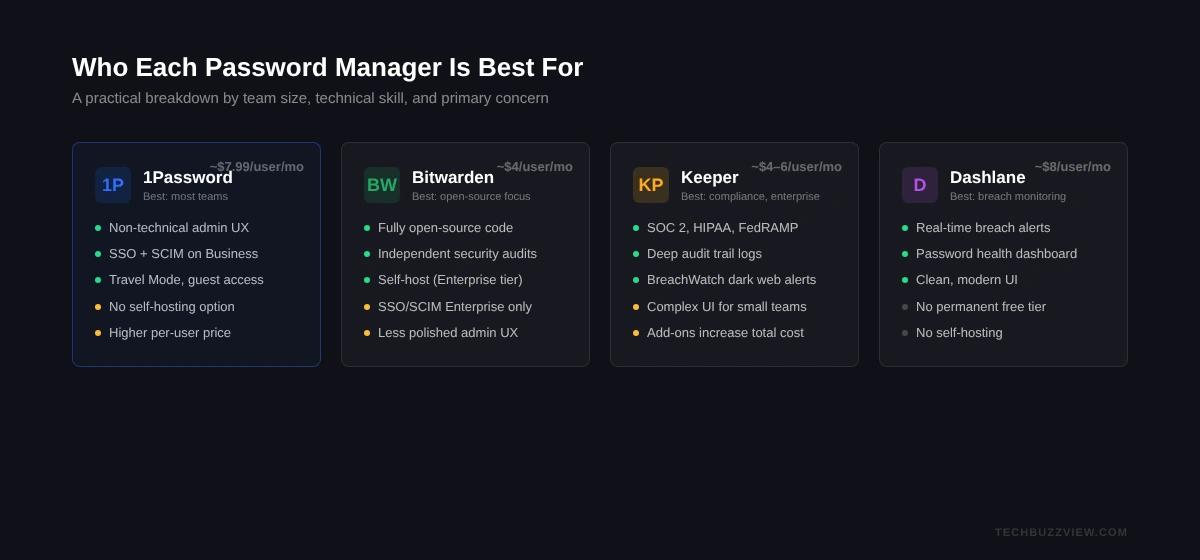
1Password is the standard choice for small and mid-sized US teams precisely because the admin experience has been designed for non-security-professionals. Setting up groups, assigning vault access, and reviewing team security scores doesn’t require IT expertise. For founders who don’t have a dedicated IT team, that matters.
Strengths:
- Polished apps across macOS, Windows, iOS, Android, and browser extensions — all in sync
- Admin console shows security scores, inactive accounts, and 2FA adoption at a glance
- Guest access lets you share specific vaults with contractors without giving them a full seat
- Travel Mode: temporarily remove sensitive vaults from devices during travel — useful for teams that cross international borders
- Business tier includes SSO integration, Active Directory/Okta SCIM provisioning, advanced reporting, and custom groups
Limitations:
- Priced higher per seat than Bitwarden or Keeper
- No self-hosting option — all data stored on 1Password’s servers (with end-to-end encryption)
- Initial pricing for new subscribers may be promotional; renewal rates can be higher
Verdict: 1Password Business is the practical default for US teams of 5–200 that want an admin experience that works without security expertise. The price premium is real; the UX quality justifies it for most.
Bitwarden Teams: Best for Cost-Sensitive and Open-Source Teams
Bitwarden is the only major password manager with a fully open-source codebase, regular third-party security audits, and a Teams plan priced at roughly $4/user/month as of mid-2026. For budget-conscious organizations, or any team where “we can audit the code ourselves” is important, Bitwarden is the category leader.
Strengths:
- Open-source: the entire codebase is publicly auditable, with independent security reviews published
- Self-hosting available on the Enterprise tier: organizations in regulated environments (healthcare, legal) can run Bitwarden on their own infrastructure
- Strong browser extension and app coverage across all platforms
- Teams plan includes admin console, shared collections, API access, and basic 2FA options
- Substantially lower per-user cost than 1Password or Dashlane
Limitations:
- The admin UX is functional but less polished than 1Password — non-technical admins may find it steeper to configure
- SSO and SCIM provisioning are Enterprise-tier features (above the Teams plan)
- Self-hosting requires technical capacity to manage updates and infrastructure
Verdict: Bitwarden Teams is the right choice for technically capable teams that want to reduce SaaS cost without compromising security fundamentals. The open-source model provides a level of transparency no closed-source competitor can match.
Keeper Business: Best for Compliance and Enterprise
Keeper positions itself explicitly at enterprises, regulated industries (healthcare, finance, government), and organizations with formal compliance requirements (SOC 2, HIPAA, FedRAMP). If your team operates under specific regulatory constraints around credential management, Keeper’s compliance certifications and audit log depth are meaningful differentiators.
Strengths:
- Extensive compliance certifications: SOC 2 Type 2, ISO 27001, FedRAMP Authorized, ITAR, FIPS 140-2
- Detailed audit trails: logs of who accessed what credential, when, and from which device
- BreachWatch: dark-web monitoring that alerts you when credentials from your domain appear in known data breaches
- Privileged Access Management (PAM) capabilities available as an add-on for infrastructure credentials
- Competitive pricing at the Business tier (roughly $4–6/user/month depending on contract)
Limitations:
- Interface can feel complex compared to 1Password, particularly for non-technical users
- Add-on pricing for advanced features (BreachWatch, Secrets Manager, PAM) can push total cost up significantly
Verdict: Keeper is the strongest choice for US businesses in regulated industries or those with formal security compliance programs. For small teams without those requirements, the feature set exceeds what most will use.
Dashlane Business: Best for Breach Monitoring Focus
Dashlane’s most differentiating feature is its real-time breach monitoring and automated password health scoring. For teams in sectors where credential exposure is a high-likelihood risk — media, agencies, e-commerce — Dashlane’s proactive alerting can prevent incidents before they escalate.
Note: Dashlane removed its permanent free plan in September 2025. Teams should budget for full per-seat pricing from day one.
Strengths:
- Proactive breach alerts that surface compromised credentials in real time
- Password health dashboard highlights reused, weak, and compromised passwords across the team
- Business plan includes SSO, SCIM provisioning, and an admin console
- Clean, modern UI that’s accessible to less technical team members
Limitations:
- Higher per-seat cost than Keeper or Bitwarden
- No self-hosting option
- No longer offers a permanent free tier — even small teams must pay from day one
Verdict: Dashlane makes sense when breach monitoring and automated credential health reporting are primary requirements. For teams that want the strongest credential hygiene visibility rather than the most features, Dashlane delivers. For most general-purpose business use, 1Password or Bitwarden offer better value.
How to Migrate Your Team to a New Password Manager
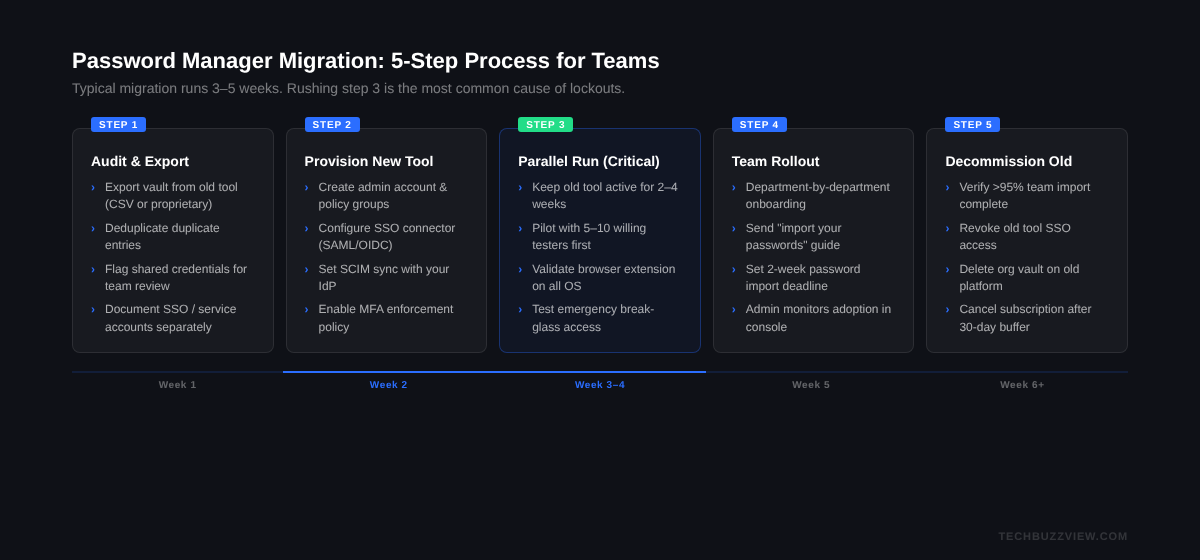
Switching tools is the highest-friction part of the decision. The practical migration path:
- Export your current vaults to an encrypted CSV or JSON backup before doing anything else. Every major password manager supports export.
- Import into the new tool using the import wizard (most support direct imports from 1Password, LastPass, Bitwarden, Dashlane, and generic CSV).
- Run both tools in parallel for 2–4 weeks while team members verify their imported credentials and adopt the new system.
- Revoke access in the old tool only after confirming all users are active in the new one and all shared credentials are transferred.
- Enable SSO/SCIM before offboarding team members from the old system, so your provisioning flow is established before you depend on it.
A Note on LastPass
LastPass still offers a Teams plan and remains widely used. However, the 2022 security incident — in which threat actors exfiltrated customer vault backups containing encrypted passwords — is a material consideration. Attackers can attempt offline brute-force attacks against those backups, particularly for accounts with weak master passwords. If you or your team members have credentials in LastPass vaults from before or around 2022 and haven’t rotated them, doing so is advisable regardless of which tool you use today. For new deployments, the alternatives reviewed here have comparable or stronger current security postures.
Frequently Asked Questions
Do password managers for teams encrypt everything end-to-end?
All four tools reviewed here use end-to-end encryption (E2EE): the vendor’s servers hold only encrypted vault data, and your master password or secret key never leaves your device. The vendor cannot decrypt your vault. Self-hosted Bitwarden and Keeper achieve this without relying on any third-party cloud infrastructure at all.
Can I try a team password manager before committing?
Yes. 1Password, Keeper, and Dashlane all offer 14-day free trials for their business tiers. Bitwarden offers a 7-day trial. These trials are worth running with a small pilot group — admin setup, browser extension behavior, and cross-device sync are things you should test before rolling out to a 50-person team.
What happens to team passwords if we cancel our subscription?
All four reviewed tools allow you to export your vault data before canceling. You won’t lose access to your passwords — you can export and migrate. Confirm the export format (CSV, JSON, or 1PIF) and test the export before canceling, not after.
Is Bitwarden Teams really secure for businesses despite being free and open-source?
Bitwarden’s open-source model is a security strength, not a weakness. Independent security audits are published publicly. The encryption implementation (AES-256 CBC, PBKDF2) is well-established. “Open-source” means the code is auditable by anyone — it doesn’t mean the product is free (the Teams plan is $4/user/month) or that it lacks enterprise features.