
If you write code — even occasionally — you have probably heard about Cursor AI by now. It is an AI-powered code editor that has been making a lot of noise in developer communities globally, and it has been getting serious traction among developers and CS students at all levels. But is it actually worth switching to? Does it meaningfully improve on GitHub Copilot or VS Code’s built-in AI features?
I spent time testing Cursor AI across different use cases — from writing simple Python scripts to building small web apps — and here is my honest take for developers in 2026.
What Is Cursor AI?
Cursor AI is a code editor built on top of VS Code (Visual Studio Code). If you have already used VS Code — which most developers and CS students have — the interface will feel completely familiar. The difference is that Cursor AI bakes AI assistance directly into the editor at a much deeper level than GitHub Copilot or VS Code’s built-in AI features.
It supports all the languages you would expect: Python, JavaScript, TypeScript, Java, C++, Go, Rust, and more. It works with your existing VS Code extensions and settings, so the transition is relatively smooth.
The AI capabilities in Cursor go beyond just autocomplete. You can chat with it about your codebase, ask it to refactor functions, generate entire files from a prompt, and debug errors by pasting them directly into the chat. It uses Claude, GPT-4, and other frontier models under the hood depending on which plan you are on.
Key Features That Actually Matter for Developers
1. Codebase-Aware AI Chat (The Real Differentiator)
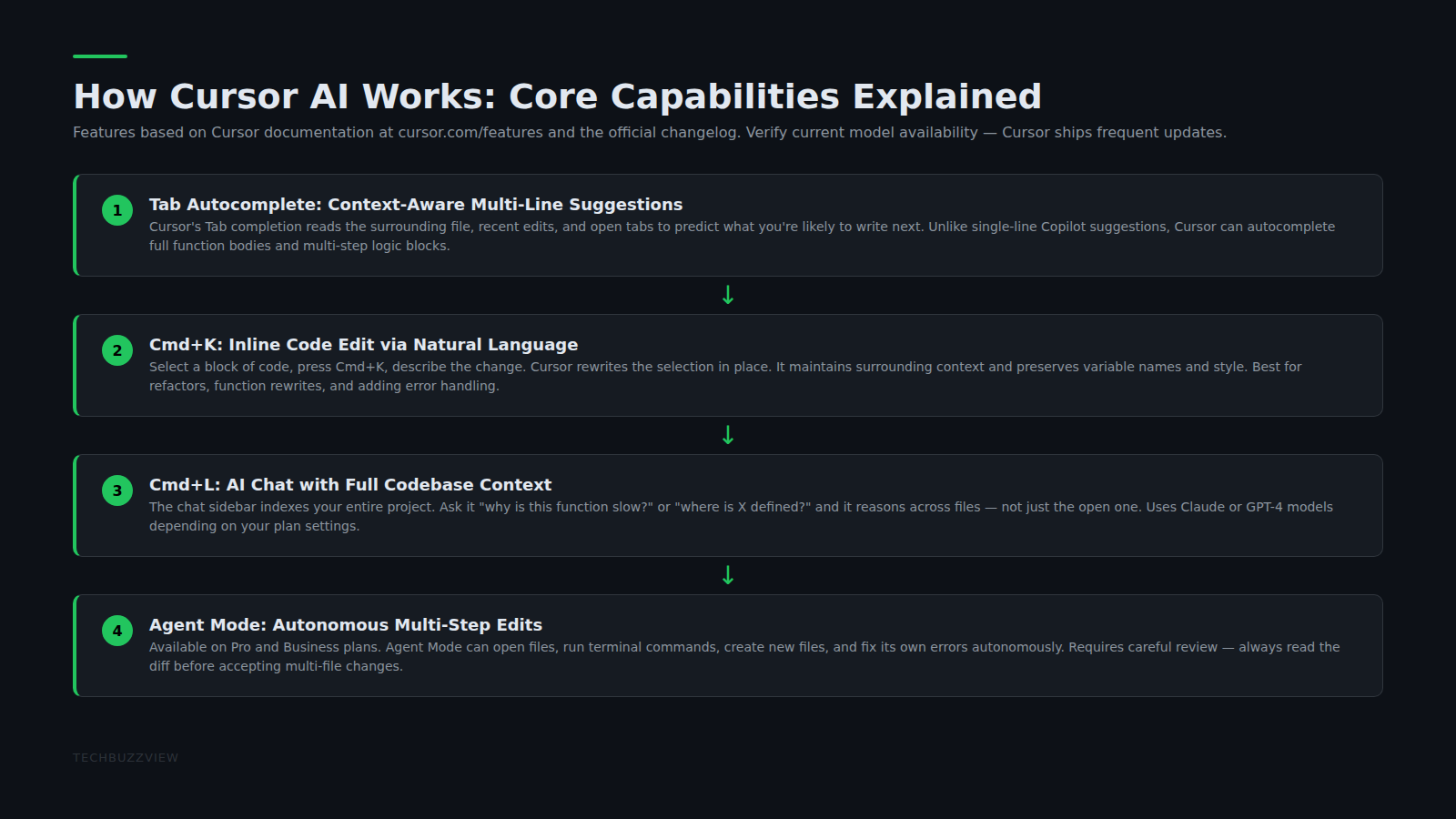
Most AI coding tools work on one file at a time. Cursor’s biggest advantage is that it can understand your entire project context. You can ask it “why is this function returning undefined in the checkout flow?” and it will look across multiple files to figure out what is going on. For anyone building something moderately complex — a Django REST API, a React app with multiple components — this is a significant time saver.
For freelancers and developers working on client projects with tight deadlines, this means less time hunting through files manually and more time actually building.
2. Tab Completion That Predicts Multi-Line Code
Cursor’s tab completion predicts entire blocks of code, not just the current line. If you write a function signature, it will often suggest the full implementation. If you are writing repetitive CRUD operations, it catches the pattern and fills in the next one automatically. GitHub Copilot does something similar, but Cursor’s version felt more contextually accurate during testing.
3. Direct Error Debugging
You can paste an error message into the Cursor chat and it will explain what went wrong and suggest a fix in the context of your actual code — not a generic Stack Overflow answer. This is particularly useful for newer developers who get stuck on cryptic error messages.
4. Composer Mode for Building from Scratch
Cursor’s Composer feature lets you describe what you want to build and it generates the scaffolding. It is not perfect — you will still need to review and edit — but for spinning up boilerplate quickly, it is noticeably faster than doing it manually.
Cursor AI Pricing in 2026
- Free (Hobby): 2,000 tab completions and 50 AI chat messages per month. Enough to evaluate if you like it, but you will hit limits quickly if you code daily.
- Pro ($20/month): Unlimited tab completions, 500 fast AI chat messages, access to advanced models including GPT-4 and Claude. This is the tier most working developers use.
- Business ($40/user/month): Team features, SSO, admin controls — designed for development teams rather than individual developers.
The Free tier is useful for evaluation. For daily use, Pro at $20/month is the practical starting point. Editorial note: Pricing is subject to change — verify current plans on cursor.sh before purchasing.
Cursor AI vs GitHub Copilot: Which One Should You Use?
This is the comparison most developers are actually making:
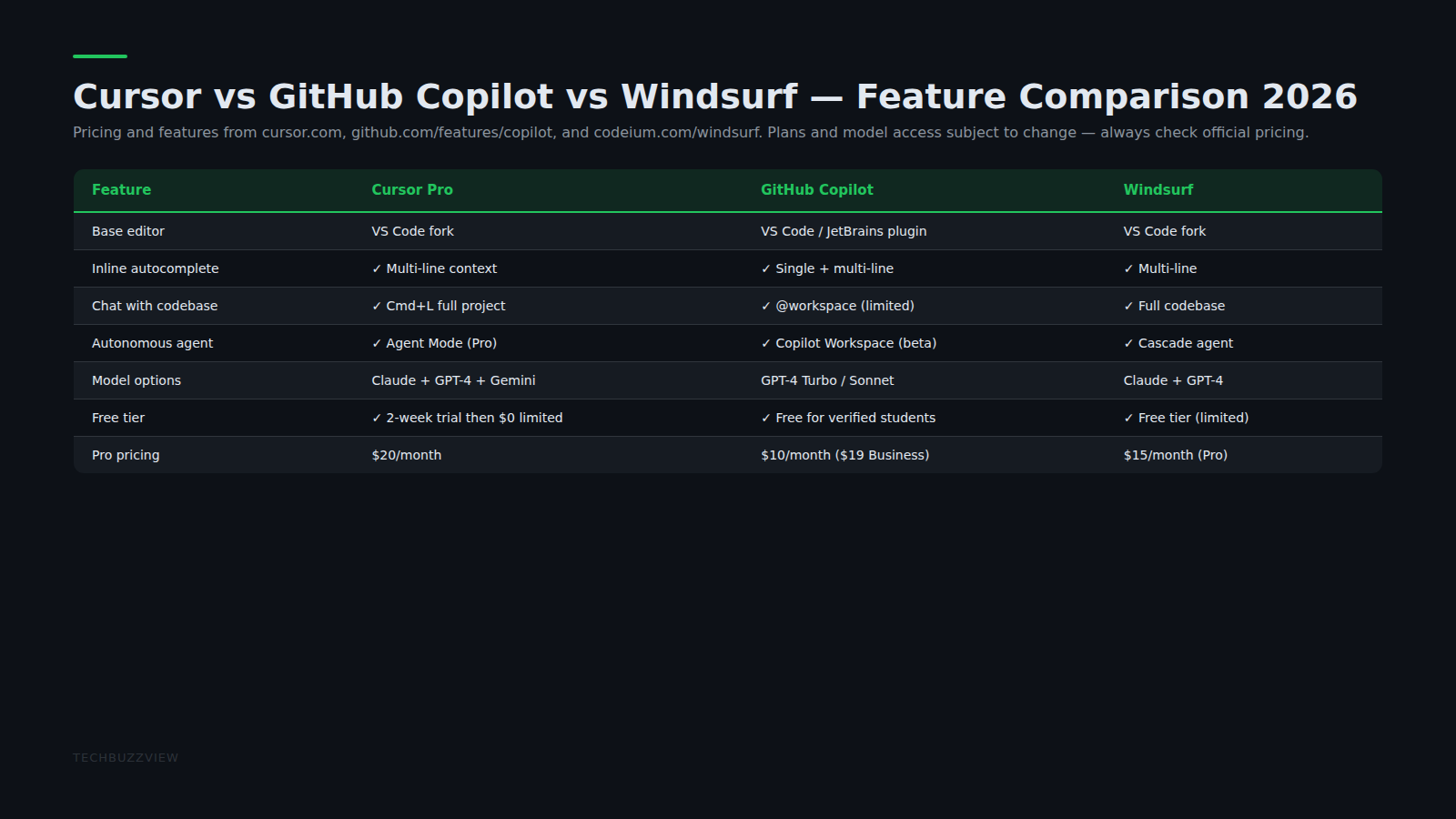
- Copilot is tightly integrated into the GitHub ecosystem and has a strong enterprise offering ($19/month on its own or included in GitHub plans). If you are on a team that lives in GitHub, Copilot’s integration is smoother.
- Cursor wins on multi-file context, the chat-with-codebase feature, and Composer mode for generating project scaffolding. If you work on complex projects solo or in small teams, Cursor typically feels more powerful for day-to-day coding tasks.
- Windsurf (Codeium) is a newer entrant with a generous free tier and strong agentic coding features — worth testing as an alternative if you are budget-conscious.
Limitations to Know Before Switching
- The free tier runs out quickly for daily development work — budget for Pro if you plan to use it seriously.
- Privacy: Cursor sends code context to AI providers. Check your company’s code privacy policy before using it on proprietary commercial codebases.
- Composer mode can go off-script on complex prompts — always review generated code rather than merging directly.
- VS Code extensions mostly work, but occasional compatibility issues exist with non-standard extensions.
Final Verdict
Cursor AI is one of the best AI code editors available in 2026 — the multi-file context awareness and Composer mode genuinely change how complex projects get built. For developers and CS students doing meaningful coding work daily, it is worth the Pro subscription. Start on the free tier to verify it fits your specific workflow before upgrading.
For more on AI tools that speed up developer workflows, see our guide on how creators are using AI to ship content faster and our AI productivity tools comparison.
Sources and Further Reading
- Cursor: Official Site — current pricing, feature documentation, and changelog.
- Cursor Documentation — official guide to features including Composer, codebase indexing, and model selection.
- GitHub Copilot — primary competitor for context when comparing AI code editor options.

