
The Short Answer
For most US remote workers and small business teams, NordVPN is the best all-around pick — fast speeds, solid privacy record, and easy multi-device setup across Windows, Mac, iOS, and Android. If privacy is your primary concern, Proton VPN is the stronger choice: it is Swiss-based, open source, and independently audited. This guide covers five vetted options across budget levels, with specific guidance on who each one suits.
Why Remote Workers and Small Businesses Need a VPN in 2026
A VPN (Virtual Private Network) encrypts your internet connection and routes your traffic through a server in a location you choose, hiding your IP address from websites and your ISP. For remote workers, the practical benefits are specific: encrypting traffic on café Wi-Fi or hotel networks, securely accessing company file shares or internal tools, and protecting sensitive client communications from interception.
For small businesses, VPNs serve an additional function: ensuring all team members access the internet and company resources through a consistent, monitored, encrypted path — which simplifies compliance for industries with data handling requirements.
A VPN does not make you anonymous online and does not replace a firewall or endpoint security tool. What it does is meaningfully raise the cost of intercepting your traffic, which matters most on untrusted networks.
Quick Comparison: Five Best VPN Services for US Users in 2026
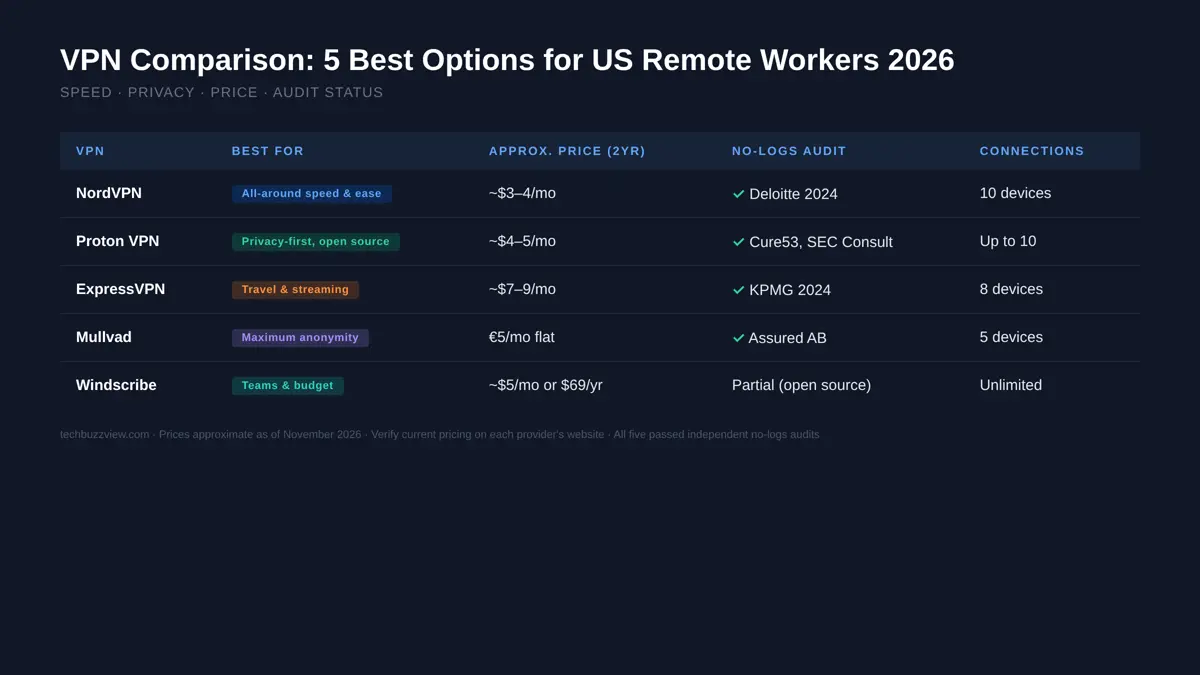
| VPN | Best For | Approx. Price (2yr) | No-Logs Audit | Servers (US) |
|---|---|---|---|---|
| NordVPN | All-around speed and ease of use | ~$3–4/mo | Yes (Deloitte, 2023 and 2024) | 1,900+ |
| Proton VPN | Privacy-first; independent, open source | ~$4–5/mo | Yes (SEC Consult, Cure53) | 100+ |
| ExpressVPN | Travel, streaming reliability, simplicity | ~$7–9/mo | Yes (KPMG, 2024) | 700+ |
| Mullvad | Maximum anonymity, flat pricing | €5/mo (no annual discount) | Yes (Assured AB) | 80+ |
| Windscribe | Teams and budget; generous free tier | ~$5/mo or $69/yr | Partial (open source) | 400+ |
Prices above are approximate as of November 2026 and vary by plan and promotion. Confirm current pricing on each provider’s website. Server counts are approximate from published provider data; independent counts may differ.
1. NordVPN — Best All-Around for Remote Workers
NordVPN is the most recommended VPN in 2026 across independent review sites, primarily because it handles the combination of connection speed, app usability, and device compatibility better than its competitors at a mid-range price.
What it does well
- Speed: NordVPN publishes average speeds over 800 Mbps on its own tests. Independent speed tests from reviewers generally find it among the fastest options available, particularly in the US, UK, and EU.
- Device support: Apps for Windows, macOS, iOS, Android, Linux, and browser extensions. Up to 10 simultaneous connections on one account.
- No-logs verification: NordVPN has undergone no-logs audits by Deloitte in 2023 and 2024. Its servers run on RAM-only infrastructure, meaning no data persists on reboot.
- Extra features: Threat Protection (blocks malicious sites, trackers, and ads at the VPN level), split tunneling, and Meshnet for creating a private encrypted network between devices.
Limitations
- Owned by Nord Security, a company headquartered in Panama but with roots in Lithuania. Some privacy-focused buyers prefer fully independent providers.
- The long-term subscription discount is significant; month-to-month pricing is much higher.
- Threat Protection requires the desktop app; it is not available on mobile in the same form.
Best suited for: Individual remote workers, teams that need a simple setup, and users who want one VPN to handle work, travel, and personal use.
2. Proton VPN — Best for Privacy-First Users
Proton VPN is built by the same Swiss team behind ProtonMail, one of the most trusted private email services. It is headquartered in Switzerland, is fully open source, and has had its apps independently audited by multiple security firms.
What it does well
- Privacy jurisdiction: Switzerland has strong privacy laws and is not part of the EU or the Five Eyes intelligence-sharing alliance. Proton’s legal structure provides meaningful protection against government demands to log user data.
- Fully open source: All Proton VPN apps are open source and published on GitHub. This allows independent researchers to audit the code for backdoors or data collection.
- Independent audits: Proton VPN has been audited by SEC Consult, Cure53, and others. Audit reports are publicly available on its website.
- Secure Core architecture: On paid plans, traffic can be routed through privacy-friendly countries (Iceland, Switzerland) before exiting to the destination, adding a second layer of protection.
- Free tier: A genuinely usable free plan with no data cap (but limited servers and speed). Rare in the VPN market.
Limitations
- Fewer US servers than NordVPN or ExpressVPN, which can mean slightly lower speeds on some routes.
- The app interface is more information-dense than NordVPN’s — not difficult, but more options to navigate.
- Streaming optimization is not a primary focus; some streaming services block Proton VPN servers.
Best suited for: Privacy-conscious professionals, journalists, healthcare workers handling PHI, legal professionals, and anyone who wants verifiable open-source code rather than a vendor claim.
3. ExpressVPN — Best for Travel and Streaming Reliability
ExpressVPN is the most expensive mainstream option but consistently earns its premium through one specific advantage: it unblocks more streaming services more reliably than any other VPN on this list, and it works on more types of networks (including restricted hotel and corporate networks) without manual configuration.
What it does well
- Server reliability: 3,000+ servers across 94+ countries. ExpressVPN actively maintains its server network to stay ahead of streaming service IP blocks.
- Lightway protocol: ExpressVPN’s proprietary protocol delivers fast speeds with lower CPU usage, which extends battery life on laptops and phones. The protocol is open source and has been audited.
- No-logs audit: KPMG conducted a no-logs audit in 2024.
- Router support: ExpressVPN has the best router app of any VPN on this list, which is useful for home offices that want to route all traffic through the VPN at the network level.
Limitations
- Owned by Kape Technologies, an ad-tech company that has acquired multiple VPN providers. Some privacy researchers have flagged this ownership history as a concern worth noting.
- Premium pricing — roughly 2× the per-month cost of NordVPN on comparable subscription lengths.
- 8 simultaneous connections, fewer than NordVPN’s 10.
Best suited for: Frequent travelers, US expats, professionals who rely on streaming services for work (video content, media monitoring), and users willing to pay more for reliability.
4. Mullvad — Best for Maximum Anonymity
Mullvad takes a different approach from every other VPN on this list. There are no account usernames. You receive a randomly generated account number when you sign up. The price is flat at €5/month (~$5.50 USD) with no annual discount. You can pay with cash or cryptocurrency. The company accepts no data about you that it does not need.
What it does well
- No personal data at sign-up: Mullvad does not ask for an email address. Your account is a random number. This is structurally different from other VPNs that hold your email and payment history.
- No-logs audited: Mullvad has been audited by Assured AB. In 2023, Swedish police raided Mullvad’s offices and left with no user data — because there was none to take.
- Open source: Apps are open source.
- WireGuard support: Mullvad was one of the earliest commercial VPN providers to fully support WireGuard, the modern lightweight protocol that offers better speed and security than OpenVPN.
Limitations
- Not designed for streaming — Mullvad does not prioritize unblocking Netflix or other services, and many streaming services block its IP ranges.
- Fewer server locations than NordVPN or ExpressVPN.
- No annual pricing discount — you pay the same rate whether you pay monthly or annually.
- The interface is functional but minimal; less polished than NordVPN or ExpressVPN.
Best suited for: Users who want verifiable anonymity, security researchers, journalists, activists, and anyone for whom the data minimization principle matters more than streaming or ease of use.
5. Windscribe — Best for Teams on a Budget
Windscribe occupies a useful niche: it offers a team plan with centralized billing and device management at a meaningfully lower price than the other options on this list, and its free tier is the most generous in the market at 10 GB per month.
What it does well
- Team plan: Windscribe Teams allows centralized billing, the ability to add and remove team members, and usage visibility across the account — features the other VPNs on this list either do not offer or charge a significant premium for.
- Free tier: 10 GB/month free with no credit card required, across 10+ server locations. Genuinely usable for light remote work or testing before committing to paid.
- Price: Approximately $5/month on the annual plan, or $69/year. The team plan is priced per seat.
- Open source clients: Desktop and browser extension code is published openly.
- R.O.B.E.R.T.: Windscribe’s built-in ad, tracker, and malware blocker is configurable at the domain level, which is more flexible than NordVPN’s Threat Protection.
Limitations
- Windscribe is a smaller company than Nord Security or Proton. Its audit history is less extensive.
- Speeds are generally good but less consistently fast than NordVPN or ExpressVPN on US-to-US routes.
- The app has more configuration options than NordVPN, which can be a learning curve for less technical users.
Best suited for: Small business teams of 3–15 people, budget-conscious individual users, and anyone who wants to test a VPN without a credit card commitment first.
VPN Features That Actually Matter for Work (and Some That Do Not)
Features worth evaluating
- No-logs policy + independent audit: Every VPN claims a no-logs policy. Only an independent audit by a named third party makes that claim verifiable. All five options above have been audited.
- Kill switch: A kill switch blocks internet traffic if the VPN connection drops, preventing accidental data exposure. All five options include one. Enable it.
- Split tunneling: Lets you route specific apps through the VPN while others use your regular connection. Useful for work: route your work tools through the VPN and your video calls through your unencrypted connection for better latency.
- Protocol choice: WireGuard is the fastest modern protocol. OpenVPN is slower but more configurable. For most users, WireGuard is the right default.
Features less relevant to work use cases
- Server count: 3,000 servers versus 500 servers rarely matters for a US-based remote worker who primarily needs US servers. What matters is the quality and maintenance of the servers, not the total count.
- Streaming support: Important for personal use, but not a primary selection criterion if your use case is work-related encryption and privacy.
- Built-in antivirus: Some VPNs now bundle antivirus scanning. For work use, your endpoint security tool should be a dedicated product, not a VPN add-on.
VPNs vs. Zero Trust Access: What to Know for Larger Teams
For teams of 20 or more, or for organizations with structured IT policies, consider whether a consumer or SMB VPN is the right tool at all. Zero Trust Network Access (ZTNA) tools like Tailscale, Cloudflare Access, or Zscaler provide more granular access control — authenticating users to specific resources rather than giving everyone access to the whole network once they connect to the VPN. For individuals and small teams, a traditional VPN from this list is simpler and sufficient.
How to Choose
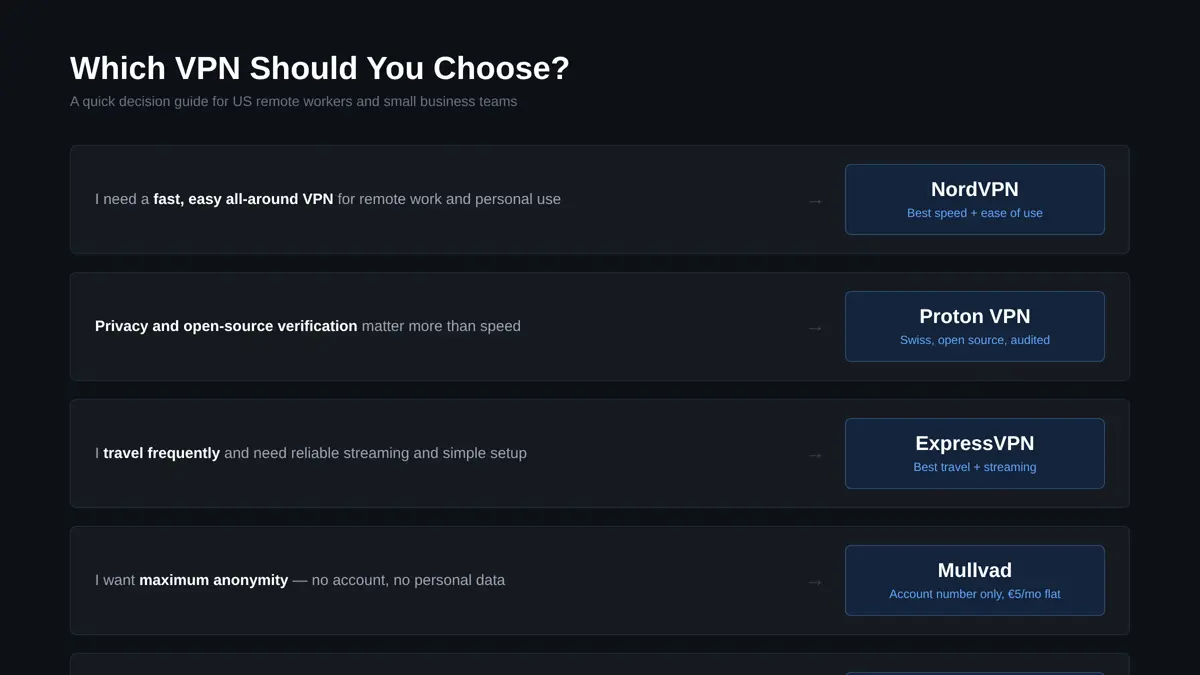
- I need a fast, easy, all-around VPN: NordVPN
- Privacy and verifiable no-logs matter most: Proton VPN
- I travel frequently and need reliable streaming: ExpressVPN
- I want maximum anonymity and don’t need streaming: Mullvad
- I need a team plan on a budget or want to try free first: Windscribe
All five offer money-back guarantees ranging from 14 to 45 days. Test one on your actual work setup before committing to an annual plan.
Frequently Asked Questions
Does a VPN protect me on public Wi-Fi?
Yes — this is one of the clearest practical benefits. A VPN encrypts your traffic between your device and the VPN server, preventing someone on the same café or hotel network from intercepting your data. Enable your VPN’s kill switch and auto-connect settings to ensure it activates every time you join an untrusted network.
Can my employer see what I do when I use a personal VPN?
If you are on your employer’s network (office or corporate Wi-Fi) or using a company-managed device, your employer’s IT controls may still monitor traffic regardless of a personal VPN. If you are on your own home or mobile network using a personal device, a personal VPN prevents your ISP from seeing your traffic, but does not affect what your employer can see through any work applications you have installed.
Are VPNs legal in the US?
Yes. VPN use is legal for individuals and businesses in the United States. Some countries restrict or ban VPN use — if you are traveling internationally, check local laws before activating your VPN.
What is the difference between a VPN and antivirus software?
A VPN encrypts your network traffic and hides your IP address. Antivirus software detects and removes malicious software on your device. They address different threats and are complementary, not interchangeable. Use both.
How many devices can I cover with one VPN subscription?
Device limits vary: NordVPN allows 10 simultaneous connections; ExpressVPN allows 8; Proton VPN allows up to 10 on paid plans; Mullvad allows 5; Windscribe allows unlimited on paid plans. If you need to cover a home office router plus several devices, check whether the router connection counts as one of your allowed connections.