
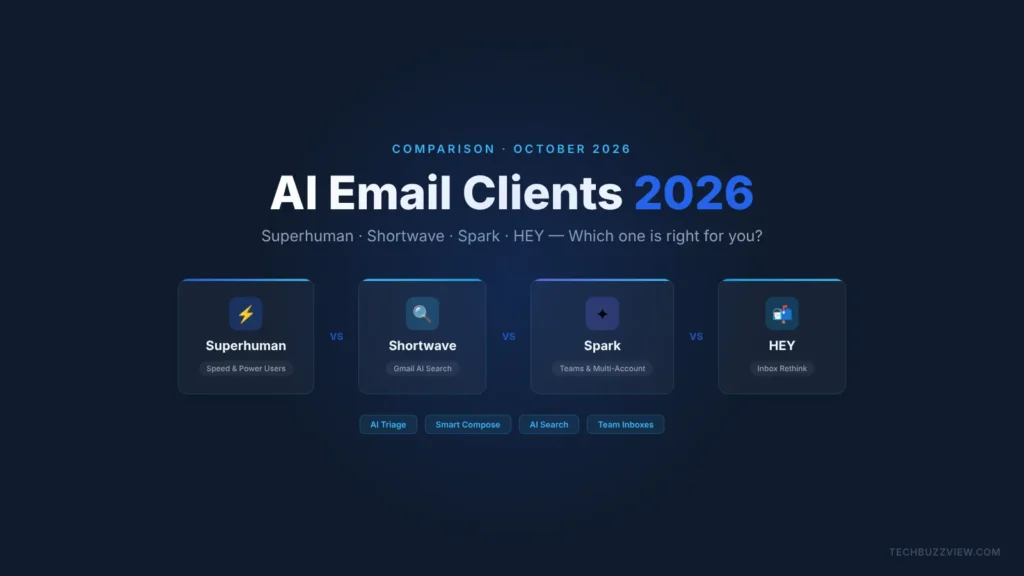
If you’re drowning in email, an AI email client won’t just organize your inbox — it fundamentally changes how you interact with it. Here’s the short answer: Superhuman for power users and sales teams who want the fastest possible interface; Shortwave for Gmail users who want AI search and summarization; Spark for teams and multi-account users on a budget; HEY for anyone willing to change their email address and rethink how email works entirely. Keep reading for the full breakdown.
| Use Case | Best Pick |
|---|---|
| Speed & keyboard shortcuts | Superhuman |
| Gmail AI search + summarization | Shortwave |
| Teams, multi-account, budget | Spark |
| Rethink email from scratch | HEY |
Pricing verified via official vendor pages — check current pricing before subscribing.
What Makes an AI Email Client Different
Traditional email clients (Gmail, Outlook, Apple Mail) organize mail by date and sender. AI email clients go further: they triage your inbox by priority, draft replies in your voice, summarize long threads, remind you to follow up on unanswered messages, and handle the cognitive overhead of 100+ emails a day. The difference isn’t just speed — it’s the shift from managing your inbox to having your inbox largely manage itself. If you’re comparing this category to AI productivity tools you already use, see our guide to best AI meeting notetakers and AI coding assistants.
Quick Comparison: Superhuman vs Shortwave vs Spark vs HEY
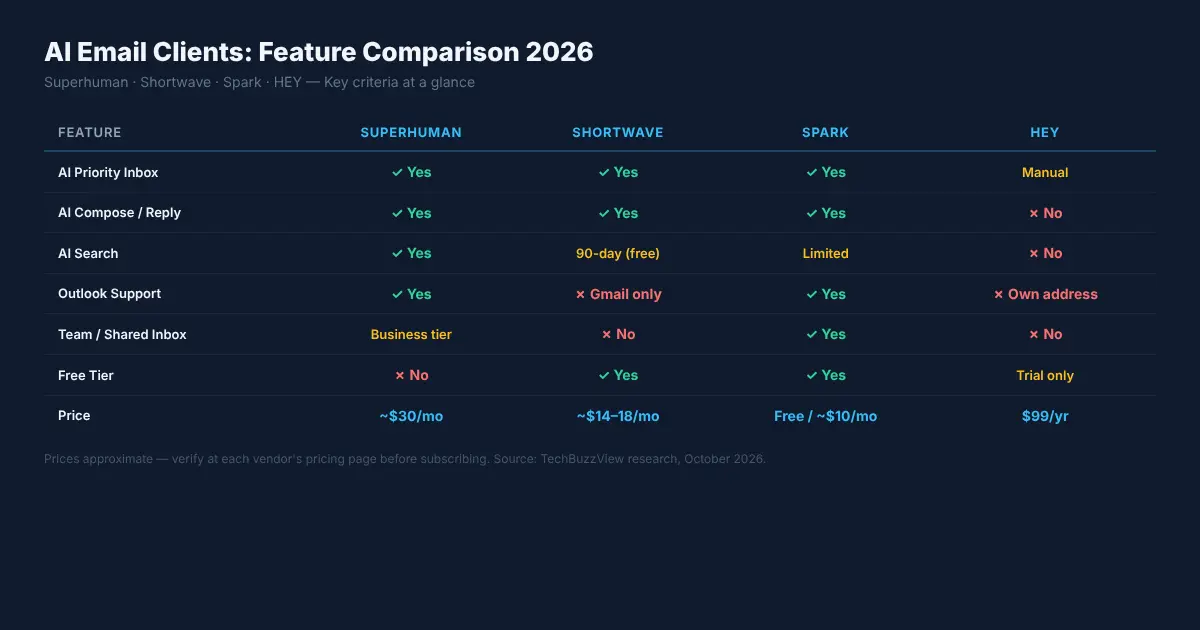
| Feature | Superhuman | Shortwave | Spark | HEY |
|---|---|---|---|---|
| AI triage / priority inbox | ✓ | ✓ | ✓ | Manual screening |
| AI email compose / reply | ✓ | ✓ | ✓ | ✗ |
| AI search | ✓ | ✓ (90-day limit on free) | Limited | ✗ |
| Gmail support | ✓ | ✓ | ✓ | ✗ (own address) |
| Outlook support | ✓ | ✗ | ✓ | ✗ |
| Team / shared inbox | Business tier | ✗ | ✓ | ✗ |
| Starting price | ~$30/mo | ~$14–18/mo | Free / ~$10/mo | $99/yr (~$8.25/mo) |
| Free tier | ✗ | ✓ (limited) | ✓ | Trial only |
Superhuman
What it does
Superhuman is built around one idea: email should feel instant. The interface is stripped to its essentials and driven almost entirely by keyboard shortcuts. When you open Superhuman for the first time, you get a 30-minute onboarding call with a human coach — which signals both its premium positioning and its target user. AI features include split-inbox sorting (Important vs. Other), auto-drafts in your writing style, follow-up reminders, read receipts, and thread summarization. It connects to Gmail and Outlook and syncs immediately.
Pricing
Starter runs approximately $30/month billed monthly. A Business tier with team features is priced higher. No free plan. Verify current pricing at superhuman.com/pricing before subscribing.
Who it’s for
- Founders, executives, and sales reps who respond to 50–200 emails per day
- Users who live in keyboard shortcuts and want sub-100ms response times
- Teams where email speed and follow-up rate directly affect revenue
Who should skip it
- Anyone sensitive to price — $30/month is hard to justify for casual use
- Users who want a free tier to try before buying
- Individuals who prefer mouse-driven UIs
Shortwave
What it does
Shortwave started as a Google-backed project and was later acquired by its team as an independent company. It layers an AI assistant directly onto your Gmail account — not a new inbox, but a new layer on top of your existing one. Its standout features are AI search (ask questions in plain language across your email history), AI-powered thread summaries, and a clean bundled inbox that groups newsletters, notifications, and important messages. The free plan limits AI search history to 90 days; paid plans extend this.
Pricing
Free tier available. Pro plan is approximately $14–18/month (pricing varies — verify at shortwave.com/pricing). No Outlook support; Gmail only.
Who it’s for
- Gmail users who want AI search (“find the contract I received in March from the agency in Chicago”)
- Users who want thread summaries to skip reading long back-and-forth chains
- Solo users who don’t need team features and are happy to stay in Gmail
Who should skip it
- Anyone on Outlook — Shortwave does not support it
- Teams needing shared inboxes or delegated access
- Users who want a cross-platform client that works across multiple email providers
Spark (by Readdle)
What it does
Spark has been a popular email client for years and has steadily added AI features: AI Compose (drafts emails from a short prompt), AI Reply (suggests replies), Smart Inbox (groups messages by type), and email scheduling. Its biggest practical advantage is breadth — it connects to Gmail, Outlook, Yahoo, iCloud, and any IMAP server. You can manage multiple accounts in one unified view. Spark for Teams adds shared drafts, shared inboxes, internal comments on emails, and assignment. It’s the only client on this list that treats email as a team collaboration tool out of the box.
Pricing
Free for personal use with core features. Teams plan approximately $10/user/month (verify at sparkmailapp.com/pricing). Available on iOS, Android, macOS, and Windows.
Who it’s for
- Small teams who need to collaborate on emails without switching to a helpdesk tool
- Users with multiple email accounts across different providers
- Anyone who wants AI email features without paying $30/month
Who should skip it
- Users who want a completely AI-native inbox redesign (Spark layers AI on a traditional structure)
- Power users who prioritize keyboard-first speed over breadth of features
HEY (by Basecamp)
What it does
HEY doesn’t connect to Gmail or Outlook. It gives you a new email address (@hey.com) and rethinks the entire concept of an inbox. New senders go through a screening step (“The Screener”) — you approve or block each one. Approved senders land in one of three places: the Imbox (important, needs your attention), the Feed (newsletters and updates you read at your own pace), and the Paper Trail (receipts, confirmations). There are no folders, no labels — HEY uses a “stack” metaphor. AI features are limited compared to the other three; the value proposition is the inbox design itself, not AI assistance.
Pricing
$99/year for personal use (approximately $8.25/month). Verify at hey.com/pricing. A trial is available.
Who it’s for
- Users willing to change their primary email address and fully commit to the HEY system
- People who want a curated inbox where they control every sender who can reach them
- Email minimalists who want to reduce inbox volume rather than use AI to manage it
Who should skip it
- Anyone who cannot change their primary email address (work email, established accounts)
- Users who rely on Gmail-specific integrations (Google Calendar invites, Drive attachments, etc.)
- Those who want AI compose, AI search, or read receipts
How to Choose: Decision Matrix
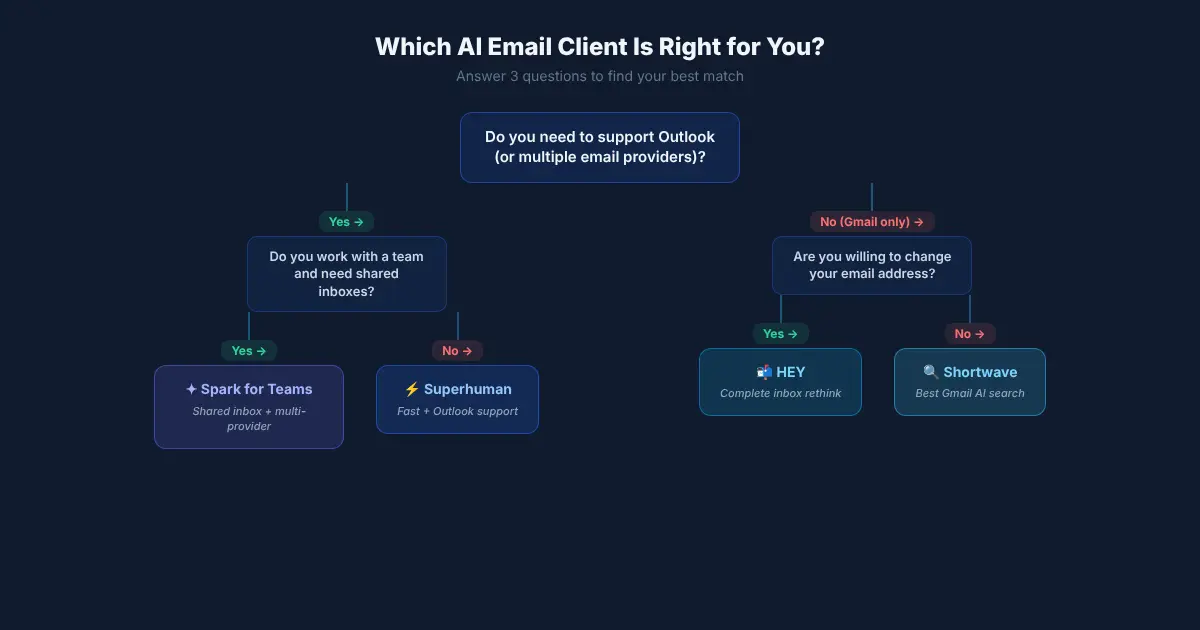
Profile 1: The Overwhelmed Executive
You respond to 100+ emails per day, you live in keyboard shortcuts, and your assistant sometimes helps triage your inbox. You’re on Gmail or Outlook. Choose Superhuman. The speed improvement is real and the AI triage genuinely reduces the mental load of sorting. The $30/month is easily justified if you save 20–30 minutes daily.
Profile 2: The Solo Gmail Professional
You receive 50–80 emails a day, you’re fully on Gmail, and your biggest pain point is finding that one email from three months ago and reading long thread chains. Choose Shortwave. The AI search alone is worth the upgrade, and you don’t need to pay Superhuman pricing to get it.
Profile 3: The Small Team Lead
You run a 3–10 person team where emails from clients sometimes need to be handled by whoever is available. You have team members on different email providers. Choose Spark for Teams. The shared inbox and internal comments mean you stop forwarding emails and starting side threads to coordinate responses.
Profile 4: The Email Minimalist
You’ve declared email bankruptcy twice. You want fewer emails, not smarter tools to manage more of them. You’re willing to change your email address and build fresh habits. Choose HEY. The Screener will cut your inbox volume dramatically within the first two weeks. But only if you can actually use a @hey.com address for the things that matter.
Bottom Line
Superhuman is the best AI email client for raw speed and power users — if the price doesn’t put you off. Shortwave is the strongest Gmail-only option, especially for AI search. Spark is the most versatile choice for teams and multi-account users who want AI features without premium pricing. HEY is in a category of its own — it won’t appeal to everyone, but for users who want a complete inbox redesign rather than AI features bolted onto the old model, nothing else comes close.
All four represent genuine improvements over opening Gmail in a browser tab. The right pick depends almost entirely on your email provider, whether you work solo or with a team, and how much you’re willing to pay.
Frequently Asked Questions
Can I use these AI email clients on mobile?
Spark has the broadest mobile support — iOS and Android. Superhuman has both iOS and Android apps. Shortwave has an iOS app and Android app. HEY has iOS and Android apps as well, but only works with @hey.com addresses on mobile. All four offer desktop apps or web access.
Do AI email clients store my emails on their servers?
All four sync your email through their servers to provide AI features, which means they access your email content. Each publishes a privacy policy and security documentation. Superhuman, Shortwave, and Spark connect to your existing Gmail or Outlook account via OAuth or IMAP. HEY stores your email on their own servers entirely. Review each vendor’s current privacy and data-handling documentation before connecting a work email account.
Is Superhuman worth $30 a month?
For users who send and receive a high volume of email and bill their time hourly, yes — saving 20–30 minutes per day can pay for itself quickly. For casual users who send 10–20 emails daily, it’s hard to justify. Shortwave and Spark deliver meaningful AI features at a significantly lower price point and are worth trying first.

